
How to Implement Interval Scheduling in Python
In this tutorial, we will learn "How to Implement Interval Scheduling in Python". The main objective is to understand interval scheduling and its implementation. This guide will walk you step by step through the process, making it easier to follow and apply. By the end of this tutorial, you will have a solid understanding of how interval scheduling works in Python for this problem, helping you strengthen your problem-solving abilities and improve your overall coding skills in data structure implementation.
This topic is straightforward and easy to understand. By following the instructions provided, you will be able to complete it with ease. The program will guide you step by step through the process of implementing interval scheduling. So, let’s dive into the coding process and start implementing the solution to gain a deeper understanding of Python.
Getting Started:
First you will have to download & install the Python IDLE's, here's the link for the Integrated Development And Learning Environment for Python https://www.python.org/downloads/.
Creating Main Function
This is the main function of the application. The following code will display a simple GUI in terminal console that will display program. To do this, simply copy and paste these blocks of code into the IDLE text editor.- def interval_scheduling(stimes, ftimes):
- index = list(range(len(stimes)))
- index.sort(key=lambda i: ftimes[i])
- maximal_set = []
- prev_finish_time = 0
- for i in index:
- if stimes[i] >= prev_finish_time:
- maximal_set.append(i)
- prev_finish_time = ftimes[i]
- return maximal_set
- # MAIN LOOP
- while True:
- print("\n========== Implement Interval Scheduling ==========\n")
- # Input number of activities
- try:
- n = int(input('Enter number of activities: '))
- if n <= 0:
- print("Number of activities must be positive.")
- continue
- except ValueError:
- print("Invalid input.")
- continue
- # Input start times
- try:
- stimes = list(map(int, input(f'Enter {n} start times: ').split()))
- if len(stimes) != n:
- print("You must enter exactly", n, "start times.")
- continue
- except ValueError:
- print("Invalid start times.")
- continue
- # Input finish times
- try:
- ftimes = list(map(int, input(f'Enter {n} finish times: ').split()))
- if len(ftimes) != n:
- print("You must enter exactly", n, "finish times.")
- continue
- except ValueError:
- print("Invalid finish times.")
- continue
- # Run algorithm
- ans = interval_scheduling(stimes, ftimes)
- print("\nSelected activity indices:", ans)
- print("Selected activities:")
- for i in ans:
- print(f"Activity {i}: Start = {stimes[i]}, Finish = {ftimes[i]}")
- # Try Again Option
- opt = input("\nDo you want to try again? (yes/no): ").strip().lower()
- if opt == "no":
- print("Exiting program...")
- break
- elif opt != "yes":
- print("Invalid choice. Exiting program...")
- break
This Python program implements the Interval Scheduling algorithm using a greedy approach to select the maximum number of non-overlapping activities. It sorts activities based on their finish times and iteratively chooses activities whose start time is greater than or equal to the finish time of the last selected activity. The program runs interactively, allowing users to input start and finish times for activities, then outputs the indices and details of the selected optimal set. It also includes input validation and a loop for repeated execution or exit.
Output:
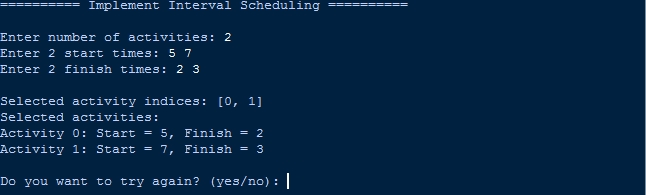
There you have it we successfully created How to Implement Interval Scheduling in Python. I hope that this simple tutorial help you to what you are looking for. For more updates and tutorials just kindly visit this site. Enjoy Coding!
More Tutorials for Python Language