
How to Remove a Key from a Dictionary in Python
In this tutorial, we will learn how to program "How to Remove a Key from a Dictionary in Python." The objective is to remove a key from a dictionary. This tutorial will guide you step by step through the process of removing a key from a dictionary. By the end of this tutorial, you will have a solid understanding of how to implement this task effectively in Python, helping you strengthen your problem-solving abilities and improve your coding skills.
This topic is straightforward and easy to understand. Simply follow the instructions provided, and you will complete it with ease. The program will guide you step by step through the process of removing a key from a dictionary. So, let's dive into the coding process!
Getting Started:
First you will have to download & install the Python IDLE's, here's the link for the Integrated Development And Learning Environment for Python https://www.python.org/downloads/.
Creating Main Function
This is the main function of the application. The following code will display a simple GUI in terminal console that will display program. To do this, simply copy and paste these blocks of code into the IDLE text editor.- while True:
- print("\n============= Remove a Key from a Dictionary =============\n")
- d = {}
- n = int(input("Enter number of key-value pairs: "))
- for i in range(n):
- key = input("Enter key: ")
- value = int(input("Enter value: "))
- d[key] = value
- print("\nInitial dictionary:")
- print(d)
- del_key = input("\nEnter the key to delete: ")
- if del_key in d:
- del d[del_key]
- print("Updated dictionary:")
- print(d)
- else:
- print("Key not found!")
- opt = input("\nDo you want to try again? (yes/no): ").strip().lower()
- if opt == 'no':
- print("Exiting program...")
- break
- elif opt != 'yes':
- print("Invalid choice. Exiting program...")
- break
Output:
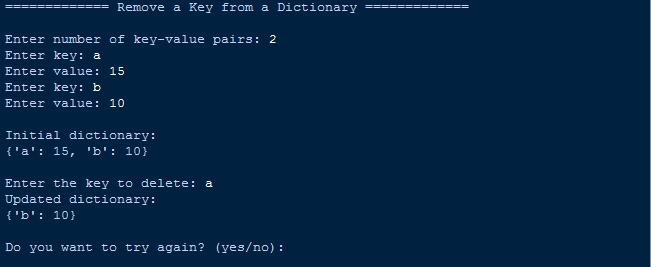
There you have it we successfully created How to Remove a Key from a Dictionary in Python. I hope that this simple tutorial help you to what you are looking for. For more updates and tutorials just kindly visit this site. Enjoy Coding!
More Tutorials for Python Language