
Digital Clock with Alarm Feature Using HTML, CSS and JavaScript with Source Code
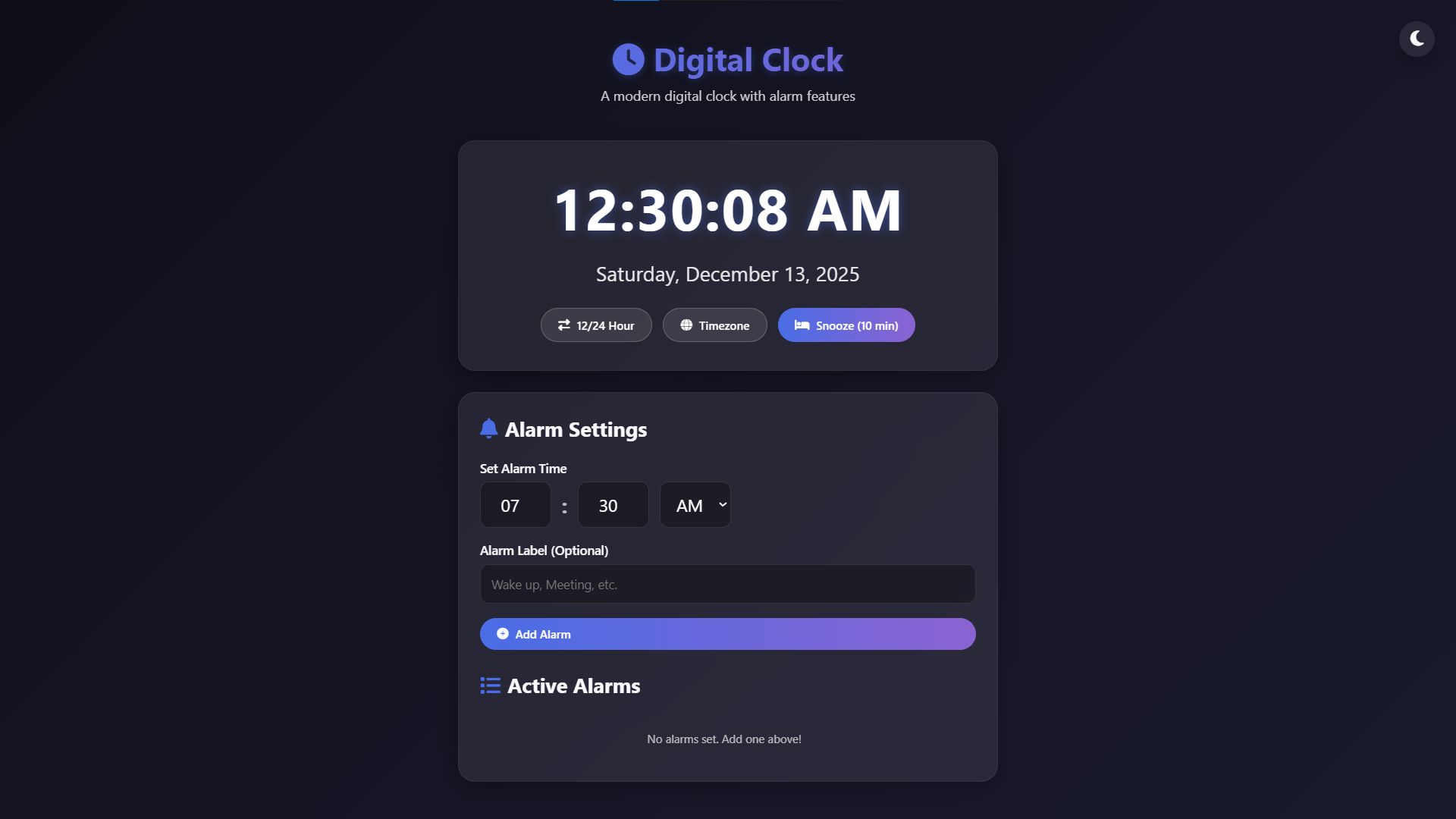
Welcome to the Digital Clock with Alarm Feature, a modern and fully functional timekeeping application built entirely with front-end web technologies. This responsive web application combines elegant design with practical functionality, providing users with a comprehensive digital clock system that includes customizable alarms, timezone support, and multiple display formats. Designed with both aesthetics and usability in mind, the application features a clean interface with glass-morphism effects, smooth animations, and intuitive controls that work seamlessly across all devices—from desktop computers to mobile phones.
The application offers robust alarm management capabilities, allowing users to set multiple alarms with custom labels, toggle between 12-hour and 24-hour time formats, and switch between local time and UTC. With persistent storage that saves alarms between sessions, audio notifications, browser push alerts, and snooze functionality, this digital clock serves as a reliable daily companion for time management. Whether you need a simple time display or a comprehensive alarm system for reminders throughout your day, this application delivers both style and substance in a single, self-contained package that runs entirely in your web browser.
You may also check this simple HTML, CSS and JavaScript project:
- Graph Calculator App
- Website Domain Info Generator
- Code Snippet Manager
- Modern Fraction Calculator
- House Loan Interest Calculator
Key Features:
Real-time digital clock display with hours, minutes, and seconds
Complete date display showing day of week, month, day, and year
12-hour and 24-hour time format toggle with automatic switching
Timezone support for both local time and UTC
Alarm system allowing users to set multiple alarms
Custom alarm labels for easy identification
Visual indicators for active and triggered alarms
Snooze functionality with 10-minute delay
Audio alarm notifications with browser sound integration
Browser push notifications when alarms trigger
Dark and light theme toggle for comfortable viewing
Responsive design that works on mobile, tablet, and desktop
Alarm persistence using localStorage to save alarms between sessions
Visual feedback system with status notifications
Clean, modern glass-morphism UI design with smooth animations
Technologies Used:
HTML5 for semantic structure and content organization
CSS3 with modern features including Flexbox, CSS Grid, and custom properties
Vanilla JavaScript for all interactive functionality
Font Awesome icons for visual elements and controls
CSS animations and transitions for smooth user interactions
Web Storage API (localStorage) for data persistence
Web Audio API for alarm sound playback
Web Notifications API for browser notifications
Responsive design principles with media queries
CSS custom properties (variables) for theming
CSS backdrop-filter for glass-morphism effects
How to Use:
The digital clock automatically displays current time and updates every second
Use the “12/24 Hour” button to toggle between time formats
Click the “Timezone” button to switch between local time and UTC
To set an alarm, enter the hour (0–23), minute (0–59), and select AM/PM
Optionally add a label to identify your alarm (e.g., “Wake up” or “Meeting”)
Click “Add Alarm” to save the alarm to your active alarms list
Active alarms appear in the alarm list with toggle and delete buttons
Use the bell icon to enable or disable specific alarms
Use the trash icon to permanently delete alarms
When an alarm triggers, it will play a sound and display a notification
Click “Snooze (10 min)” to delay the current alarm for 10 minutes
Use the moon/sun icon in the top-right to toggle between dark and light themes
Alarms are automatically saved and will persist when you return to the application
On mobile devices, the interface adjusts for optimal touch interaction
Browser notifications will appear if you grant permission when prompted
Sample Screenshots of the Project
Landing Page
How to Run?
- Download the provided source code zip file.
- Extract the downloaded zip file.
- Open the html file and you are now ready to go!
Video Demonstration for Installation/Setup:
Conclusion:
In conclusion, this Digital Clock with Alarm Feature demonstrates the power of modern web technologies to create practical, feature-rich applications that rival native software in functionality and user experience. By combining HTML for structure, CSS for sophisticated styling and responsive design, and JavaScript for dynamic interactivity and data persistence, this project serves as both a useful daily tool and an exemplary showcase of front-end development capabilities—proving that web applications can deliver comprehensive functionality, aesthetic appeal, and reliable performance entirely within the browser environment.
That's it! I hope this "Digital Clock with Alarm Feature Using HTML, CSS and JavaScript" will assist you on your programming journey, providing value to your current and upcoming project.
For additional tutorials and free source codes, explore our website.
Enjoy Coding :>>
Note: Due to the size or complexity of this submission, the author has submitted it as a .zip file to shorten your download time. After downloading it, you will need a program like Winzip to decompress it.
Virus note: All files are scanned once-a-day by SourceCodester.com for viruses, but new viruses come out every day, so no prevention program can catch 100% of them.
FOR YOUR OWN SAFETY, PLEASE:
1. Re-scan downloaded files using your personal virus checker before using it.
2. NEVER, EVER run compiled files (.exe's, .ocx's, .dll's etc.)--only run source code.