
How to Implement Ternary Heap in Python
In this tutorial, we will learn how to program “How to Implement a Ternary Heap in Python.” The main objective is to implement a ternary heap data structure. This tutorial will guide you step by step through the process of implementing a ternary heap. By the end of this tutorial, you will have a solid understanding of how ternary heaps work in Python, helping you strengthen your problem-solving abilities and improve your overall coding skills in data structure implementation.
This topic is straightforward and easy to understand. By simply following the instructions provided, you will be able to complete it with ease. The program will guide you step by step through the process of implementing a ternary heap. So, let’s dive into the coding process and start implementing the solution to gain a deeper understanding of data structures in Python.
Getting Started:
First you will have to download & install the Python IDLE's, here's the link for the Integrated Development And Learning Environment for Python https://www.python.org/downloads/.
Creating Main Function
This is the main function of the application. The following code will display a simple GUI in terminal console that will display program. To do this, simply copy and paste these blocks of code into the IDLE text editor.- class TernaryHeap:
- def __init__(self):
- self.items = []
- def size(self):
- return len(self.items)
- def parent(self, i):
- return (i - 1) // 3
- def left(self, i):
- return 3 * i + 1
- def mid(self, i):
- return 3 * i + 2
- def right(self, i):
- return 3 * i + 3
- def get(self, i):
- return self.items[i]
- def get_max(self):
- if self.size() == 0:
- return None
- return self.items[0]
- def extract_max(self):
- if self.size() == 0:
- return None
- largest = self.get_max()
- self.items[0] = self.items[-1]
- del self.items[-1]
- if self.size() > 0:
- self.max_heapify(0)
- return largest
- def max_heapify(self, i):
- l = self.left(i)
- m = self.mid(i)
- r = self.right(i)
- largest = i
- if l < self.size() and self.get(l) > self.get(largest):
- largest = l
- if m < self.size() and self.get(m) > self.get(largest):
- largest = m
- if r < self.size() and self.get(r) > self.get(largest):
- largest = r
- if largest != i:
- self.swap(i, largest)
- self.max_heapify(largest)
- def swap(self, i, j):
- self.items[i], self.items[j] = self.items[j], self.items[i]
- def insert(self, key):
- index = self.size()
- self.items.append(key)
- while index != 0:
- p = self.parent(index)
- if self.get(p) < self.get(index):
- self.swap(p, index)
- index = p
- # MAIN PROGRAM
- while True:
- print("\n================= Implement Ternary Heap =================\n")
- theap = TernaryHeap()
- print("Menu")
- print("insert <data>")
- print("max get")
- print("max extract")
- print("quit")
- while True:
- do = input("\nWhat would you like to do? ").split()
- if len(do) == 0:
- continue
- operation = do[0].lower()
- if operation == "insert":
- data = int(do[1])
- theap.insert(data)
- print("Inserted:", data)
- elif operation == "max":
- suboperation = do[1].lower()
- if suboperation == "get":
- print("Maximum value:", theap.get_max())
- elif suboperation == "extract":
- print("Maximum value removed:", theap.extract_max())
- elif operation == "quit":
- break
- else:
- print("Invalid command.")
- # Try Again Option
- opt = input("\nDo you want to try again? (yes/no): ").strip().lower()
- if opt == "no":
- print("Exiting program...")
- break
- elif opt != "yes":
- print("Invalid choice. Exiting program...")
- break
This program demonstrates the implementation of a Ternary Heap, a variation of the heap data structure in which each parent node can have up to three children instead of two. The `TernaryHeap` class manages the heap using a list and provides functions to determine the parent and the three child positions (left, middle, and right). It maintains the max-heap property, where the value of each parent node is greater than or equal to the values of its children. The program allows users to insert elements into the heap, retrieve the maximum value without removing it, and extract the maximum value while reorganizing the heap using the `max_heapify` method to preserve the heap structure. Through a menu-driven interface, users can repeatedly perform these operations, making the program a practical example of how ternary heaps work and how they extend the concept of binary heaps by allowing three children per node.
Output:
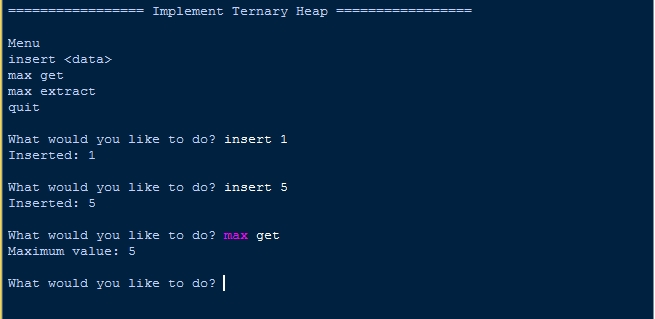
There you have it we successfully created How to Implement Ternary Heap in Python. I hope that this simple tutorial help you to what you are looking for. For more updates and tutorials just kindly visit this site. Enjoy Coding!
More Tutorials for Python Language