
How to Implement Binomial Tree in Python

In this tutorial, we will learn how to program "How to Implement a Binomial Tree in Python." The objective is to implement a binomial tree. This tutorial will guide you step by step through methods for implementing a binomial tree. By the end of this tutorial, you will have a solid understanding of how to implement a binomial tree effectively in Python, helping you strengthen your problem-solving abilities and improve your coding skills.
This topic is straightforward and easy to understand. Simply follow the instructions provided, and you will complete it with ease. The program will guide you step by step through the process of implementing a binomial tree. So, let's dive into the coding process!
Getting Started:
First you will have to download & install the Python IDLE's, here's the link for the Integrated Development And Learning Environment for Python https://www.python.org/downloads/.
Creating Main Function
This is the main function of the application. The following code will display a simple GUI in terminal console that will display program. To do this, simply copy and paste these blocks of code into the IDLE text editor.- class BinomialTree:
- def __init__(self, key):
- self.key = key
- self.children = []
- self.order = 0
- def add_at_end(self, t):
- self.children.append(t)
- self.order += 1
- while True:
- print("\n================== Implement Binomial Tree ==================\n")
- trees = []
- print("Menu")
- print("create <key>")
- print("combine <index1> <index2>")
- print("quit")
- while True:
- do = input("\nWhat would you like to do? ").split()
- operation = do[0].strip().lower()
- if operation == 'create':
- key = int(do[1])
- btree = BinomialTree(key)
- trees.append(btree)
- print("Binomial tree created.")
- elif operation == 'combine':
- index1 = int(do[1])
- index2 = int(do[2])
- if trees[index1].order == trees[index2].order:
- trees[index1].add_at_end(trees[index2])
- del trees[index2]
- print("Binomial trees combined.")
- else:
- print("Orders of the trees need to be the same.")
- elif operation == 'quit':
- break
- else:
- print("Invalid command.")
- # Show table of trees
- print("\n{:>8}{:>12}{:>8}".format("Index", "Root key", "Order"))
- for index, t in enumerate(trees):
- print("{:8d}{:12d}{:8d}".format(index, t.key, t.order))
- # Ask user if they want to run the whole program again
- opt = input("\nDo you want to try again? (yes/no): ").strip().lower()
- if opt == 'no':
- print("Exiting program...")
- break
- elif opt != 'yes':
- print("Invalid choice. Exiting program...")
- break
This program implements a simple Binomial Tree manager that allows users to create and combine binomial trees interactively. Each tree stores a key, a list of children, and its order. Users can create new trees, combine two trees of the same order (attaching one as a child of the other), and view an updated table showing each tree’s index, root key, and order. The program runs in a loop, allowing repeated operations until the user chooses to exit.
Output:
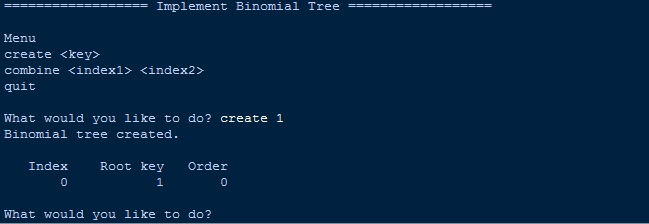
There you have it we successfully created How to Implement Binomial Tree in Python. I hope that this simple tutorial help you to what you are looking for. For more updates and tutorials just kindly visit this site. Enjoy Coding!
More Tutorials for Python Language