
JavaScript Fetch API with async/await: GET, POST, Error Handling and Timeouts
Almost every modern web page loads data from somewhere: a weather widget, a product list, a chat window, a dashboard. In JavaScript, the standard way to do that is the Fetch API, and the cleanest way to use it is with async/await. Old tutorials often show long chains of .then() calls, which work, but are harder to read and much easier to get wrong.
In this tutorial, you will learn how to use fetch() with async/await to make GET and POST requests, how to handle errors the right way (including the 404 trap that catches many beginners), how to add a timeout, and how to run several requests at the same time. At the end, we will build a small page that loads users into a list. All examples were run and the outputs below are the real results.
Requirements
- Any modern browser (Chrome, Edge, Firefox, Safari)
- Node.js 18 or newer if you want to run the examples in the terminal, since
fetchis built into Node from version 18 - A code editor such as VS Code
We will use JSONPlaceholder, a free fake REST API made for testing, so you do not need to set up a server.
Step 1: A Basic GET Request
fetch() returns a Promise. With await, JavaScript pauses inside the async function until the response arrives, so the code reads from top to bottom like normal code:
- // 1. Basic GET request
- async function getUser(id) {
- const response = await fetch(`${API}/users/${id}`);
- const user = await response.json();
- return user;
- }
There are two await keywords here, and both are needed. The first waits for the response headers. The second waits for the body to download and be parsed as JSON with response.json().
Step 2: Handle Errors Properly
Here is the part many developers miss: fetch() does not throw an error for HTTP errors like 404 or 500. It only rejects when the request could not be made at all (no internet, DNS failure, blocked by CORS). A 404 page is still a "successful" response from fetch's point of view.
That is why you should always check response.ok, which is true only for status codes 200 to 299. Let's write a reusable helper that does this, sends JSON headers, and also adds a timeout so a slow server cannot freeze your app forever:
- // 2. A reusable helper with error handling and a timeout
- async function request(url, options = {}, timeoutMs = 8000) {
- try {
- const response = await fetch(url, {
- ...options,
- headers: { 'Content-Type': 'application/json', ...options.headers },
- signal: AbortSignal.timeout(timeoutMs),
- });
- if (!response.ok) {
- throw new Error(`HTTP ${response.status} ${response.statusText}`);
- }
- return await response.json();
- } catch (error) {
- if (error.name === 'TimeoutError') {
- throw new Error(`Request timed out after ${timeoutMs} ms`);
- }
- throw error;
- }
- }
A few things are going on here:
- AbortSignal.timeout(ms) cancels the request automatically after the given time. When that happens, fetch rejects with an error named
TimeoutError, which we turn into a friendly message. - We use the spread operator (
...options) so callers can pass their own method, body or extra headers. - If the status is not OK, we
throwour own error. Now every problem, whether network, timeout or HTTP status, ends up in one place: the caller'scatchblock.
Step 3: Send Data with a POST Request
To send data, set the method to POST and convert your object to a JSON string with JSON.stringify(). Our helper already adds the Content-Type: application/json header, so this function stays short:
- // 3. POST request that sends JSON
- async function createPost(title, body) {
- return request(`${API}/posts`, {
- method: 'POST',
- body: JSON.stringify({ title, body, userId: 1 }),
- });
- }
PUT, PATCH and DELETE requests work exactly the same way; only the method value changes.
Step 4: Run Requests in Parallel with Promise.all
If two requests do not depend on each other, do not wait for them one by one. Promise.all() starts them together and waits until both are finished, which can make your page noticeably faster:
- // 4. Run several requests at the same time
- async function getDashboard() {
- const [user, todos] = await Promise.all([
- request(`${API}/users/2`),
- request(`${API}/todos?userId=2`),
- ]);
- const done = todos.filter((todo) => todo.completed).length;
- return `${user.name} has finished ${done} of ${todos.length} tasks`;
- }
Keep in mind that if any request in Promise.all fails, the whole thing rejects. If you want partial results even when one fails, use Promise.allSettled() instead.
The Complete Script
Here is everything together in one file. Save it as fetch-demo.mjs and run it with node fetch-demo.mjs. The last two calls in main() intentionally fail so you can see the error handling in action: one asks for a user that does not exist, and the other uses a 1 millisecond timeout.
- // fetch-demo.mjs - run with: node fetch-demo.mjs (Node 18+)
- const API = 'https://jsonplaceholder.typicode.com';
- // 1. Basic GET request
- async function getUser(id) {
- const response = await fetch(`${API}/users/${id}`);
- const user = await response.json();
- return user;
- }
- // 2. A reusable helper with error handling and a timeout
- async function request(url, options = {}, timeoutMs = 8000) {
- try {
- const response = await fetch(url, {
- ...options,
- headers: { 'Content-Type': 'application/json', ...options.headers },
- signal: AbortSignal.timeout(timeoutMs),
- });
- if (!response.ok) {
- throw new Error(`HTTP ${response.status} ${response.statusText}`);
- }
- return await response.json();
- } catch (error) {
- if (error.name === 'TimeoutError') {
- throw new Error(`Request timed out after ${timeoutMs} ms`);
- }
- throw error;
- }
- }
- // 3. POST request that sends JSON
- async function createPost(title, body) {
- return request(`${API}/posts`, {
- method: 'POST',
- body: JSON.stringify({ title, body, userId: 1 }),
- });
- }
- // 4. Run several requests at the same time
- async function getDashboard() {
- const [user, todos] = await Promise.all([
- request(`${API}/users/2`),
- request(`${API}/todos?userId=2`),
- ]);
- const done = todos.filter((todo) => todo.completed).length;
- return `${user.name} has finished ${done} of ${todos.length} tasks`;
- }
- async function main() {
- const user = await getUser(1);
- console.log('GET :', user.name, '-', user.email);
- const post = await createPost('Hello Fetch', 'Learning async/await');
- console.log('POST :', post);
- console.log('PARALLEL:', await getDashboard());
- try {
- await request(`${API}/users/9999`);
- } catch (error) {
- console.log('ERROR :', error.message);
- }
- try {
- await request(`${API}/photos`, {}, 1);
- } catch (error) {
- console.log('TIMEOUT:', error.message);
- }
- }
- main();
Output
GET    : Leanne Graham - [email protected]
POST   : {
  title: 'Hello Fetch',
  body: 'Learning async/await',
  userId: 1,
  id: 101
}
PARALLEL: Ervin Howell has finished 8 of 20 tasks
ERROR  : HTTP 404 Not Found
TIMEOUT: Request timed out after 1 ms
Notice the 404 line. Without the response.ok check, that request would have "succeeded" and returned an empty object, and the bug would have been hard to spot.
Using Fetch in the Browser
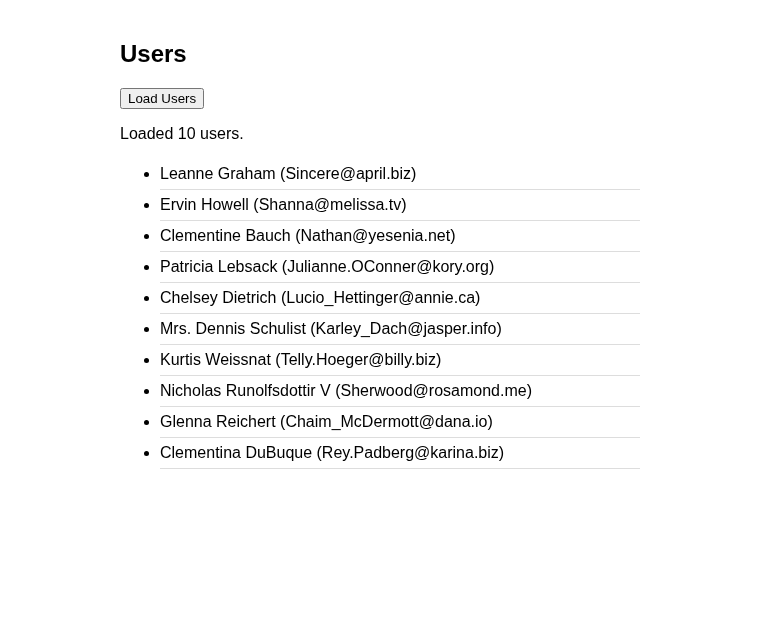
Now let's use the same ideas on a real page. This example shows a loading message, disables the button while the request is running, displays the users, and shows a readable message if something goes wrong. Save it as index.html and open it in your browser.
- <!DOCTYPE html>
- <html lang="en">
- <head>
- <meta charset="UTF-8">
- <style>
- body { font-family: Arial, sans-serif; max-width: 520px; margin: 40px auto; }
- li { padding: 6px 0; border-bottom: 1px solid #ddd; }
- .error { color: #c0392b; }
- </style>
- </head>
- <body>
- <script>
- const statusEl = document.getElementById('status');
- const listEl = document.getElementById('userList');
- const loadBtn = document.getElementById('loadBtn');
- async function loadUsers() {
- statusEl.textContent = 'Loading...';
- statusEl.className = '';
- listEl.innerHTML = '';
- loadBtn.disabled = true;
- try {
- const response = await fetch('https://jsonplaceholder.typicode.com/users');
- if (!response.ok) {
- throw new Error(`HTTP ${response.status}`);
- }
- const users = await response.json();
- users.forEach((user) => {
- const li = document.createElement('li');
- li.textContent = `${user.name} (${user.email})`;
- listEl.appendChild(li);
- });
- statusEl.textContent = `Loaded ${users.length} users.`;
- } catch (error) {
- statusEl.textContent = `Could not load users: ${error.message}`;
- statusEl.className = 'error';
- } finally {
- loadBtn.disabled = false;
- }
- }
- loadBtn.addEventListener('click', loadUsers);
- </script>
- </body>
- </html>
The finally block runs whether the request succeeds or fails, which makes it the perfect place to re-enable the button. Also notice that we use textContent instead of innerHTML to show data from the API, which protects the page from HTML injection.
Here is the page after clicking Load Users:

Common Mistakes to Avoid
- Forgetting await before
response.json(). You will get a pending Promise instead of your data. - Using await outside an async function. In normal scripts,
awaitmust be inside anasyncfunction. It is only allowed at the top level in JavaScript modules. - Not checking response.ok. As shown above, fetch happily resolves for 404 and 500 responses.
- Sending an object as the body. Always use
JSON.stringify(), or the server will receive[object Object]. - Blaming fetch for CORS errors. If the browser blocks a request from another domain, the fix is on the server, which must send the right CORS headers.
Conclusion
The Fetch API with async/await gives you clean, readable code for talking to any REST API. Remember the three habits that separate working code from fragile code: always check response.ok, wrap your calls in try...catch, and add a timeout. Once you have a small helper like request(), you can reuse it across your whole project. You can download the complete source code below. Happy coding!
More Tutorials for JavaScript