Excel

Python CSV Tutorial: Read, Write, Append and Filter CSV Files with the csv Module

Submitted by jaypabs on

CSV (comma-separated values) files are everywhere: exported Excel sheets, Google Forms responses, bank statements, grade sheets, product lists for an inventory system. Sooner or later every programmer has to read one, clean it, compute something and write a new file. In Python you do not need to install anything for that. The built-in csv module handles it, including the tricky parts like commas inside a field, quotes, different delimiters and Excel-friendly encodings.

Inventory Management System Using Tkinter in Python with Source Code

Submitted by razormist on
The Inventory Management System is an interactive desktop application built entirely with Python using the Tkinter library. The application allows you to manage product items through a graphical user interface (GUI) with full CRUD (Create, Read, Update, Delete) operations. The Inventory Management System Using Tkinter features tools that utilize an Excel file to track and manage product data

CSV File Analyzer Using HTML, CSS and JavaScript with Source Code

Submitted by rems on
Welcome to the CSV File Analyzer! This powerful web app lets you quickly analyze and understand your CSV files with just a few clicks. Built with HTML, CSS, and JavaScript, it provides instant insights into your data—including row counts, column statistics, and a preview of your file—all in a clean, modern interface. Whether you're a developer, data analyst, or just working with spreadsheets, this

Google's Python Integration Revolutionizes Data Analysis with Excel Empowerment

Submitted by rems on
In a groundbreaking move, Google has announced a revolutionary native integration for Python in Excel, opening up a world of possibilities for Excel users. This exciting development allows users to seamlessly run Python scripts directly within Excel cells, and even craft custom functions and macros using Python. Unlocking this potential requires Excel aficionados to have the latest version

Invoice generation application in EXCEL

Submitted by Rajan on
A beautiful Invoice Generating Application in Microsoft Excel, create and save PDF format for invoice copy in current working directory. And excel copy also in current directory for future edit. A menu driven application truely professional style. Password : 123 all comments to : [email protected] Pls send your comments to [email protected] regarding Why you doesnot like ? Why you like ? so that

Create a Chart and Export Data from the DataGridView into Excel

Submitted by Thongkorn on
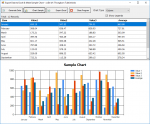
This code sample will randomly generate the data set, then put into the DataGridView. The data from the Grid table is generated in the Chart. There are three types: Column, Line, and Point. I used the @Run Time method to create Legends and Series. In addition, I gave the code to send data to Excel (Line-By-Line) as well. Visual Basic .NET (2010) + MS Excel 2010 Thank You. I hope this sample