
Search
Barangay Document Request System using Python Flask and SQLite with Source Code
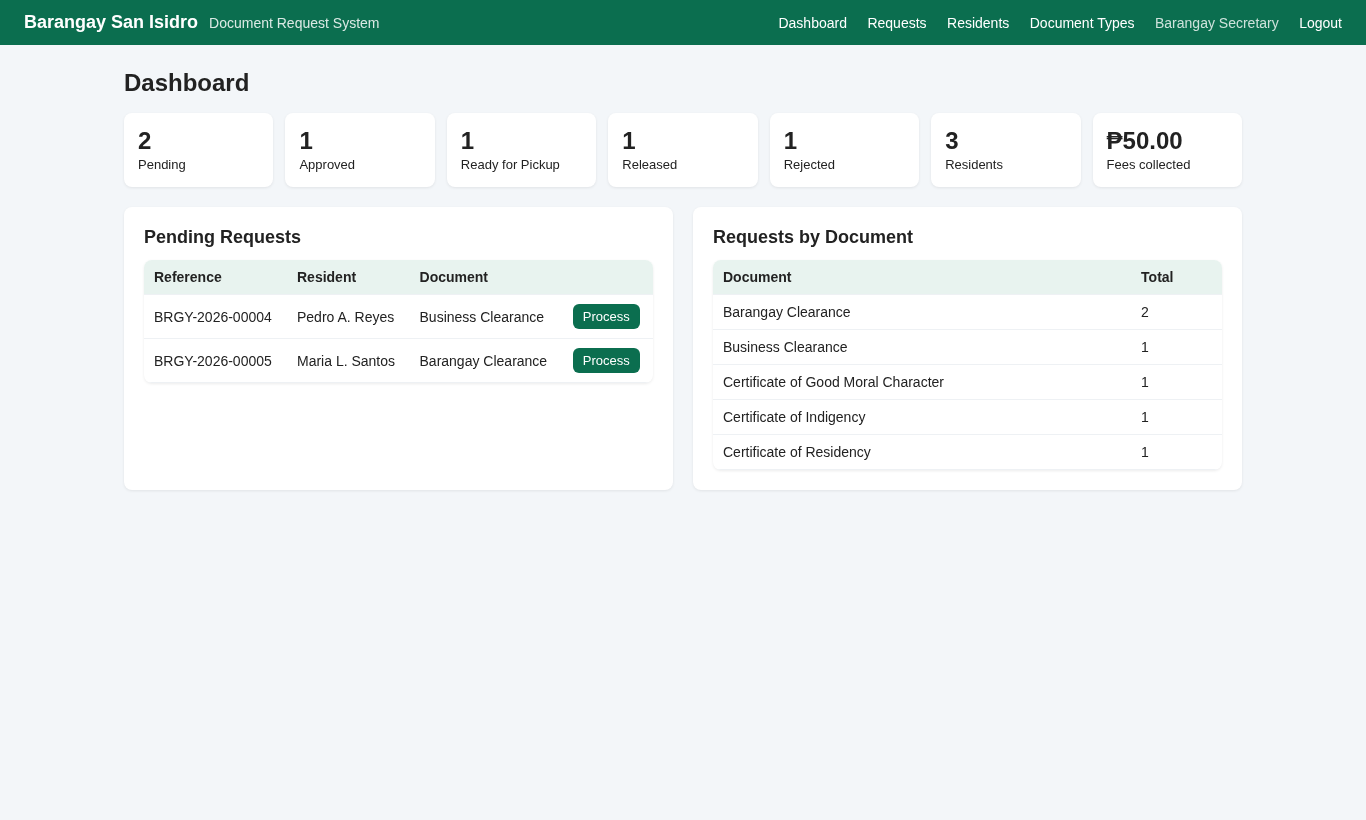
The Barangay Document Request System is a web application built with Python Flask and SQLite that lets residents request barangay documents online instead of lining up at the barangay hall. Residents create an account, request a Barangay Clearance, Certificate of Residency, Certificate of Indigency, Business Clearance or Certificate of Good Moral Character, and track each request from Pending to Released. Barangay staff process the requests, leave remarks for the resident, print the certificate, and manage document types and fees.
It is a good fit for an IT capstone project, a Flask final project, or a starting point for a real barangay e-services portal. The code is plain Flask with the built-in sqlite3 module (no ORM), so every query is easy to follow. The first run creates the database with sample residents and requests, so you can try every feature in a minute. The full source code is free to download below.
Barangay Document Request System Basic Information
- Language used: Python 3.10+ (tested with Python 3.13)
- Framework: Flask 3 (tested with Flask 3.1.3)
- Database used: SQLite (built into Python, nothing to install)
- Front end: Jinja2 templates with plain HTML and CSS, print-friendly certificate (no CDN required)
- Coding Tool used: VS Code, PyCharm or any text editor
- Type: Web Application
About the Project
In many barangays, getting a simple clearance still means going to the hall, writing your details in a logbook, waiting, and sometimes coming back the next day because the secretary or the captain is out. The office, on the other hand, has no easy way to see how many requests are waiting or how much was collected.
This system moves the request step online. The resident submits the request from a phone or computer and gets a reference number such as BRGY-2026-00007. Staff see all pending requests on the dashboard, update the status to Approved, Ready for Pickup, Released or Rejected, and type a remark like "Bring a valid ID". The resident sees the new status and remark on the My Requests page and only goes to the hall when the document is ready. Payment stays at the hall, which matches how most barangays work today.
Features
For residents
- Online registration with full name, address (purok/street), contact number and birthdate.
- Request a document, enter the purpose and number of copies (1 to 5). The fee is computed automatically (fee x copies) and shown as Free for zero-fee documents such as the Certificate of Indigency.
- Unique reference number for every request.
- My Requests page with color-coded status badges and staff remarks.
- Cancel a request while it is still Pending.
For barangay staff
- Dashboard with counts per status (clickable), number of residents, total fees collected from released documents, pending requests and requests per document type.
- Request list with search by reference number or resident name and a status filter.
- Request details page to update the status and remarks.
- Printable certificate with the barangay name, municipality, resident name, address, purpose, date issued, Punong Barangay signature line and reference number. Printing is only allowed for approved requests.
- Residents list with the number of requests per resident.
- Document types and fees: add new documents, change fees and processing days, or deactivate a document so residents can no longer request it.
Security basics
- Passwords hashed with Werkzeug's
generate_password_hash()and checked withcheck_password_hash(). - CSRF token on every form, role checks on every staff page, and residents can only see and cancel their own requests.
- Parameterized SQL queries everywhere and auto-escaped Jinja2 templates.
Screenshots
The screenshots below were captured from the running application with the included sample data. The staff dashboard is the main screenshot; the others show the login and registration pages, a resident's request list and request form, the staff request list and request details, the printable certificate, the residents list, and the document types page.
Code Highlights
Every staff page is protected by a small decorator. Guests are sent to the login page and residents get a 403 error:
- def staff_required(view):
- @wraps(view)
- def wrapped(**kw):
- if g.user is None:
- return redirect(url_for('login', next=request.path))
- if g.user['role'] != 'staff':
- abort(403)
- return view(**kw)
- return wrapped
Every POST must carry the CSRF token stored in the session. Notice the not session.get('_csrf') part: without it, a visitor with no session and a form with no token would compare None == None and slip through. The included test suite caught exactly that bug during development.
- def csrf_token():
- if '_csrf' not in session:
- session['_csrf'] = secrets.token_hex(16)
- return session['_csrf']
- app.jinja_env.globals['csrf_token'] = csrf_token
- @app.before_request
- def check_csrf():
- if request.method == 'POST' and (not session.get('_csrf')
- or request.form.get('_csrf') != session['_csrf']):
- abort(400, 'Invalid form token. Please reload the page and try again.')
Reference numbers come from the SQLite AUTOINCREMENT id, which is never reused. That means a cancelled request never gives its number to someone else:
- def assign_reference(db, request_id):
- """BRGY-<year>-<id>. AUTOINCREMENT ids are never reused, even after a cancel."""
- ref = f'BRGY-{date.today().year}-{request_id:05d}'
- db.execute('UPDATE requests SET reference_no = ? WHERE id = ?', (ref, request_id))
- return ref
Submitting a request checks that the document exists and is active, validates the purpose and copies, computes the amount, then assigns the reference number:
- @app.route('/request/new', methods=['GET', 'POST'])
- @login_required
- def new_request():
- db = get_db()
- types = db.execute('SELECT * FROM document_types WHERE active = 1 ORDER BY name').fetchall()
- if request.method == 'POST':
- doc = db.execute('SELECT * FROM document_types WHERE id = ? AND active = 1',
- (request.form.get('document_type_id', type=int),)).fetchone()
- purpose = request.form.get('purpose', '').strip()
- copies = request.form.get('copies', 1, type=int) or 1
- if doc is None or not purpose or not 1 <= copies <= 5:
- flash('Choose a document, enter the purpose and 1-5 copies.', 'error')
- else:
- cur = db.execute('INSERT INTO requests (reference_no, user_id, document_type_id, purpose, copies, amount) '
- 'VALUES (?, ?, ?, ?, ?, ?)', ('NEW-' + secrets.token_hex(8), g.user['id'], doc['id'],
- purpose, copies, doc['fee'] * copies))
- ref = assign_reference(db, cur.lastrowid)
- db.commit()
- flash(f'Request {ref} submitted. Processing time: about {doc["processing_days"]} working day(s).', 'success')
- return redirect(url_for('my_requests'))
- return render_template('request_form.html', types=types)
Database Tables
The database has three tables: users (residents and staff, separated by a role column), document_types (name, fee, processing days, active flag) and requests. The CHECK constraint keeps the status column clean even if someone edits the database by hand:
- CREATE TABLE requests (
- id INTEGER PRIMARY KEY AUTOINCREMENT,
- reference_no TEXT NOT NULL UNIQUE,
- user_id INTEGER NOT NULL REFERENCES users(id),
- document_type_id INTEGER NOT NULL REFERENCES document_types(id),
- purpose TEXT NOT NULL,
- copies INTEGER NOT NULL DEFAULT 1,
- STATUS TEXT NOT NULL DEFAULT 'Pending'
- CHECK (STATUS IN ('Pending', 'Approved', 'Ready for Pickup', 'Released', 'Rejected')),
- remarks TEXT NOT NULL DEFAULT '',
- amount REAL NOT NULL DEFAULT 0,
- requested_at TEXT NOT NULL DEFAULT (datetime('now', 'localtime')),
- updated_at TEXT NOT NULL DEFAULT (datetime('now', 'localtime'))
- );
Project Structure
barangay-document-request-system/
  app.py              Flask routes, database helpers, login and CSRF checks
  schema.sql          Table definitions
  requirements.txt    Flask
  test_app.py         30 automated checks using Flask's test client
  README.txt          Setup steps and demo accounts
  static/style.css    Layout, badges and print styles
  templates/          Jinja2 pages (base, login, register, my_requests,
                      request_form, admin_dashboard, admin_requests,
                      admin_request_detail, certificate, admin_residents,
                      admin_documents)
How to Run the Barangay Document Request System
- Install Python 3.10 or newer from python.org. On Windows, tick "Add python.exe to PATH" during setup.
- Download the zip file below and extract it.
- Open a terminal (Command Prompt, PowerShell or the VS Code terminal) inside the
barangay-document-request-systemfolder. - Optional but recommended: create a virtual environment with
python -m venv venv, then activate it withvenv\Scripts\activateon Windows orsource venv/bin/activateon macOS/Linux. - Install Flask:
pip install -r requirements.txt - Start the app:
python app.py. The first run createsbarangay.dbwith sample data. - Open
http://127.0.0.1:5000in your browser.
Demo accounts: staff admin / admin123; residents juan, maria and pedro, all with password resident123. To start over with fresh sample data, run flask --app app init-db. You can change the barangay name, municipality and Punong Barangay printed on the certificate with the BARANGAY_NAME, MUNICIPALITY and CAPTAIN environment variables, or by editing the defaults at the top of app.py.
Automated Tests
Run python test_app.py to check the main flows (it uses a temporary database, so your data is safe). This is the output from the version in the zip:
PASS guest redirected to login
PASS POST without CSRF token rejected
PASS wrong password rejected
PASS short password rejected on register
PASS resident registered
PASS duplicate username rejected
PASS resident lands on My Requests
PASS resident cannot open admin pages
PASS request submitted with next reference number
PASS amount = fee x copies (2 x 50)
PASS empty purpose rejected
PASS free document shows Free
PASS resident cancels own pending request
PASS cannot cancel another resident's request
PASS reference number not reused after cancel
PASS staff lands on dashboard
PASS dashboard pending count = 4
PASS dashboard fees collected = released only
PASS filter by status
PASS search by resident name
PASS print blocked while pending
PASS status updated
PASS invalid status rejected
PASS certificate prints name, purpose, reference
PASS resident sees new status and remarks
PASS residents page lists Ana with 2 requests
PASS document type added
PASS fee updated
PASS deactivated type hidden from residents
PASS logout works

30 passed, 0 failed
Ideas to Extend the Project
- Send an SMS or email when a request becomes Ready for Pickup.
- Let residents upload a photo of a valid ID during registration, with staff verification.
- Add a QR code on the printed certificate that links to a verification page.
- Add blotter records and block clearance requests for residents with an open case.
- Add monthly reports of requests and collections, exported to CSV.
- Before deploying, change
SECRET_KEYand the demo passwords, turn off debug mode, and run it behind a production server such as Gunicorn or Waitress.
Conclusion
The Barangay Document Request System shows a complete Flask workflow in one small project: registration and login with hashed passwords, two user roles, a request lifecycle with statuses and remarks, a dashboard with summary queries, and a printable certificate. Download the source code, run it with the sample data, then make it your own with your barangay's documents, fees and branding. If you use it for a capstone, the extension ideas above are a good way to add your own features.
Note: Due to the size or complexity of this submission, the author has submitted it as a .zip file to shorten your download time. After downloading it, you will need a program like Winzip to decompress it.
Virus note: All files are scanned once-a-day by SourceCodester.com for viruses, but new viruses come out every day, so no prevention program can catch 100% of them.
FOR YOUR OWN SAFETY, PLEASE:
1. Re-scan downloaded files using your personal virus checker before using it.
2. NEVER, EVER run compiled files (.exe's, .ocx's, .dll's etc.)--only run source code.