
Captcha Generator App Using Tkinter in Python with Source Code
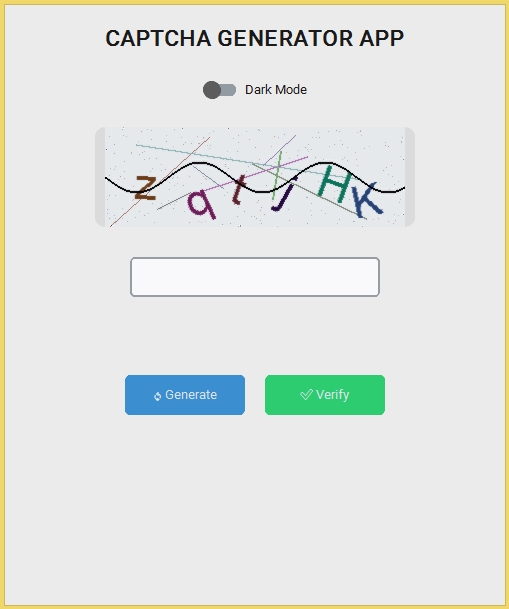
The Captcha Generator App is an interactive desktop application built entirely with Python using the Tkinter library. The application is easy to use and can generate captchas efficiently. The Captcha Generator App Using Tkinter features straightforward functionality for generating and displaying captcha codes. This project is an excellent opportunity to reinforce essential programming concepts, making it a valuable exercise for improving your Python skills in application development.
The Captcha Generator App Using Tkinter in Python with Source Code is free to be downloaded just read the content below for more info. This application is for educational purpose only.
Captcha Generator App Using Tkinter in Python with Source Code Basic Information
- Language used: Python
- Coding Tool used: Built-in Python IDLE
- Type: Desktop Application
- Database used: None
About Captcha Generator App
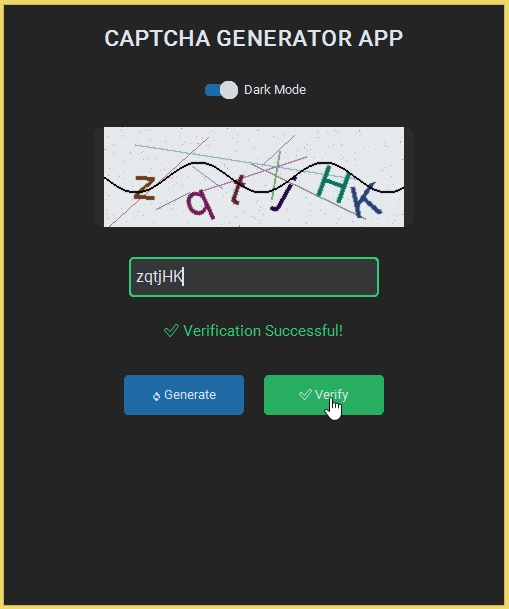
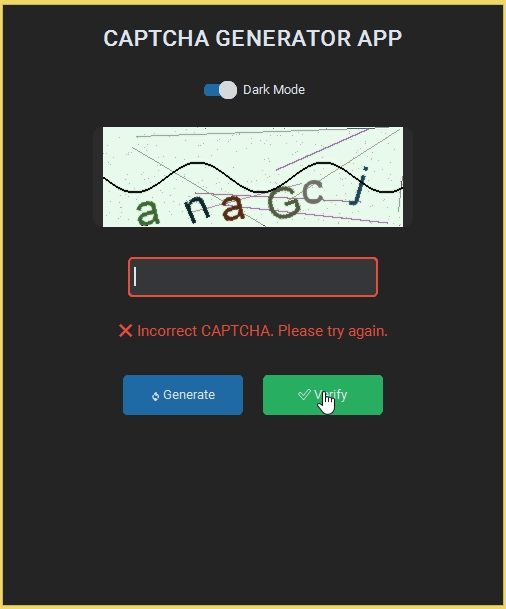
The Captcha Generator App Using Tkinter is a Python-based desktop application designed to generate and display random CAPTCHA codes to improve security and distinguish human users from automated bots. Built using the Tkinter library, it provides a simple and interactive graphical user interface where users can view a generated CAPTCHA and enter the matching text for verification. The application typically creates CAPTCHA strings using a combination of uppercase and lowercase letters, numbers, and sometimes special characters, making each generated code unique and difficult for automated systems to predict. It also includes a refresh feature that allows users to generate a new CAPTCHA if the current one is unclear or hard to read. This project helps beginners strengthen their understanding of GUI development in Python, as well as core programming concepts such as randomization, string handling, event-driven programming, and user input validation. Overall, it is a practical and educational project that demonstrates how security features can be implemented in a simple desktop application.
Captcha Generator App Using Tkinter in Python with Source Code Features
- Graphical User Interface (GUI)
- Built using Python’s Tkinter library.
- Simple and interactive interface for CAPTCHA generation.
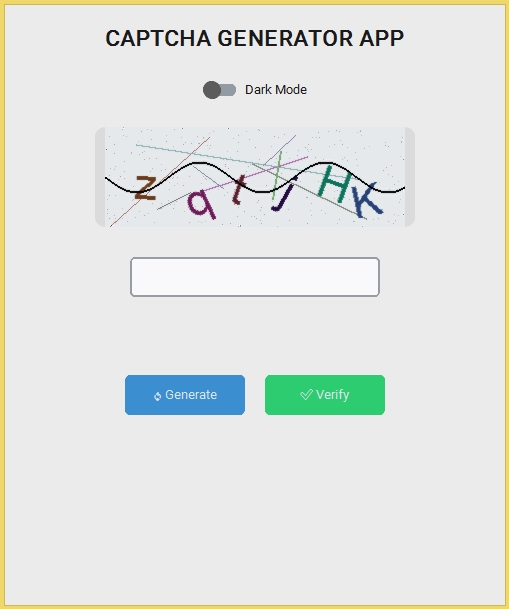
- Displays generated CAPTCHA text in a visual format.
- Input field for user verification entry.
- Buttons for generate, verify, and refresh actions.
- Random CAPTCHA Generation
- Generates random alphanumeric strings.
- Uses Python’s `random` and `string` modules.
- Produces unique CAPTCHA each time.
- Prevents predictable patterns for better security simulation.
- CAPTCHA Display System
- Shows generated CAPTCHA clearly on screen.
- Optional styling (fonts, colors, distortion effects).
- Improves visual difficulty for automated bots.
Sample Application Screenshot:
Captcha Generator App Using Tkinter in Python with Source Code Installation Guide
- First you need to download & install the Python IDLE's, here's the link "https://www.python.org/downloads/".
- Download the source code in this site.
- Locate and Extract the zip file.
- Open the extracted folder
- Locate the py file.
- Then open the file via python IDLE or any IDE that supports python language.
- Run the py file to launch the program.
That's all, The Captcha Generator App was created fully functional using Python language. I hope that this project can help you to what you are looking for. For more projects and tutorials please kindly visit this site. Enjoy Coding!
The Captcha Generator App Using Tkinter in Python with Source Code is ready to be downloaded just kindly click the download button below.
Related Projects & Tutorials
Captcha Generator AppNote: Due to the size or complexity of this submission, the author has submitted it as a .zip file to shorten your download time. After downloading it, you will need a program like Winzip to decompress it.
Virus note: All files are scanned once-a-day by SourceCodester.com for viruses, but new viruses come out every day, so no prevention program can catch 100% of them.
FOR YOUR OWN SAFETY, PLEASE:
1. Re-scan downloaded files using your personal virus checker before using it.
2. NEVER, EVER run compiled files (.exe's, .ocx's, .dll's etc.)--only run source code.