Search
Hotel Reservation System using PHP and MySQL with Source Code
The Hotel Reservation System is a complete web application built with PHP and MySQL for small hotels, inns, resorts and pension houses. Guests check room availability for their dates, see the total price right away, and book online with a reference number. The front desk gets a dashboard with today's arrivals and departures, a 14-day room calendar, check-in and check-out with a printable invoice, and screens to manage rooms, room types and rates.
Hotel and resort reservation systems are among the most requested capstone and thesis topics, and the hardest part to get right is availability: making sure a room is never booked twice for the same night. This project solves that with a correct date-overlap query and a database transaction that locks rooms while a booking is saved, and it comes with an automated test that proves two guests racing for the last room cannot both get it. The full source code is free to download below.
Hotel Reservation System Basic Information
- Language used: PHP 8.0+ (tested with PHP 8.3)
- Database used: MySQL or MariaDB (tested with MariaDB 11.8) through PDO
- Front end: plain HTML and CSS, no framework or CDN, responsive layout
- Coding Tool used: VS Code, Sublime Text or any text editor
- Type: Web Application
About the Project
Many small hotels still take bookings through phone calls, chat messages and a paper logbook. That works until two staff members promise the same room to two families for the same weekend. This system keeps every booking in one database, shows which rooms are free for any date range, and guides the front desk through the life of a reservation: Pending when the guest books online, Confirmed after the hotel accepts it, Checked In on arrival, and Checked Out when the guest pays and leaves. A booking can also be Cancelled, which frees the room immediately.
The sample hotel, "Casa Laguna Hotel", has four room types and nine rooms, one of them under maintenance. The sample bookings are dated relative to the day you import the database, so the dashboard always has guests arriving, staying and leaving "today" when you first open it.
Features
Guest side
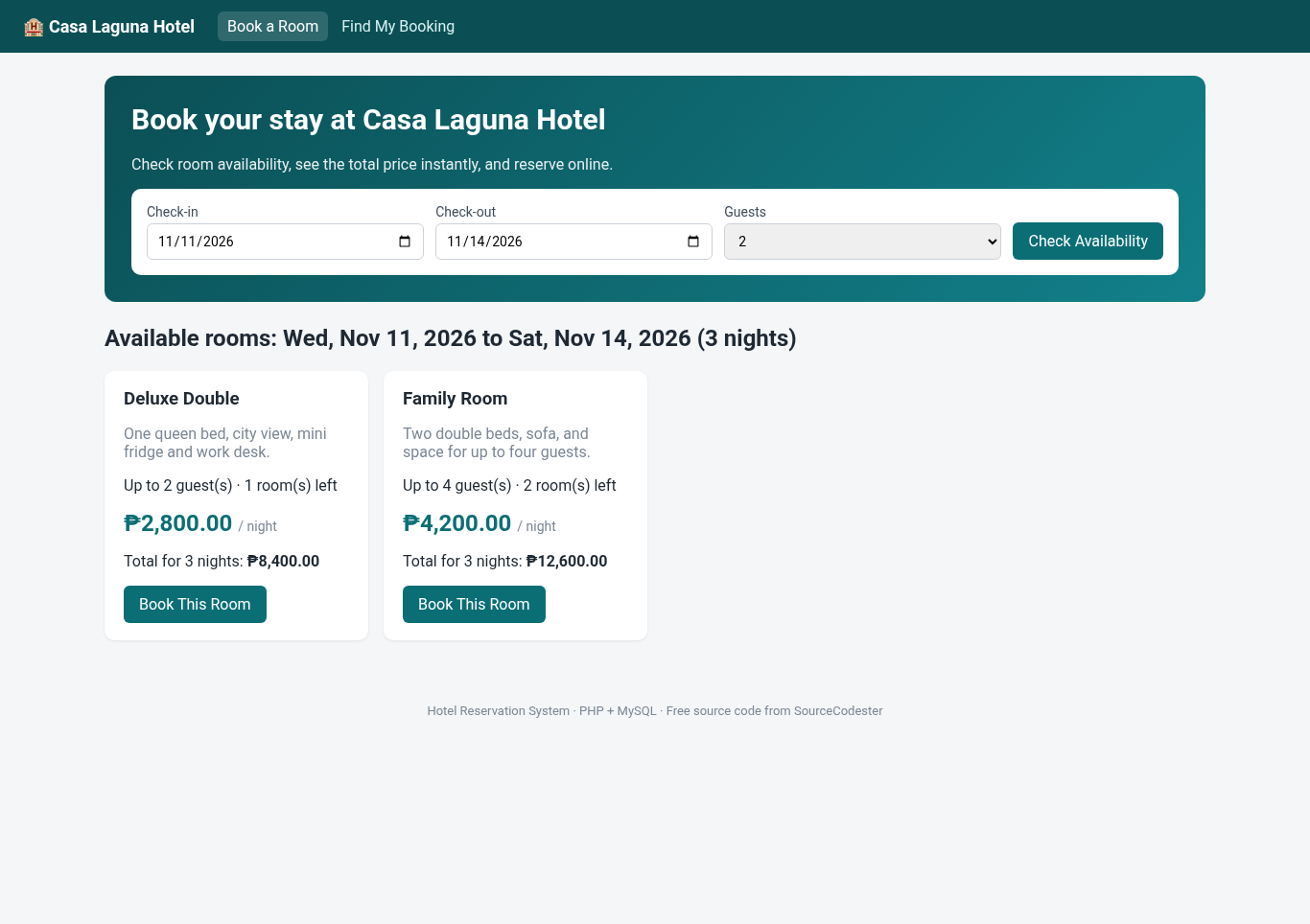
- Availability search by check-in date, check-out date and number of guests
- Results grouped by room type with description, capacity, rooms left, rate per night and total price for the stay
- Booking form with name, email, mobile number and special request, plus a booking summary
- Booking confirmation with a unique reference number and a print button
- "Find My Booking" page: look up a reservation with the reference number and email
- Date rules: no past dates, check-out after check-in, maximum stay of 30 nights (configurable)
Front desk (admin) side
- Dashboard: rooms occupied, occupancy percentage, arrivals today, departures due, pending bookings and money collected today
- Room calendar: a 14-day grid of all rooms, color-coded by Pending, Confirmed, Checked In and Maintenance, with Previous and Next buttons
- Reservations list with search (reference, guest, email or room number) and status filter
- Reservation page with Confirm, Check In, Cancel and Check Out actions. Only valid status changes are allowed, and guests cannot be checked in before their arrival date
- Check-out with amount received, automatic change computation, and a printable invoice (statement of account)
- Rooms: add, edit, set to Maintenance, delete (rooms with booking history are protected)
- Room types and rates: change a rate for new bookings while existing bookings keep the rate they were booked at
Screenshots
The main screenshot shows the guest availability search. The gallery has the booking form, confirmation, dashboard, room calendar, reservations list, check-out page, invoice, and the room and rate screens. All screenshots were taken from the running project with the sample data.
Code Highlights
Finding free rooms. Two stays overlap when the existing booking starts before the new one ends and ends after the new one starts. Using < and > (not <=) means the check-out day is free for the next guest, which is how hotels work. Cancelled and checked-out bookings are ignored, and rooms under maintenance are never offered:
- /**
- * Rooms that are free for the whole stay. Two stays overlap when
- * existing.check_in < new.check_out AND existing.check_out > new.check_in.
- * Check-out day is free for the next guest (same-day turnover).
- */
- $sql = "SELECT r.id, r.room_no, r.floor, t.id AS type_id, t.name AS type_name, t.rate, t.capacity, t.description
- FROM rooms r
- JOIN room_types t ON t.id = r.type_id
- WHERE r.status = 'Available'
- AND t.capacity >= :guests
- AND NOT EXISTS (
- SELECT 1 FROM reservations x
- WHERE x.room_id = r.id
- AND x.status IN ('Pending', 'Confirmed', 'Checked In')
- AND x.check_in < :check_out
- AND x.check_out > :check_in
- )";
- $params = [':guests' => $guests, ':check_in' => $in, ':check_out' => $out];
- if ($typeId) {
- $sql .= ' AND t.id = :type_id';
- $params[':type_id'] = $typeId;
- }
- $sql .= ' ORDER BY t.rate, r.room_no';
- $stmt = db()->prepare($sql);
- $stmt->execute($params);
- return $stmt->fetchAll();
- }
Saving a booking without double booking. Checking availability and then inserting is not enough on its own: two guests could both see "1 room left" and click Reserve at the same moment. The booking page starts a transaction and locks the rooms of the chosen type with SELECT ... FOR UPDATE. The second request waits until the first one commits, then runs the availability query again and gets an honest "just booked" message:
- $pdo = db();
- $pdo->beginTransaction();
- try {
- // Lock all rooms of this type so two guests cannot grab the last room at the same moment.
- $lock = $pdo->prepare("SELECT id FROM rooms WHERE type_id = ? AND status = 'Available' ORDER BY room_no FOR UPDATE");
- $lock->execute([$typeId]);
- $free = available_rooms($in, $out, $guests, $typeId);
- if (!$free) {
- $pdo->rollBack();
- $errors[] = 'Sorry, the last ' . $type['name'] . ' for these dates was just booked. Please choose another room type.';
- } else {
- $room = $free[0];
- $reference = new_reference();
- $ins = $pdo->prepare('INSERT INTO reservations
- (reference, room_id, guest_name, email, phone, guests, check_in, check_out, nights, rate, total, special_request)
- VALUES (?, ?, ?, ?, ?, ?, ?, ?, ?, ?, ?, ?)');
- $ins->execute([$reference, $room['id'], $form['guest_name'], $form['email'], $form['phone'], $guests,
- $in, $out, $nights, $type['rate'], $type['rate'] * $nights, $form['special_request']]);
- $pdo->commit();
- $_SESSION['last_booking'] = $reference;
- }
The rate is copied into the reservation, so changing a room type's price later does not change what existing guests owe.
Allowed status changes. The reservation page uses a small table of allowed transitions, so a cancelled booking cannot be checked in and a checked-out guest cannot be cancelled. Each change re-reads the reservation with a row lock first:
- // Allowed status changes: current status => [action => new status]
- const TRANSITIONS = [
- 'Pending' => ['confirm' => 'Confirmed', 'cancel' => 'Cancelled'],
- 'Confirmed' => ['checkin' => 'Checked In', 'cancel' => 'Cancelled'],
- 'Checked In' => ['checkout' => 'Checked Out'],
- ];
Database Tables
The database has four tables: admins, room_types, rooms and reservations. The reservations table holds the guest details, the dates and the money:
- CREATE TABLE reservations (
- id INT AUTO_INCREMENT PRIMARY KEY,
- reference VARCHAR(20) NOT NULL UNIQUE,
- room_id INT NOT NULL,
- guest_name VARCHAR(100) NOT NULL,
- email VARCHAR(120) NOT NULL,
- phone VARCHAR(30) NOT NULL,
- guests TINYINT UNSIGNED NOT NULL DEFAULT 1,
- check_in DATE NOT NULL,
- check_out DATE NOT NULL,
- nights SMALLINT UNSIGNED NOT NULL,
- rate DECIMAL(10,2) NOT NULL, -- price per night at the time of booking
- total DECIMAL(10,2) NOT NULL,
- amount_paid DECIMAL(10,2) NOT NULL DEFAULT 0,
- STATUS ENUM('Pending','Confirmed','Checked In','Checked Out','Cancelled') NOT NULL DEFAULT 'Pending',
- special_request VARCHAR(255) NOT NULL DEFAULT '',
- created_at DATETIME NOT NULL DEFAULT CURRENT_TIMESTAMP,
- checked_in_at DATETIME NULL,
- checked_out_at DATETIME NULL,
- FOREIGN KEY (room_id) REFERENCES rooms(id),
- INDEX idx_room_dates (room_id, check_in, check_out),
- INDEX idx_status (STATUS),
- CHECK (check_out > check_in)
- ) ENGINE=InnoDB;
The (room_id, check_in, check_out) index keeps the availability query fast as bookings pile up, and the CHECK constraint rejects impossible date ranges at the database level.
Project Structure
hotel-reservation-system/
├── index.php            availability search (guest home page)
├── book.php             booking form and safe booking transaction
├── confirmation.php     booking received page
├── lookup.php           find my booking (reference + email)
├── config.php           database, hotel name, currency, time zone
├── database.sql         tables + sample data
├── test_app.py          automated end-to-end test
├── admin/
│   ├── login.php, logout.php
│   ├── index.php        dashboard
│   ├── calendar.php     14-day room calendar
│   ├── reservations.php
│   ├── reservation.php  confirm / check in / check out / cancel
│   ├── invoice.php
│   ├── rooms.php
│   └── room_types.php
├── includes/            db connection, helpers, auth, header/footer
└── assets/style.css
How to Run the Hotel Reservation System
Using XAMPP
- Download and extract the zip file below.
- Copy the
hotel-reservation-systemfolder intoC:\xampp\htdocs\. - Start Apache and MySQL in the XAMPP Control Panel.
- Open
http://localhost/phpmyadmin, click Import, choosedatabase.sqland click Go. This creates thehotel_reservationdatabase with sample data. - If your MySQL root account has a password, edit
config.php. - Guests: open
http://localhost/hotel-reservation-system/
Front desk: openhttp://localhost/hotel-reservation-system/admin/
Using the PHP built-in server
mysql -u root -p < database.sql
php -S localhost:8000
Then open http://localhost:8000 for guests and http://localhost:8000/admin/ for the front desk.
Default account
- Admin: admin / admin123
Change the password before using the system for real bookings. The hotel name, currency symbol (₱ by default), maximum number of nights and time zone (Asia/Manila) are in config.php. Re-import database.sql any time to reset the demo.
Automated Tests
The zip includes test_app.py, which uses only Python's standard library. It searches, books, races two guests for the last room in parallel, and walks a reservation through the whole front desk process. Import a fresh database.sql, start the app, and run python3 test_app.py http://localhost:8000. This is the output from the version in the zip:
PASS search shows Deluxe and Family for 2 guests
PASS price total = rate x nights
PASS suite hidden (booked), single hidden (capacity 1)
PASS past check-in rejected
PASS check-out before check-in rejected
PASS more than 30 nights rejected
PASS same-day turnover: room 203 free on Jose's check-out day
PASS maintenance room 303 never offered
PASS invalid booking form shows 3 errors
PASS over capacity rejected
PASS valid booking -> confirmation with reference
PASS confirmation shows total and Pending
PASS other browser cannot open confirmation page
PASS lookup by reference + email works
PASS lookup with wrong email fails
PASS bad CSRF rejected
PASS Deluxe rooms left after first booking = 1
PASS two guests racing for the last room: exactly one wins
PASS Deluxe now sold out for those dates
PASS guest redirected to admin login
PASS wrong admin password rejected
PASS admin login opens dashboard
PASS dashboard: 2 of 8 rooms occupied, 25%
PASS dashboard: 2 arrivals, 1 departure due
PASS reservation search by reference
PASS filter by status
PASS cannot check in a Pending booking
PASS confirm booking
PASS cannot check in before arrival date
PASS check in today's arrival
PASS checkout with too little payment rejected
PASS checkout -> invoice with change
PASS invoice shows paid and zero balance
PASS checked-out booking cannot be cancelled
PASS dashboard shows money collected today
PASS cancel booking
PASS cancelled room is free again
PASS add room
PASS duplicate room number rejected
PASS new suite room is bookable today
PASS room with reservations cannot be deleted
PASS change room rate
PASS search uses new rate
PASS existing booking keeps old total
PASS calendar shows 10 rooms x 14 days
PASS calendar shows in-house and pending guests
PASS admin/index.php has no PHP warnings
PASS admin/reservations.php has no PHP warnings
PASS admin/calendar.php has no PHP warnings
PASS admin/rooms.php has no PHP warnings
PASS admin/room_types.php has no PHP warnings
PASS logout

52 passed, 0 failed
Ideas to Extend the Project
- Send a confirmation email with the booking reference using PHPMailer.
- Add extra charges at check-out, such as minibar, laundry or extra bed, as invoice line items.
- Accept a down payment online through a payment gateway and track the balance.
- Add seasonal rates (weekend or holiday pricing) with a rates-by-date table.
- Upload photos for each room type.
- Add a monthly occupancy and revenue report with a chart.
Conclusion
This Hotel Reservation System gives you a realistic booking workflow in a small, readable PHP and MySQL project: online availability search with instant pricing, safe bookings that cannot double-book a room, a front desk dashboard and room calendar, check-in and check-out with invoices, and room and rate management. Download the source code, run the sample hotel, then rename it, add your own rooms and rates, and use the extension ideas to make it your own capstone project.
Note: Due to the size or complexity of this submission, the author has submitted it as a .zip file to shorten your download time. After downloading it, you will need a program like Winzip to decompress it.
Virus note: All files are scanned once-a-day by SourceCodester.com for viruses, but new viruses come out every day, so no prevention program can catch 100% of them.
FOR YOUR OWN SAFETY, PLEASE:
1. Re-scan downloaded files using your personal virus checker before using it.
2. NEVER, EVER run compiled files (.exe's, .ocx's, .dll's etc.)--only run source code.