
Search
Online Voting System for Student Council Elections using PHP and MySQL with Source Code
The Online Voting System is a web application built with PHP and MySQL for student council, SSG and school organization elections. Voters sign in with their Student ID, fill out an official ballot and get a printable vote receipt. The election officer manages positions, candidates and voters, opens and closes the polls, watches turnout live, and prints the final results with winners and ties marked automatically.
It is a classic capstone and thesis topic, and this version is written for modern PHP 8 with PDO, prepared statements, hashed passwords and CSRF protection. It also handles the parts that simple voting systems usually get wrong: positions where you vote for more than one candidate, abstaining, double submission, and ties. The database comes with sample positions, candidates and ten voters, so you can try a full election in a few minutes. The complete source code is free to download below.
Online Voting System Basic Information
- Language used: PHP 8.0+ (tested with PHP 8.3)
- Database used: MySQL or MariaDB (tested with MariaDB 11.8) through PDO
- Front end: plain HTML, CSS and a few lines of JavaScript, no framework or CDN
- Coding Tool used: VS Code, Sublime Text or any text editor
- Type: Web Application
About the Project
Many schools still run student elections on paper: printed ballots, a ballot box, and a long night of manual counting where one mistake means recounting everything. An online voting system lets students vote from a phone or a computer lab, makes sure each student votes only once, and produces the tally the moment the polls close.
The system has two sides. Voters open the main page, log in with their Student ID and password, and see the ballot grouped by position. Single-seat positions such as President use radio buttons; multi-seat positions such as Councilor ("vote for 3") use checkboxes, and a small script stops the voter from ticking more than allowed. After submitting, the voter sees a receipt of their choices and cannot vote again. The election officer logs in at /admin/ to prepare the ballot, register voters, open or close voting, and print the results.
Features
Voter side
- Login with Student ID and password (hashed with
password_hash()) - Official ballot grouped by position, with partylist, course and year, and a short platform for each candidate
- Radio buttons for "vote for 1" positions, checkboxes for multi-seat positions
- Abstain on any position by leaving it blank
- Confirmation before submitting, then a printable vote receipt
- One vote per voter, enforced on the server and in the database
- Clear "Voting is closed" message when the polls are not open
Admin (election officer) side
- Dashboard with registered voters, number who voted, turnout percentage and progress bar, and the latest voters
- Open and close voting with one click, and edit the election title
- Positions: add, edit, set how many candidates to vote for, and set the ballot order
- Candidates: add, edit and delete (a candidate who already has votes cannot be deleted)
- Voters: register, search, filter by voted / not yet voted, change passwords, delete voters who have not voted
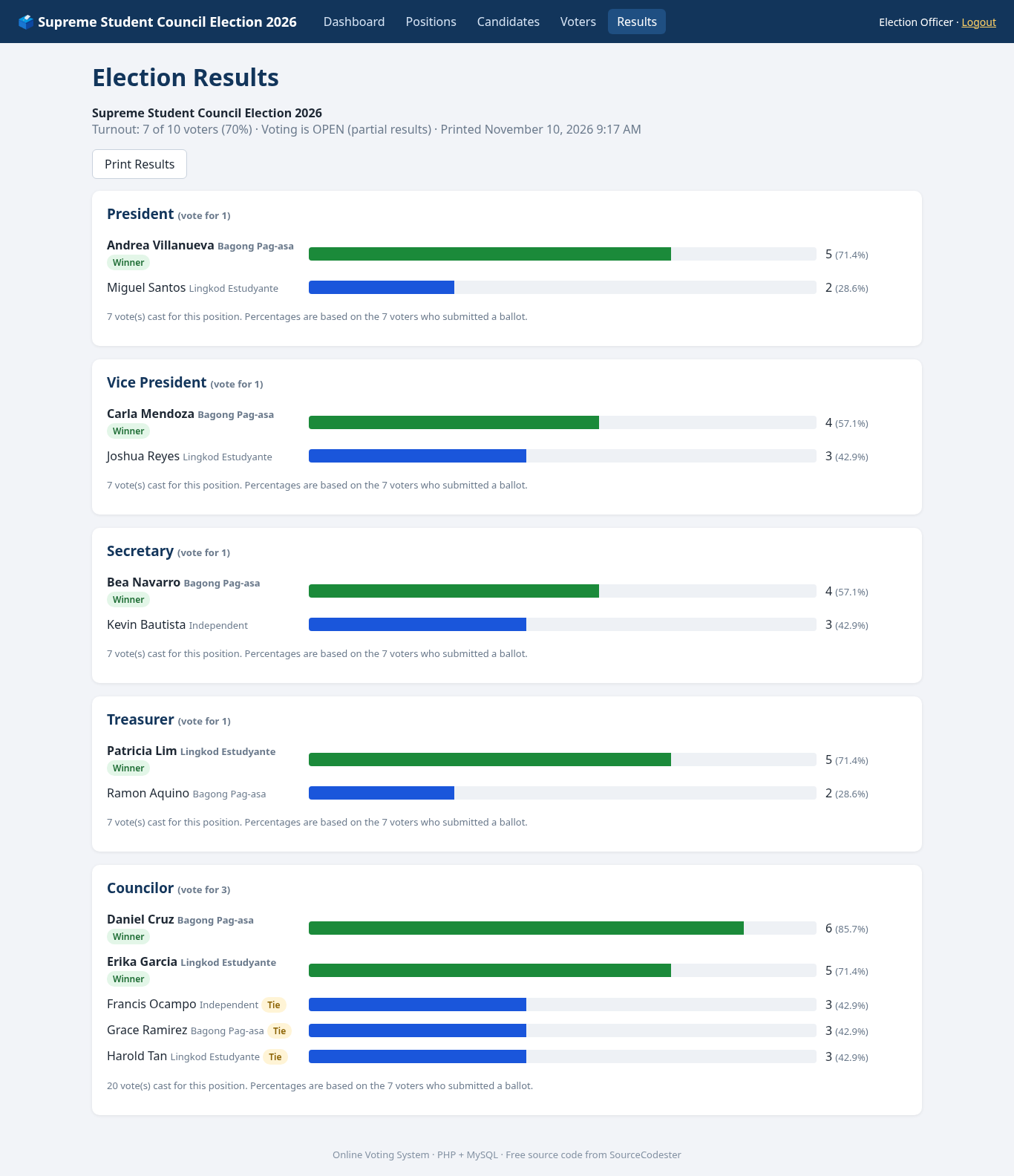
- Results page with vote counts, percentage bars, winners and ties detected automatically, and a print layout
- Reset Election button (type RESET to confirm) to clear test votes before the real election
Screenshots
The main screenshot above shows the results page. More screenshots of the voter login, ballot, receipt and admin pages are in the gallery. All of them were taken from the running project with the sample data.
Code Highlights
Saving a ballot safely. The ballot is validated first: every candidate must belong to the position it was submitted for, and no position can have more choices than its "vote for" limit. Then the votes are saved inside a transaction. SELECT ... FOR UPDATE locks the voter's row, so if the same student submits from two tabs at the same moment, the second request waits, sees that voted_at is already set, and is turned away:
- if (!$errors) {
- $pdo = db();
- $pdo->beginTransaction();
- try {
- // Lock the voter row so two tabs cannot vote at the same time.
- $stmt = $pdo->prepare('SELECT voted_at FROM voters WHERE id = ? FOR UPDATE');
- $stmt->execute([$voter['id']]);
- if ($stmt->fetchColumn() !== null) {
- $pdo->rollBack();
- flash('You have already voted.', 'error');
- redirect('receipt.php');
- }
- $ins = $pdo->prepare('INSERT INTO votes (voter_id, position_id, candidate_id) VALUES (?, ?, ?)');
- foreach ($choices as [$pid, $cid]) {
- $ins->execute([$voter['id'], $pid, $cid]);
- }
- $pdo->prepare('UPDATE voters SET voted_at = NOW() WHERE id = ?')->execute([$voter['id']]);
- $pdo->commit();
- } catch (Throwable $ex) {
- $pdo->rollBack();
- throw $ex;
- }
Counting votes and finding winners. The results come from one LEFT JOIN with COUNT(), so candidates with zero votes still appear. The top N candidates win, where N is the position's "vote for" number, but if there is a tie exactly at the last seat, the tied candidates are marked Tie instead of picking one at random:
- /**
- * Vote counts per candidate for one position, highest first.
- * Winners are the top max_vote candidates; ties at the cut-off are flagged.
- */
- $stmt = db()->prepare(
- 'SELECT c.id, c.full_name, c.partylist, COUNT(v.id) AS votes
- FROM candidates c
- LEFT JOIN votes v ON v.candidate_id = c.id
- WHERE c.position_id = ?
- GROUP BY c.id, c.full_name, c.partylist
- ORDER BY votes DESC, c.full_name'
- );
- $stmt->execute([$position['id']]);
- $rows = $stmt->fetchAll();
- $max = (int)$position['max_vote'];
- foreach ($rows as $i => &$r) {
- $r['votes'] = (int)$r['votes'];
- $r['winner'] = $r['votes'] > 0 && ($i < $max) && !($tieAtCutoff && $r['votes'] === $cutoff);
- $r['tie'] = $tieAtCutoff && $r['votes'] === $cutoff;
- }
- return $rows;
- }
Database Tables
The database has six tables: settings (election title and open/closed flag), admins, positions, candidates, voters and votes. These are the main ones:
- CREATE TABLE positions (
- id INT UNSIGNED AUTO_INCREMENT PRIMARY KEY,
- name VARCHAR(80) NOT NULL UNIQUE,
- max_vote TINYINT UNSIGNED NOT NULL DEFAULT 1,
- sort_order INT NOT NULL DEFAULT 0
- ) ENGINE=InnoDB;
- CREATE TABLE candidates (
- id INT UNSIGNED AUTO_INCREMENT PRIMARY KEY,
- position_id INT UNSIGNED NOT NULL,
- full_name VARCHAR(100) NOT NULL,
- partylist VARCHAR(80) NOT NULL DEFAULT '',
- course_year VARCHAR(40) NOT NULL DEFAULT '',
- platform VARCHAR(255) NOT NULL DEFAULT '',
- CONSTRAINT fk_cand_position FOREIGN KEY (position_id) REFERENCES positions(id)
- ) ENGINE=InnoDB;
- CREATE TABLE voters (
- id INT UNSIGNED AUTO_INCREMENT PRIMARY KEY,
- student_id VARCHAR(20) NOT NULL UNIQUE,
- full_name VARCHAR(100) NOT NULL,
- course_year VARCHAR(40) NOT NULL DEFAULT '',
- password_hash VARCHAR(255) NOT NULL,
- voted_at DATETIME NULL DEFAULT NULL
- ) ENGINE=InnoDB;
- CREATE TABLE votes (
- id INT UNSIGNED AUTO_INCREMENT PRIMARY KEY,
- voter_id INT UNSIGNED NOT NULL,
- position_id INT UNSIGNED NOT NULL,
- candidate_id INT UNSIGNED NOT NULL,
- created_at TIMESTAMP NOT NULL DEFAULT CURRENT_TIMESTAMP,
- UNIQUE KEY uq_voter_candidate (voter_id, candidate_id),
- KEY idx_candidate (candidate_id),
- CONSTRAINT fk_vote_voter FOREIGN KEY (voter_id) REFERENCES voters(id),
- CONSTRAINT fk_vote_position FOREIGN KEY (position_id) REFERENCES positions(id),
- CONSTRAINT fk_vote_candidate FOREIGN KEY (candidate_id) REFERENCES candidates(id)
- ) ENGINE=InnoDB;
The UNIQUE (voter_id, candidate_id) key is a second safety net: even if the application had a bug, the database would refuse to store the same vote twice.
Project Structure
online-voting-system/
├── index.php          voter login
├── ballot.php         official ballot and vote saving
├── receipt.php        printable vote receipt
├── logout.php
├── config.php         database settings and time zone
├── database.sql       tables + sample data
├── test_app.py        automated end-to-end test
├── admin/
│   ├── login.php, logout.php
│   ├── index.php      dashboard, open/close voting, reset
│   ├── positions.php
│   ├── candidates.php
│   ├── voters.php
│   └── results.php
├── includes/          db connection, helpers, auth, header/footer
└── assets/style.css
How to Run the Online Voting System
Using XAMPP
- Download and extract the zip file below.
- Copy the
online-voting-systemfolder intoC:\xampp\htdocs\. - Start Apache and MySQL in the XAMPP Control Panel.
- Open
http://localhost/phpmyadmin, click Import, choosedatabase.sqland click Go. This creates theonline_votingdatabase with sample data. - If your MySQL root account has a password, edit
config.php. - Voters: open
http://localhost/online-voting-system/
Admin: openhttp://localhost/online-voting-system/admin/
Using the PHP built-in server
mysql -u root -p < database.sql
php -S localhost:8000
Then open http://localhost:8000 for voters and http://localhost:8000/admin/ for the admin.
Default accounts
- Admin: admin / admin123
- Voters: 2026-0001 to 2026-0010 / voter123
Change these passwords before using the system for a real election. The time zone is set to Asia/Manila in config.php; change it if you are in another country.
Automated Tests
The zip includes test_app.py, which runs a whole election against the running app: logins, ballot rules, double voting, results, and every admin page. Import a fresh database.sql, start the app, and run python3 test_app.py http://localhost:8000. This is the output from the version in the zip:
PASS guest redirected from ballot to login
PASS guest redirected from admin to admin login
PASS wrong voter password rejected
PASS voter login opens ballot
PASS ballot lists 5 positions
PASS councilor uses checkboxes
PASS 4 councilors rejected (max 3)
PASS candidate from another position rejected
PASS empty ballot rejected
PASS bad CSRF token rejected
PASS valid ballot accepted -> receipt
PASS receipt shows 7 choices
PASS second vote blocked
PASS ballot page redirects after voting
PASS 4 more voters voted (one abstained on a position)
PASS wrong admin password rejected
PASS admin login -> dashboard
PASS turnout 5 of 10 = 50%
PASS President: Andrea 3, Miguel 2
PASS Andrea marked winner
PASS Secretary: Bea 2, Kevin 2 -> tie, no winner
PASS Councilor: Daniel 3, Erika 3, Francis 2, Grace 2, Harold 2
PASS Councilor: Daniel and Erika win, three-way tie for 3rd seat
PASS President percentage 60%
PASS candidate with votes cannot be deleted
PASS add candidate
PASS position with candidates cannot be deleted
PASS add position
PASS duplicate position blocked
PASS register voter
PASS duplicate Student ID blocked
PASS filter not-yet-voted shows 6
PASS search voters
PASS close voting
PASS new voter can log in, sees closed notice
PASS vote rejected while closed
PASS reopen voting
PASS reset needs RESET confirmation
PASS reset election
PASS admin logout
PASS admin pages locked after logout

41 passed, 0 failed
Ideas to Extend the Project
- Import the voter list from a CSV file exported from the registrar.
- Add candidate photos with a secure image upload.
- Send each voter a one-time password by email instead of a shared initial password.
- Add per-department elections, where a voter only sees the representatives for their own course.
- Show a live turnout chart by course and year level.
- For a fully secret ballot, remove
voter_idfrom thevotestable and keep only thevoted_atflag on the voter (you lose the per-voter receipt).
Conclusion
This Online Voting System covers a complete election in one small PHP and MySQL project: voter and admin logins, a ballot that supports multi-seat positions and abstaining, a transaction that guarantees one vote per student, a live turnout dashboard, and results that detect winners and ties. Download the source code, run a test election with the sample data, then change the positions, candidates and branding for your school. It is a solid base for a capstone project, and the extension ideas above are a good way to make it your own.
Note: Due to the size or complexity of this submission, the author has submitted it as a .zip file to shorten your download time. After downloading it, you will need a program like Winzip to decompress it.
Virus note: All files are scanned once-a-day by SourceCodester.com for viruses, but new viruses come out every day, so no prevention program can catch 100% of them.
FOR YOUR OWN SAFETY, PLEASE:
1. Re-scan downloaded files using your personal virus checker before using it.
2. NEVER, EVER run compiled files (.exe's, .ocx's, .dll's etc.)--only run source code.