
Search
Clinic Appointment System using PHP and SQLite with Source Code
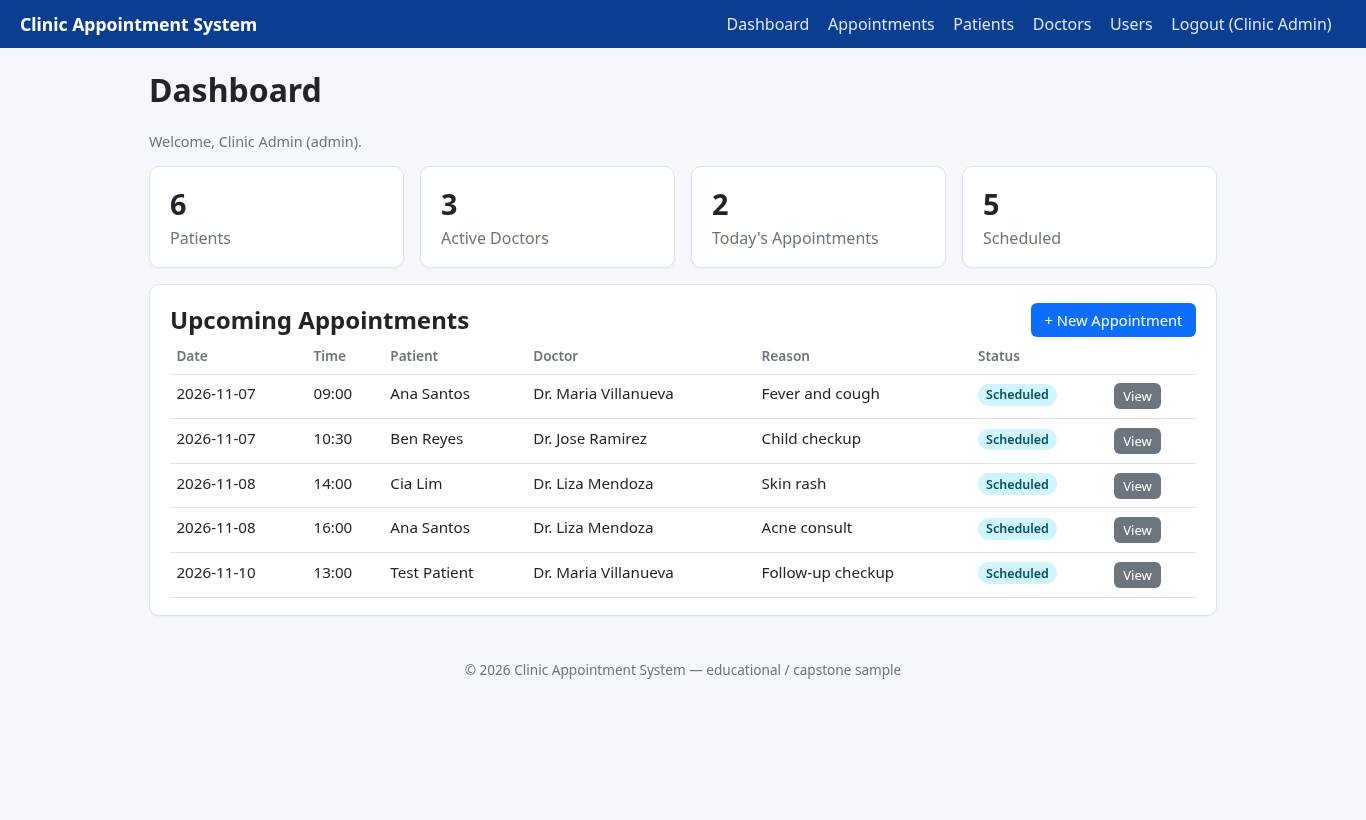
The Clinic Appointment System is a web application built with PHP and SQLite for small clinics, school clinics and student capstone projects. Reception staff can log in, manage patients and doctors, book appointments, prevent double-booking, and update status (Scheduled, Completed, Cancelled, No-Show) from a simple dashboard.
Because it uses SQLite, there is no MySQL server or phpMyAdmin import step. The database file is created automatically on first visit, with sample Philippine clinic data and two demo accounts. The source code is free to download below.
Clinic Appointment System Basic Information
- Language used: PHP 8.0+ (tested with PHP 8.3)
- Database used: SQLite via PDO (file created at
data/clinic.sqlite) - Front end: Plain HTML and CSS (no CDN required)
- Coding Tool used: VS Code, PHPStorm or any text editor
- Type: Web Application
About the Clinic Appointment System
School and barangay clinics often keep appointments in a paper logbook or a shared spreadsheet. The usual problems show up quickly: two patients are booked with the same doctor at the same time, nobody sees today's list at a glance, and cancelled visits stay mixed with active ones.
In this system, staff sign in, add patients and doctors, and book an appointment with a date, time, reason and status. The booking form refuses a past date for new appointments and blocks a second booking when the same doctor already has a non-cancelled visit at that slot. The dashboard shows patient count, active doctors, today's appointments and the next scheduled visits.
Roles are simple on purpose: admin can manage doctors and user accounts; staff can manage patients and appointments. Passwords are stored with PHP's password_hash().
Clinic Appointment System Features
- Login
- Email and password authentication with hashed passwords.
- Demo accounts:
[email protected] / admin123and[email protected] / staff123.
- Dashboard
- Counts for patients, active doctors, today's appointments and scheduled appointments.
- Upcoming appointments table with a shortcut to book a new visit.
- Patients
- Add and edit patient records (name, gender, birthdate, phone, email, address).
- Search by name, phone or email.
- Doctors
- Admin can add and edit doctors with specialization and Active/Inactive status.
- Inactive doctors are hidden from the new-appointment dropdown.
- Appointment count per doctor.
- Appointments
- Book, edit and view appointments linked to a patient and a doctor.
- Statuses: Scheduled, Completed, Cancelled, No-Show.
- Double-booking check on the same doctor, date and time.
- Filter list by status, doctor and date.
- Admin can delete an appointment from the view page.
- Users (admin)
- List accounts and create additional staff or admin users.
Screenshots
These screenshots were taken from the running application with the included sample data. The dashboard is shown as the main screenshot; additional shots include the login page, patients, doctors, appointments list, new appointment form, appointment detail and users page.
Code Highlights
On first request the app creates the SQLite file, builds the tables and seeds sample data. Foreign keys stay on for every connection:
- $pdo = new PDO('sqlite:' . DB_PATH, null, null, [
- PDO::ATTR_ERRMODE => PDO::ERRMODE_EXCEPTION,
- PDO::ATTR_DEFAULT_FETCH_MODE => PDO::FETCH_ASSOC,
- ]);
- if ($needInit) {
- init_schema($pdo);
- seed_data($pdo);
- }
The booking form checks that the doctor is free at the chosen slot. Cancelled and No-Show rows do not block the time:
- $sql = "SELECT COUNT(*) FROM appointments
- WHERE doctor_id=? AND appointment_date=? AND appointment_time=?
- AND status NOT IN ('Cancelled','No-Show') AND id <> ?";
- $chk = $pdo->prepare($sql);
- $chk->execute([$did, $date, $time, $id]);
- $error = 'That doctor is already booked at this date and time.';
- }
Project Structure
clinic-appointment-system/
├── config.php              DB bootstrap, helpers, seed data
├── index.php               Dashboard
├── login.php / logout.php
├── patients.php / patient_form.php
├── doctors.php / doctor_form.php
├── appointments.php / appointment_form.php / appointment_view.php
├── users.php               Admin-only account management
├── assets/style.css
├── includes/header.php, footer.php
├── data/                   clinic.sqlite is created here
├── run.sh / run.bat
└── README.txt
Database Tables
- users — name, email, password hash, role (admin/staff)
- patients — name, gender, birthdate, phone, email, address
- doctors — name, specialization, phone, email, status
- appointments — patient, doctor, date, time, reason, status, notes, created_by
How to Run the Clinic Appointment System
Requirements: PHP 8.0 or newer with the PDO SQLite extension (pdo_sqlite). On XAMPP this is usually already enabled.
- Download the source code below and extract the zip file.
- Open a terminal inside the
clinic-appointment-systemfolder. - Start PHP's built-in server:
php -S localhost:8000
On Windows you can also double-clickrun.bat. On macOS or Linux run./run.sh. - Open
http://localhost:8000in your browser. - Log in with [email protected] / admin123 (or the staff account).
The SQLite database is created automatically on the first page load. To reset the sample data, delete data/clinic.sqlite and refresh the site.
If you prefer Apache/XAMPP, copy the folder into htdocs and open http://localhost/clinic-appointment-system/. No database import is required.
Ideas to Extend the Project
- Email or SMS reminders the day before an appointment.
- Doctor weekly schedule and available time slots instead of free typing of time.
- Patient portal where patients request an appointment without a staff login.
- Simple medical chart notes attached to a completed visit.
- Export today's appointment list to PDF for the front desk.
Conclusion
The Clinic Appointment System is a complete PHP and SQLite CRUD project you can run in minutes: login, patients, doctors, appointments, double-booking protection and an admin user page. Use it as a capstone base for a school clinic, study how the SQLite bootstrap works, or extend it with schedules and reminders. Before putting it on a public server, change the default passwords and review access rules, as noted in the README.
Note: the default accounts are for testing only. Change the passwords after your first login.
Download the complete source code below. Happy coding!
Note: Due to the size or complexity of this submission, the author has submitted it as a .zip file to shorten your download time. After downloading it, you will need a program like Winzip to decompress it.
Virus note: All files are scanned once-a-day by SourceCodester.com for viruses, but new viruses come out every day, so no prevention program can catch 100% of them.
FOR YOUR OWN SAFETY, PLEASE:
1. Re-scan downloaded files using your personal virus checker before using it.
2. NEVER, EVER run compiled files (.exe's, .ocx's, .dll's etc.)--only run source code.