
Search
Water Billing System using Java Swing and SQLite with Source Code
The Water Billing System is a desktop application built with Java Swing and SQLite for barangay water systems, rural water associations and small water districts. It handles the whole monthly cycle: registering consumers and their water meters, entering meter readings, computing the bill with tiered water rates, printing the bill, receiving payments with official receipt numbers, adding penalties to overdue accounts, and producing a monthly report that opens in Excel.
It is a great capstone or final project for Java students because it goes beyond simple CRUD. You will find a real billing formula, database transactions, money stored safely as centavos, hashed passwords, user roles, input validation, and a set of automated tests. Since it uses SQLite, there is no MySQL server or XAMPP to set up: the database file is created on the first run. The Water Billing System using Java Swing and SQLite with Source Code is free to download. Just read the content below for more information. This application is for educational purposes only.
Water Billing System Basic Information
- Language used: Java 17+ (tested with JDK 21)
- GUI: Java Swing (Nimbus look and feel), no GUI builder needed
- Database used: SQLite through the sqlite-jdbc driver 3.54.1.0 (included in the
libfolder) - Coding Tool used: Any: NetBeans, IntelliJ IDEA, Eclipse, VS Code, or just the command line
- Type: Desktop Application
About the Water Billing System
In many small water systems, the meter reader writes readings in a notebook, the bills are computed by hand or in a spreadsheet, and the cashier checks a printed list to see who has paid. Mistakes are common: a wrong previous reading, a reading entered twice for the same month, a payment recorded but not deducted from the balance.
This system puts each step in its own screen and lets the database enforce the rules. When the reader enters a present reading, the system automatically pulls the previous reading, computes the consumption and the amount, and creates the bill in the same transaction. It refuses a reading lower than the previous one, a second reading for the same month, or a reading for a disconnected account. Payments can be partial, and the bill status changes from UNPAID to PARTIAL to PAID on its own.
The code is organized in three layers so it is easy to explain during a defense: db (creating the tables), service (all the business rules, with no Swing code), and ui (the screens). Because the rules live in the service classes, they can be tested without opening any window.
Water Billing System Features
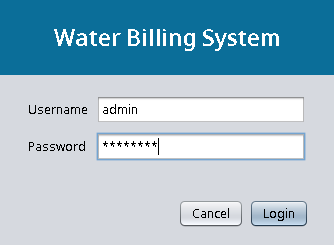
- Login and User Roles
- Two roles: Admin (all screens) and Staff (no Water Rates and Users screens).
- Passwords are hashed with PBKDF2 (HMAC-SHA256) and a random salt, never stored as plain text.
- Admins can add users, reset passwords, and deactivate accounts.
- Dashboard
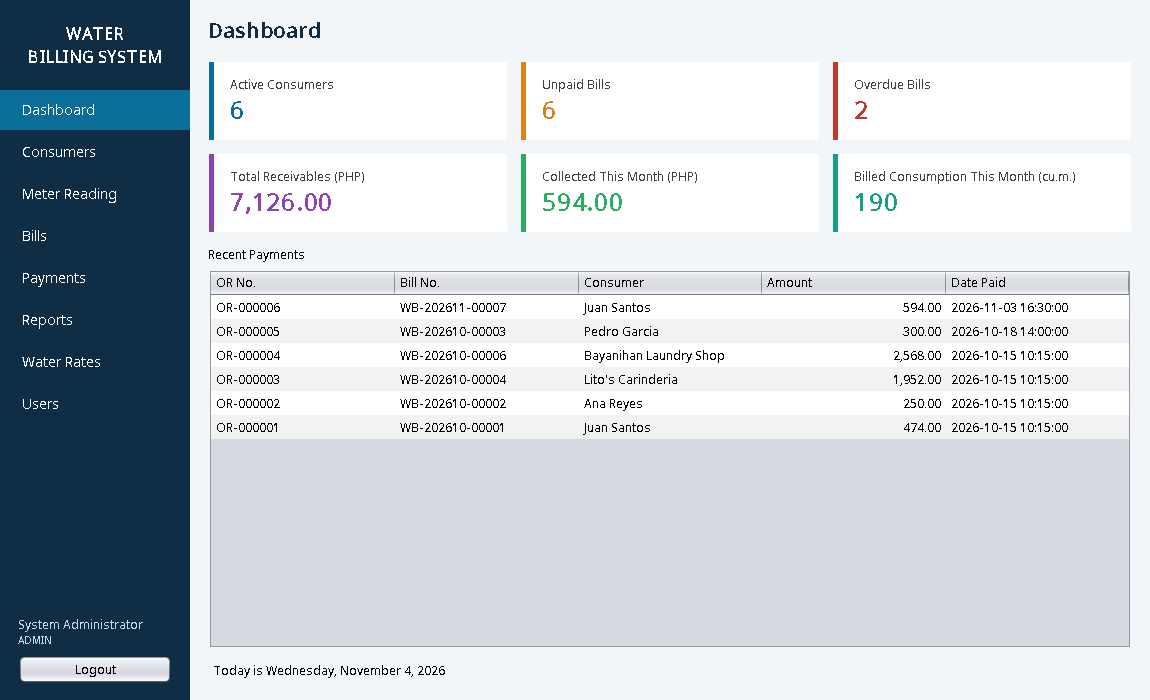
- Active consumers, unpaid and overdue bills, total receivables, collections this month and billed consumption.
- List of the most recent payments.
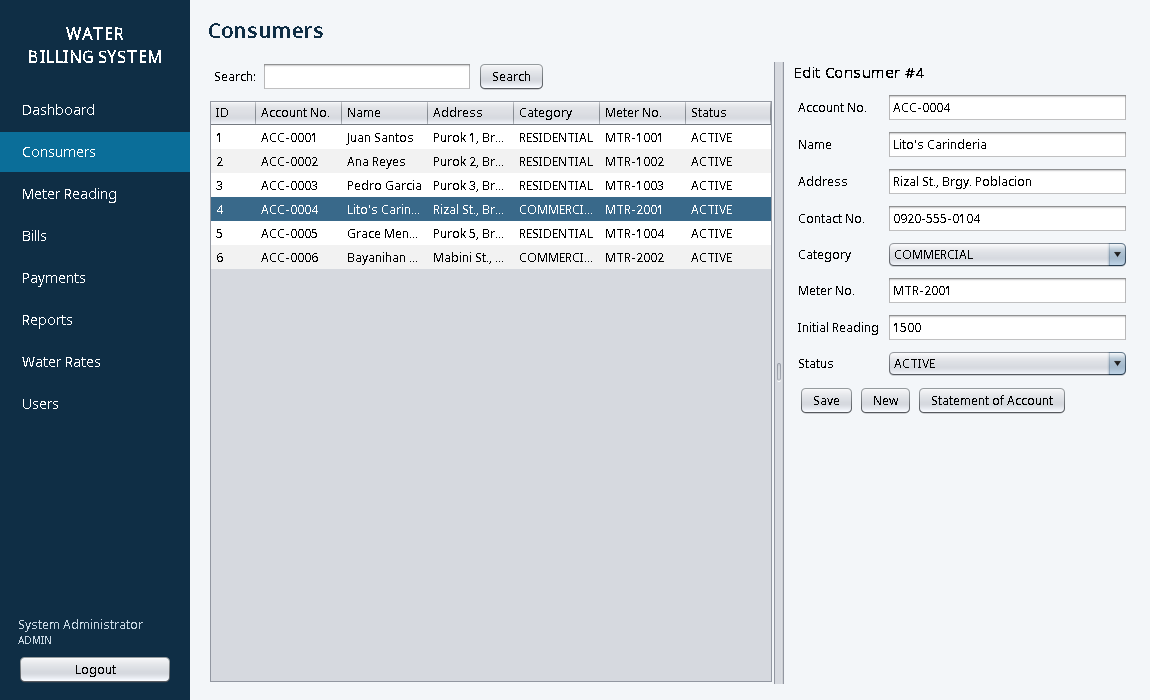
- Consumer Management
- Add, edit and search consumers by account number, name, address or meter number.
- Residential and commercial categories, initial meter reading, and Active/Disconnected status.
- Statement of account showing every bill and the total outstanding balance.
- Meter Reading and Automatic Billing
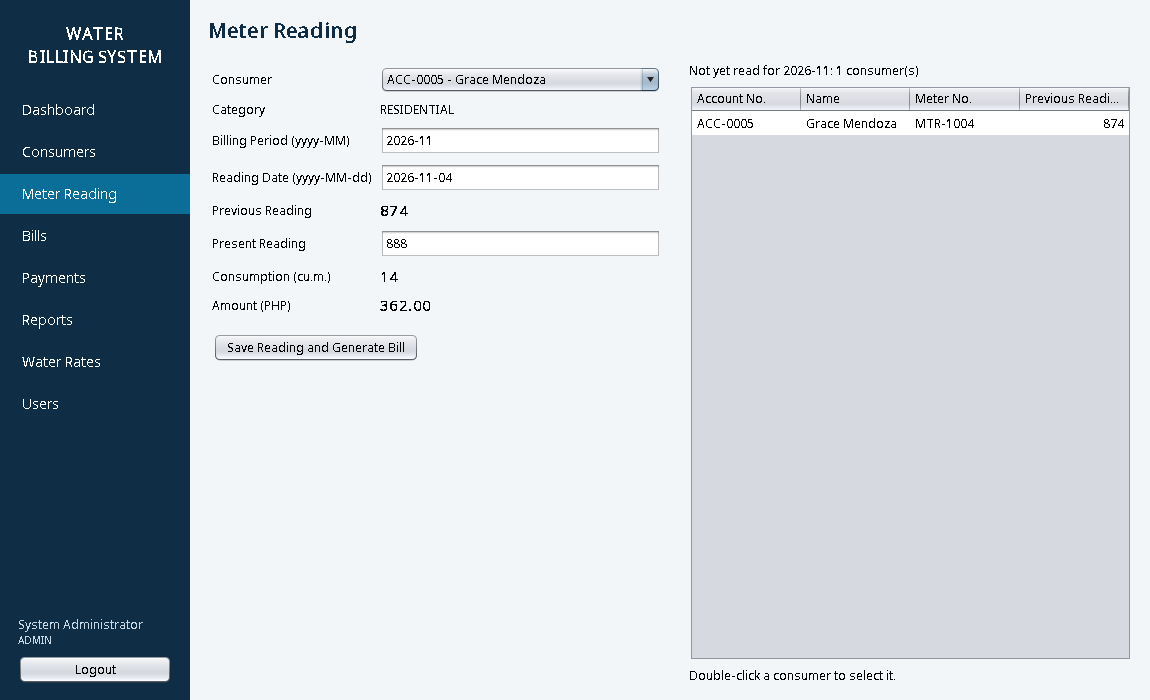
- Previous reading is filled in automatically, with a live preview of the consumption and amount.
- A list of consumers who have not been read yet for the billing period.
- Saving a reading generates the bill (bill number, due date 15 days after the reading) in one transaction.
- Tiered Water Rates
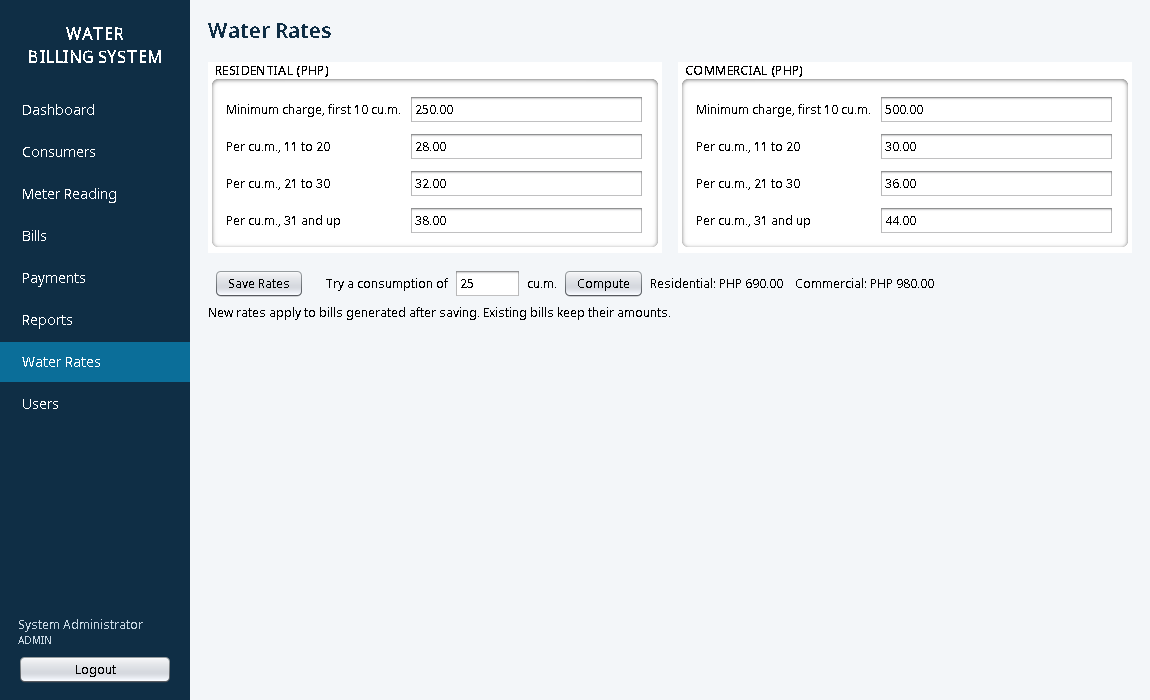
- Minimum charge for the first 10 cubic meters, then different rates for 11 to 20, 21 to 30, and 31 and above.
- Separate rates for residential and commercial, editable by the admin, with a built-in calculator.
- Bills and Payments
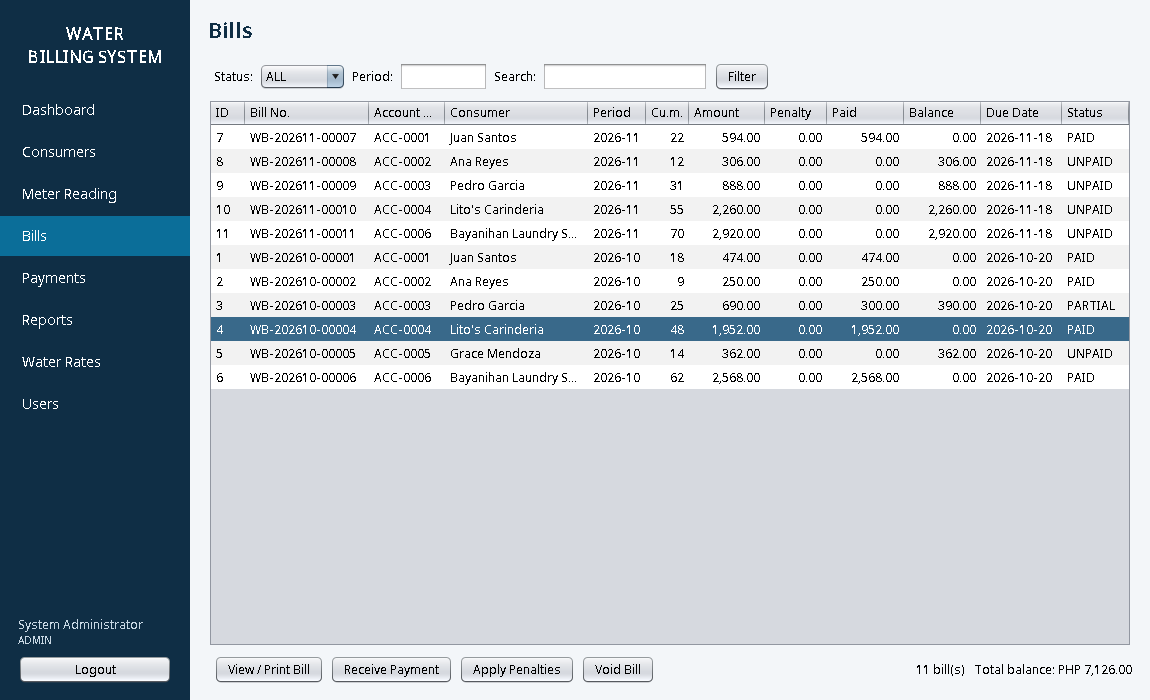
- Filter bills by status (all, unpaid, overdue, paid), billing period, or name.
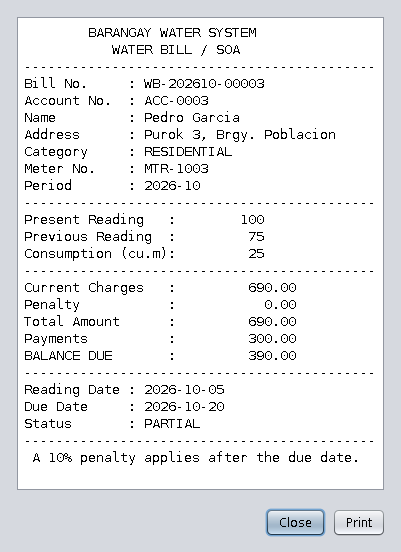
- View and print a bill / statement of account.
- Full or partial payments with automatic official receipt numbers (OR-000001).
- Apply a 10% penalty to overdue bills with one click (never twice on the same bill).
- Admins can void the latest bill of a consumer if a reading was entered wrong, as long as nothing was paid.
- Reports
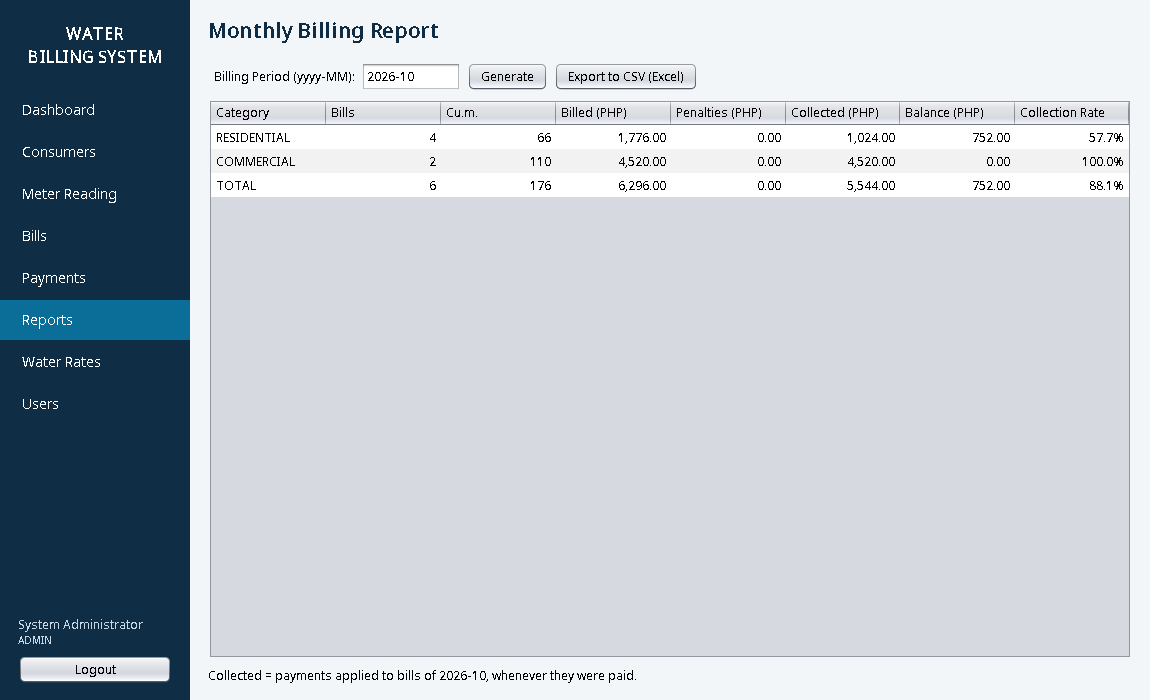
- Monthly billing summary per category: number of bills, cubic meters, amount billed, penalties, collected, balance and collection rate.
- Export the billing report to CSV that opens correctly in Microsoft Excel.
Screenshots
Dashboard:

Login:
Meter reading with automatic bill computation:
Bills with balances and status:
Printable water bill:
Consumers:
Monthly billing report:
Tiered water rates (admin):
Code Highlights
The billing formula is a short static method, so it is easy to test and to change. With the sample residential rates, 25 cubic meters costs 250.00 + 10 × 28.00 + 5 × 32.00 = 690.00:
- /**
- * Tiered (block) rate: the minimum charge covers the first 10 cu.m.,
- * then each cubic meter is charged by the block it falls in.
- */
- public static long computeAmount(Rate r, int consumption) {
- long amount = r.minimumCharge();
- if (consumption > 30) amount += (long) (consumption - 30) * r.rate31up();
- return amount;
- }
All amounts are stored as centavos in a long (69000 instead of 690.00). Using double for money causes rounding errors like 0.1 + 0.2 = 0.30000000000000004, which is unacceptable in a billing system.
Penalties are applied with a single SQL statement. The penalty = 0 condition makes it safe to click the button many times:
- /** Adds a 10% penalty to every unpaid bill past its due date that has no penalty yet. Returns how many. */
- UPDATE bills SET penalty = (amount * ? + 50) / 100
- WHERE status <> 'PAID' AND penalty = 0 AND due_date < ?""";
- ps.setInt(1, PENALTY_PERCENT);
- ps.setString(2, today.toString());
- return ps.executeUpdate();
- }
- }
Passwords are hashed with PBKDF2 from the standard Java library, so there is no extra dependency:
- byte[] salt = new byte[16];
- return ITERATIONS + ":" + Base64.getEncoder().encodeToString(salt) + ":"
- + Base64.getEncoder().encodeToString(pbkdf2(password, salt, ITERATIONS));
- }
Project Structure
WaterBillingSystem/
  lib/sqlite-jdbc-3.54.1.0.jar     SQLite JDBC driver
  src/waterbilling/
    Main.java                       starts the app and shows the login
    db/Database.java                creates the tables and the sample data
    service/
      AuthService.java              login, password hashing, users
      ConsumerService.java          consumer CRUD and search
      BillingService.java           rates, readings, bills, penalties, payments, reports
      Money.java                    centavo formatting and parsing
    ui/
      LoginDialog.java, MainFrame.java (sidebar menu + CardLayout)
      DashboardPanel, ConsumersPanel, ReadingPanel, BillsPanel,
      PaymentsPanel, ReportsPanel, RatesPanel, UsersPanel, Ui (helpers)
  test/waterbilling/SystemTest.java automated tests (no JUnit needed)
  run.bat / run.sh                  compile and run
  run-tests.bat / run-tests.sh      run the tests
Database Tables
- users: username, password hash, full name, role, active flag
- rates: minimum charge and block rates per category
- consumers: account no., name, address, contact, category, meter no., initial reading, status
- readings: consumer, billing period, previous and present reading, consumption (one per consumer per month)
- bills: bill no., reading, amount, penalty, amount paid, due date, status
- payments: OR no., bill, amount, date paid, received by
How to Run the Water Billing System
Requirements
- JDK 17 or newer, for example Eclipse Temurin. Check with
java -versionandjavac -version. - No database server is needed. The SQLite driver is already in the
libfolder.
Installation
- Download the source code below and extract the zip file.
- On Windows, double-click run.bat. On Linux or macOS, open a terminal in the WaterBillingSystem folder and run
./run.sh. - To use an IDE instead: create a new Java project, copy the
srcfolder into it, addlib/sqlite-jdbc-3.54.1.0.jarto the project libraries (in NetBeans: right-click Libraries > Add JAR/Folder), and runwaterbilling.Main.
Default Login
- Admin: admin / admin123
- Staff: staff / staff123
On the first run, the system creates waterbilling.db with six sample consumers, two months of readings, bills and payments. Try this flow: open Meter Reading, double-click Grace Mendoza in the "not yet read" list, enter a present reading and save to generate her bill. Then go to Bills, click Apply Penalties to charge the overdue accounts, receive a partial payment, and print the bill. Finally, open Reports and export last month's report to Excel. To start over, close the program and delete waterbilling.db.
Testing
The business rules are covered by test/waterbilling/SystemTest.java, which runs on a temporary database. Run it with run-tests.bat or ./run-tests.sh. This is the output from the downloaded zip, run with JDK 21 (the code also compiles with --release 17):
PASS  0 cu.m. = minimum charge 250.00
PASS  10 cu.m. = 250.00
PASS  11 cu.m. = 278.00
PASS  20 cu.m. = 530.00
PASS  25 cu.m. = 690.00
PASS  31 cu.m. = 888.00
PASS  commercial 48 cu.m. = 1,952.00
PASS  Money.parse("1,250.5") = 125050 centavos
PASS  Money.parse rejects letters -> "Invalid amount: 12a"
PASS  admin login works
PASS  staff login is STAFF
PASS  wrong password rejected
PASS  passwords are hashed, not plain text
PASS  short password rejected -> "Password must be at least 6 characters."
PASS  duplicate username rejected -> "Username already exists."
PASS  deactivated user cannot log in
PASS  6 sample consumers
PASS  11 sample bills
PASS  bill no. format WB-yyyyMM-00001
PASS  due date = reading date + 15 days
PASS  bill 1: 18 cu.m. residential = 474.00
PASS  bill 3 is PARTIAL
PASS  bill 5 is UNPAID
PASS  duplicate meter no. rejected -> "Account no. or meter no. is already used by another consumer."
PASS  blank name rejected -> "Account no., name, address and meter no. are required."
PASS  new consumer gets ACC-0007
PASS  previous reading of new consumer = initial reading 40
PASS  only the latest bill can be voided -> "Only the latest bill of a consumer can be voided."
PASS  voided bill and reading are gone
PASS  lower present reading rejected -> "Present reading (35) cannot be lower than the previous reading (40)."
PASS  bad period rejected -> "Period must look like 2026-11."
PASS  23 cu.m. bill = 626.00
PASS  second reading same period rejected -> "This consumer already has a reading for 2026-11."
PASS  earlier period rejected -> "Period 2026-10 is earlier than the last reading (2026-11)."
PASS  disconnected consumer cannot be read -> "Consumer is disconnected. Reconnect the account first."
PASS  failed readings left no extra bills
PASS  overpayment rejected -> "Amount is more than the balance of 626.00."
PASS  zero payment rejected -> "Amount must be greater than zero."
PASS  partial payment -> PARTIAL, balance 426.00 (OR-000007)
PASS  full payment -> PAID, balance 0.00
PASS  paying a PAID bill rejected -> "This bill is already fully paid."
PASS  penalty added to all 6 unpaid bills when overdue
PASS  10% penalty rounded to centavo
PASS  penalty not added twice
PASS  paid bill has no penalty
PASS  cannot void a bill with payments -> "Cannot void a bill that already has payments."
PASS  void latest unpaid bill removes bill and reading
PASS  dashboard active consumers = 6 (one disconnected, one added)
PASS  CSV export: BOM + header + 6 rows

...
49 passed, 0 failed
Ideas to Extend the Project
- Print bills in batches for all consumers of a purok, or export them to PDF.
- Send SMS reminders before the due date using an SMS gateway API.
- Add a reconnection fee and a disconnection list for accounts unpaid for two months.
- Add a consumption chart per consumer to spot leaks (a sudden jump in cubic meters).
- Switch the database to MySQL by changing the JDBC URL and driver.
Conclusion
The Water Billing System shows how a real billing application is put together in Java: Swing screens on top of a service layer, SQLite with prepared statements and transactions, tiered rate computation, money stored as centavos, partial payments and penalties, and tests that prove the rules work. It is small enough to read in a weekend and complete enough to serve as the base of a capstone project for a barangay or local water system. Download the source code, run it, and try adding your own feature.
Happy coding!
Note: Due to the size or complexity of this submission, the author has submitted it as a .zip file to shorten your download time. After downloading it, you will need a program like Winzip to decompress it.
Virus note: All files are scanned once-a-day by SourceCodester.com for viruses, but new viruses come out every day, so no prevention program can catch 100% of them.
FOR YOUR OWN SAFETY, PLEASE:
1. Re-scan downloaded files using your personal virus checker before using it.
2. NEVER, EVER run compiled files (.exe's, .ocx's, .dll's etc.)--only run source code.