
Search
Sari-Sari Store POS and Inventory System using ASP.NET Core Razor Pages and SQLite with Source Code
The Sari-Sari Store POS and Inventory System is a web application built with C#, ASP.NET Core Razor Pages and SQLite for the small neighborhood stores found on almost every street in the Philippines. It lets the store owner and the cashier ring up sales quickly, compute the change, print a receipt, keep track of stock, and, just as important for a sari-sari store, record utang (items bought on credit) and the payments that come in later.
It is a practical project for learning ASP.NET Core because it covers what real systems need: login with roles, CRUD, a shopping cart stored in the session, database transactions, stock movement logs, reports and printable receipts. It uses SQLite, so there is no SQL Server or XAMPP to install: the database file is created automatically the first time you run the app. The Sari-Sari Store POS and Inventory System using ASP.NET Core Razor Pages and SQLite with Source Code is free to download. Just read the content below for more information. This application is for educational purposes only.
Sari-Sari Store POS and Inventory System Basic Information
- Language used: C# 12
- Framework: ASP.NET Core Razor Pages (.NET 8, also works on .NET 10)
- Database used: SQLite through Microsoft.Data.Sqlite (parameterized SQL, no ORM)
- Front-end used: HTML, CSS and a little vanilla JavaScript (no framework, works offline)
- Coding Tool used: Visual Studio 2022/2026, VS Code with C# Dev Kit, or JetBrains Rider
- Type: Web Application
About the Sari-Sari Store POS and Inventory System
A sari-sari store sells many small, cheap items: canned goods, instant noodles, coffee sachets, softdrinks, rice by the kilo, shampoo and detergent sachets. Margins are thin, so the owner needs to know which items are running low, which ones sell the most, and how much profit was made today. Many stores also let trusted customers ("suki") buy on credit and pay on payday, and those notebook lists of utang are easy to lose or miscalculate.
This system puts all of that in one place. The cashier uses the POS screen to scan a barcode or tap a product tile, and the system checks the stock, computes the total and the change, and saves the sale. Every stock change, whether a sale, a delivery or a voided sale, is written to a stock movement log. The utang page shows each customer's balance and a ledger with a running balance, and accepts partial payments.
The code is kept simple on purpose. Instead of Entity Framework migrations, it uses a small Db helper class and plain SQL with parameters, so you can see exactly which queries run. Each page has its own .cshtml view and .cshtml.cs page model, which is easy to explain during a capstone defense.
Sari-Sari Store POS and Inventory System Features
- Login and Roles
- Cookie-based login with two roles: Admin (store owner) and Cashier.
- Passwords are hashed with ASP.NET Core Identity's
PasswordHasher(PBKDF2), never stored as plain text. - Cashiers cannot open Reports, Users, product editing or stock-in, and cannot void sales.
- Dashboard
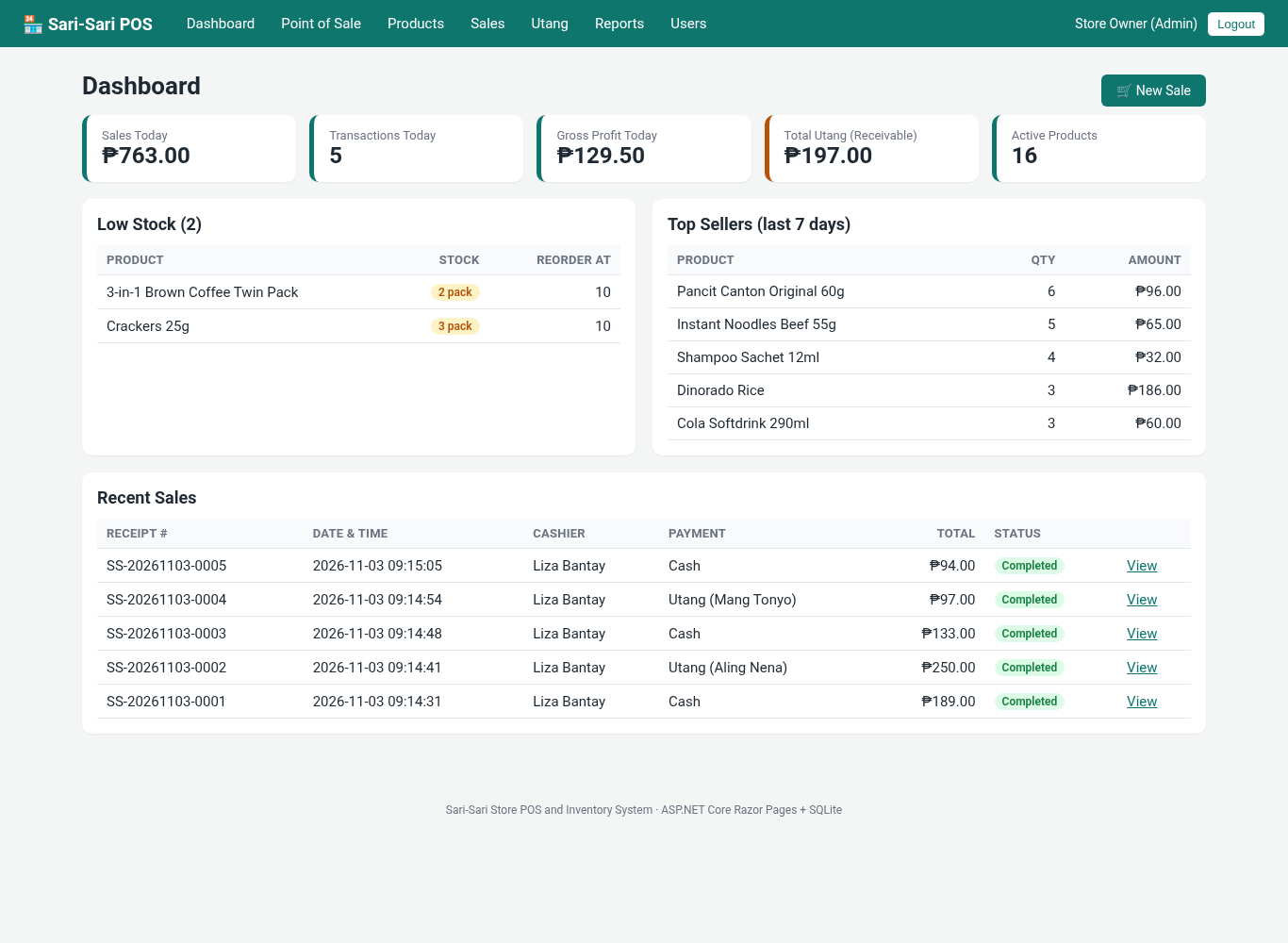
- Cards for sales today, number of transactions, gross profit today (Admin only), total utang receivable and active products.
- Low-stock list based on each product's reorder level, top sellers of the last 7 days, and recent sales.
- Point of Sale
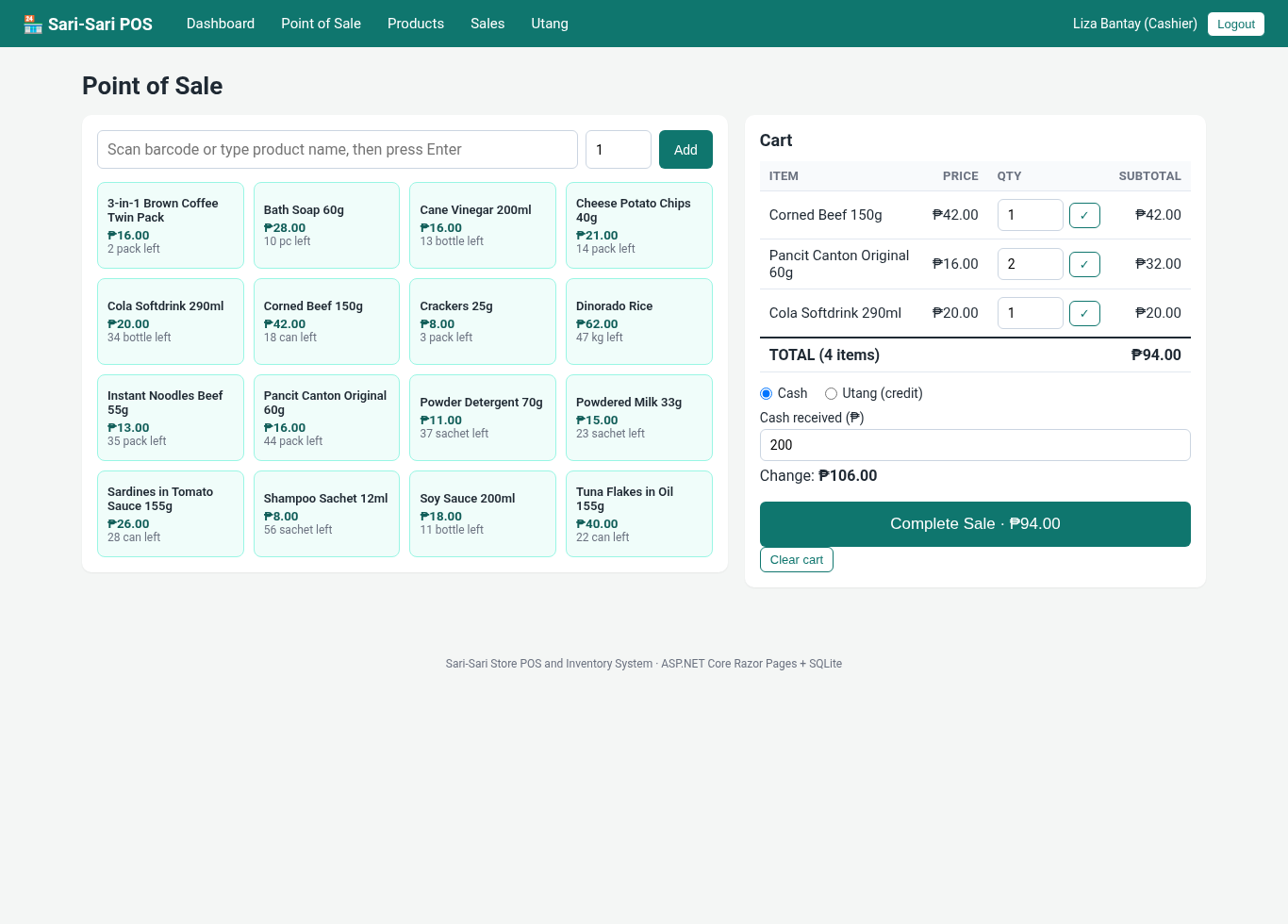
- Scan a barcode or type part of a product name and press Enter, or tap a product tile.
- Change quantities in the cart (0 removes the item). The system will not let you sell more than the available stock.
- Cash payment with live change computation, or Utang payment for an existing or new customer.
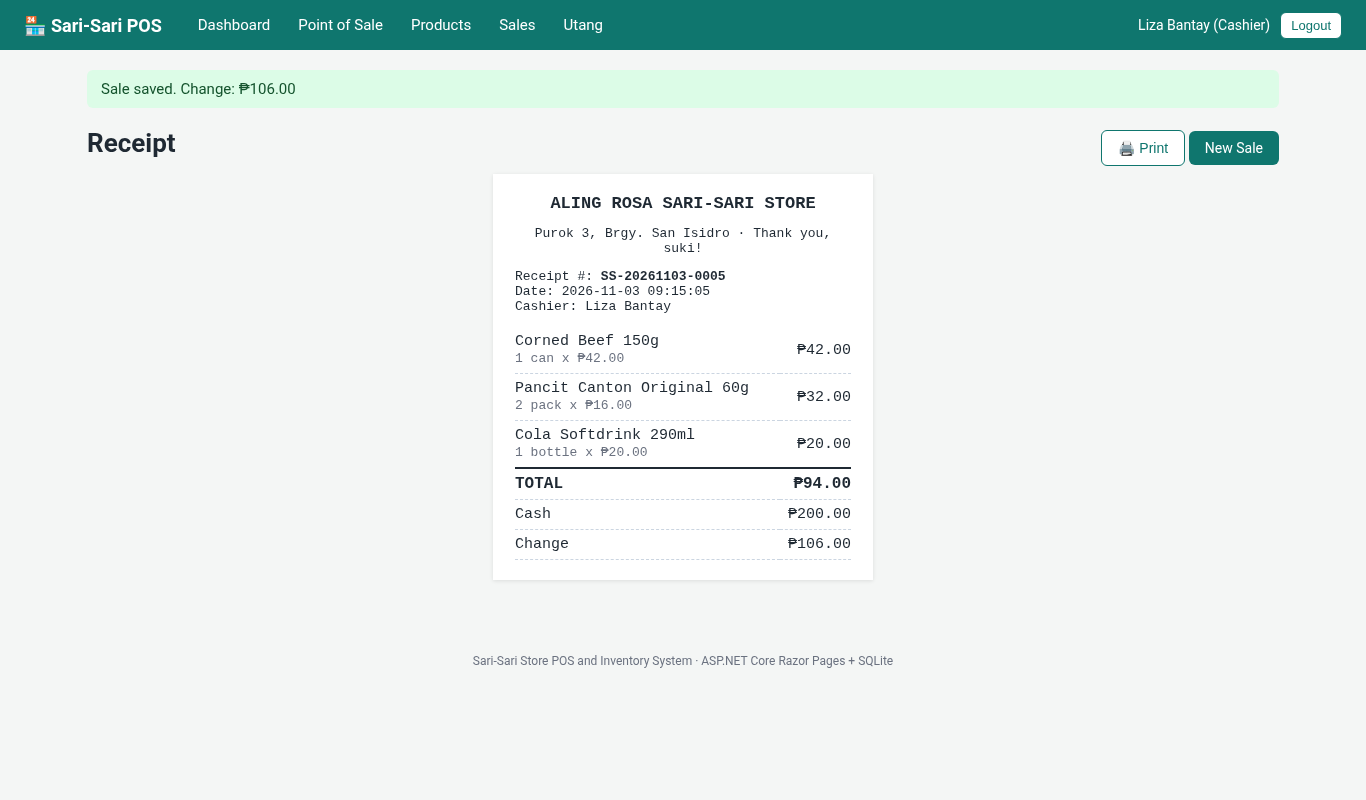
- Sequential receipt numbers per day (for example
SS-20261103-0001) and a printable receipt.
- Products and Inventory
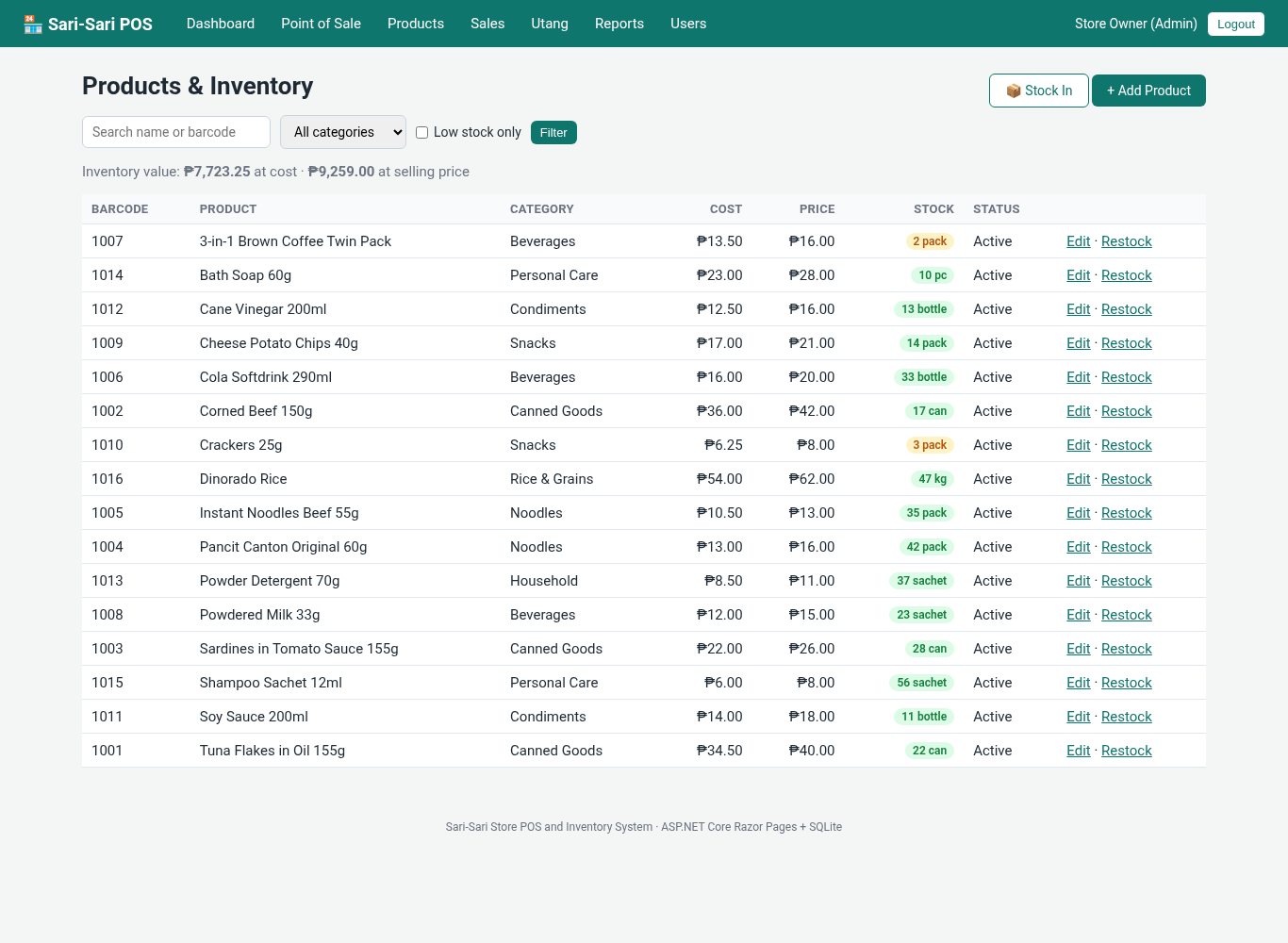
- Add and edit products with barcode, category, unit, cost, selling price, reorder level and active status.
- Validation: required name, positive price, no duplicate barcodes, and a warning when the selling price is lower than the cost.
- Search, category filter, "low stock only" filter and total inventory value at cost and at selling price.
- Stock In page for deliveries with an optional new unit cost and supplier reference.
- Every stock change is logged: opening stock, sale, stock in and void.
- Sales
- Sales history with date range and search by receipt number or customer.
- Admin can void a sale. The items go back to stock and the sale is excluded from reports.
- Utang (Customer Credit)
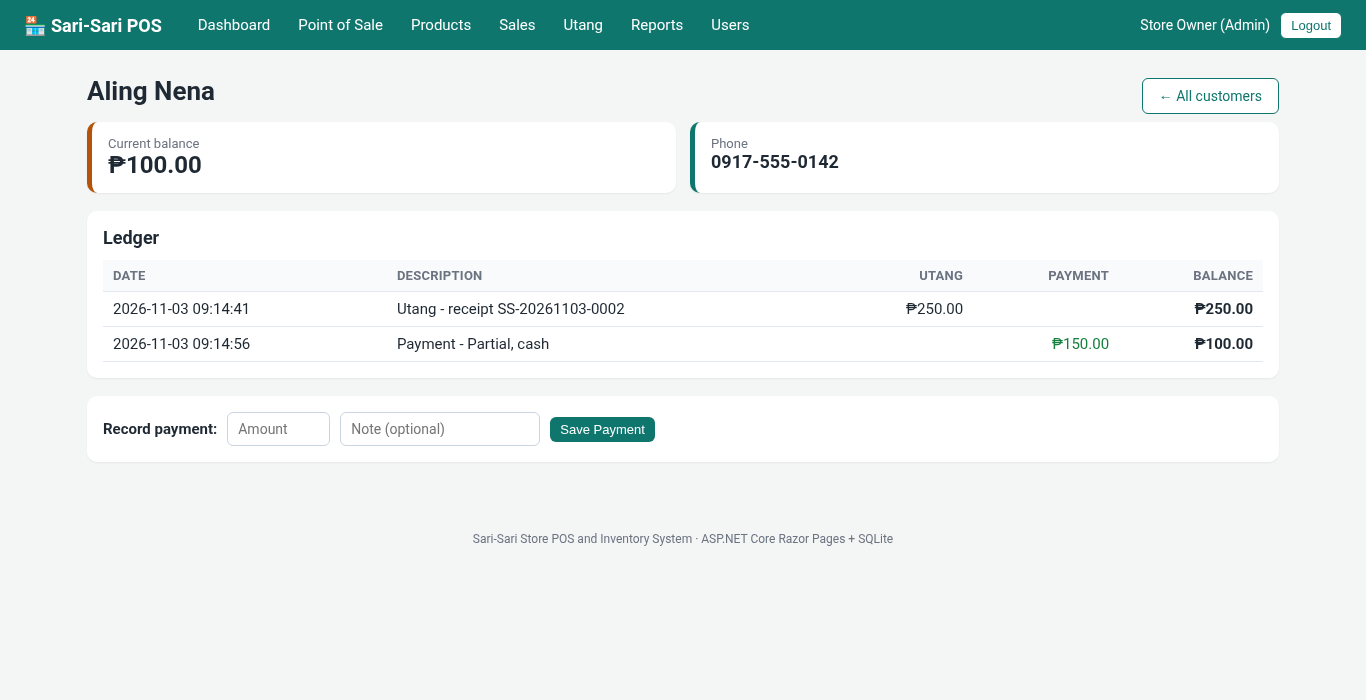
- List of customers with total utang, total paid and current balance.
- Customer ledger with a running balance computed by an SQL window function.
- Record partial payments. Payments larger than the balance are rejected.
- Reports (Admin)
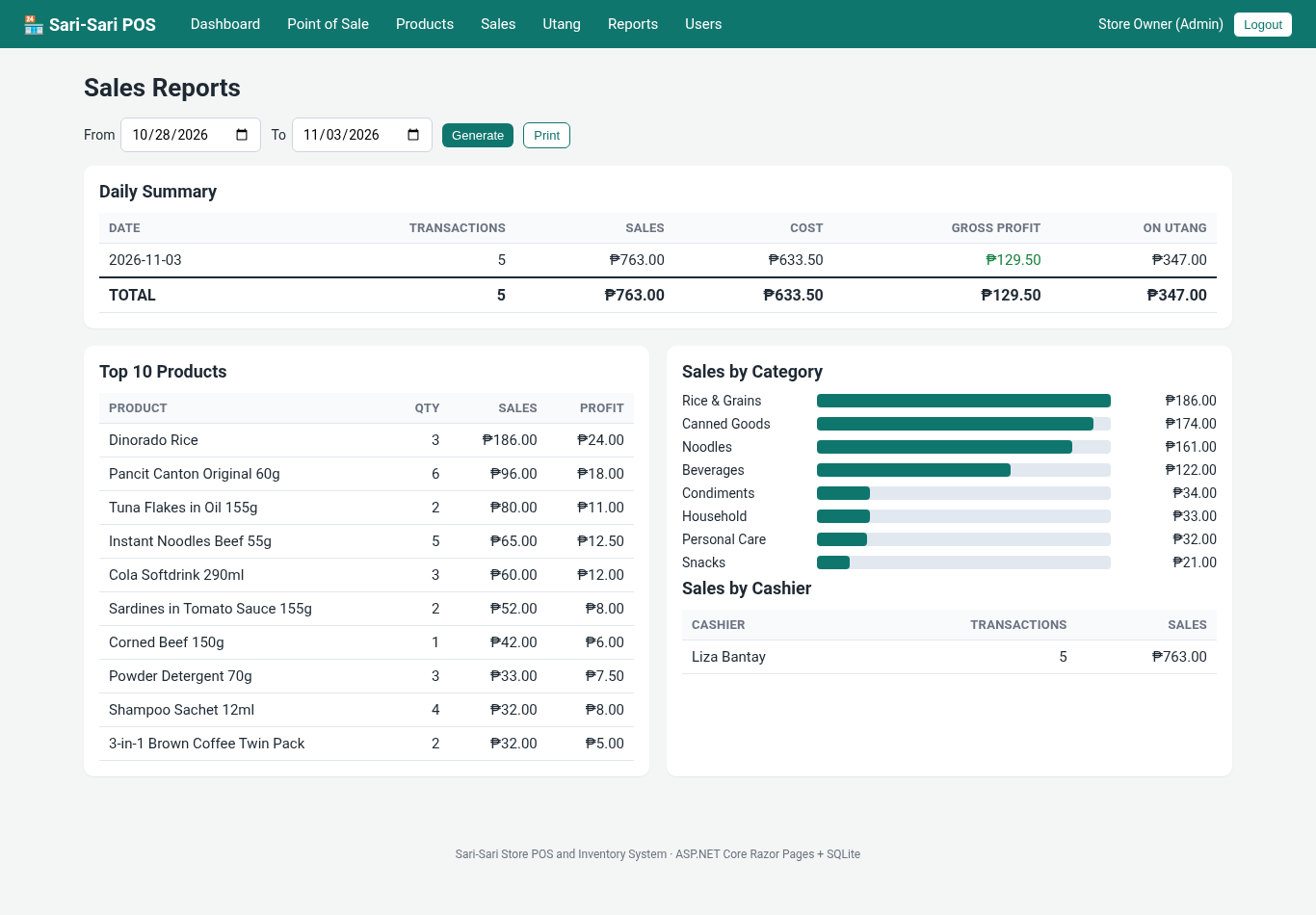
- Daily summary with transactions, sales, cost, gross profit and amount sold on utang.
- Top 10 products, sales by category with bars, and sales by cashier for any date range.
- User Management (Admin)
- Add users, reset passwords, and activate or deactivate accounts. You cannot deactivate your own account by mistake.
Screenshots
Dashboard:

Point of Sale screen with the cart and live change computation:
Printable receipt:
Products and inventory with stock badges:
Utang ledger with running balance:
Sales reports:
Code Highlights
Authentication uses the built-in cookie handler. Instead of adding [Authorize] to every page, Razor Pages conventions protect whole folders at once, and an AdminOnly policy guards the owner-only pages:
- builder.Services.AddAuthentication(CookieAuthenticationDefaults.AuthenticationScheme)
- .AddCookie(o =>
- {
- o.LoginPath = "/Account/Login";
- o.AccessDeniedPath = "/Account/Denied";
- o.ExpireTimeSpan = TimeSpan.FromHours(12);
- });
- builder.Services.AddAuthorization(o => o.AddPolicy("AdminOnly", p => p.RequireRole("Admin")));
- builder.Services.Configure<WebEncoderOptions>(o => o.TextEncoderSettings = new TextEncoderSettings(UnicodeRanges.All));
- builder.Services.AddRazorPages(o =>
- {
- o.Conventions.AuthorizeFolder("/");
- o.Conventions.AllowAnonymousToPage("/Account/Login");
- o.Conventions.AuthorizeFolder("/Users", "AdminOnly");
- o.Conventions.AuthorizeFolder("/Reports", "AdminOnly");
- o.Conventions.AuthorizePage("/Products/Edit", "AdminOnly");
- o.Conventions.AuthorizePage("/Products/Restock", "AdminOnly");
- });
The checkout handler is the heart of the system. It re-reads the prices and stock inside a database transaction, so two cashiers can never sell the same last item, and the sale, its items, the stock deduction and the stock log are saved together or not at all:
- public IActionResult OnPostCheckout(string paymentType, decimal? cash, long? customerId, string? newCustomer)
- {
- var cart = CartSession.Get(HttpContext.Session);
- if (cart.Count == 0) { TempData["err"] = "The cart is empty."; return RedirectToPage(); }
- if (paymentType != "Cash" && paymentType != "Utang") { TempData["err"] = "Choose a payment type."; return RedirectToPage(); }
- using var c = db.Open();
- using var tx = c.BeginTransaction();
- // Re-read prices and stock inside the transaction
- decimal total = 0;
- foreach (var l in cart)
- {
- var p = Db.Query(c, "SELECT id, name, price, cost, stock FROM products WHERE id = @id AND active = 1", new { id = l.ProductId }, tx).FirstOrDefault();
- if (p == null) { TempData["err"] = "A product in the cart is no longer available."; return RedirectToPage(); }
- if (l.Qty > Util.Long(p["stock"])) { TempData["err"] = $"Not enough stock for \"{p["name"]}\" (only {p["stock"]} left)."; return RedirectToPage(); }
- var price = Util.Dec(p["price"]);
- lines.Add((l.ProductId, (string)p["name"]!, l.Qty, price, Util.Dec(p["cost"])));
- total += price * l.Qty;
- }
- decimal paid = 0, change = 0;
- long? custId = null;
- if (paymentType == "Cash")
- {
- paid = cash ?? 0;
- if (paid < total) { TempData["err"] = $"Cash received ({Util.Peso(paid)}) is less than the total ({Util.Peso(total)})."; return RedirectToPage(); }
- change = paid - total;
- }
- else
- {
- if (!string.IsNullOrWhiteSpace(newCustomer))
- {
- var name = newCustomer.Trim();
- ?? (long)Db.Scalar(c, "INSERT INTO customers (name) VALUES (@name) RETURNING id", new { name }, tx)!;
- }
- else if (customerId != null && Db.Scalar(c, "SELECT id FROM customers WHERE id = @customerId", new { customerId }, tx) != null)
- custId = customerId;
- if (custId == null) { TempData["err"] = "Choose or type the customer's name for utang."; return RedirectToPage(); }
- }
- var today = DateTime.Now.ToString("yyyyMMdd");
- var seq = Util.Long(Db.Scalar(c, "SELECT COUNT(*) FROM sales WHERE receipt_no LIKE @p", new { p = $"SS-{today}-%" }, tx)) + 1;
- var receiptNo = $"SS-{today}-{seq:0000}";
- var now = Util.Now();
- var uid = Util.UserId(User);
- var saleId = (long)Db.Scalar(c, """
- INSERT INTO sales (receipt_no, sold_at, user_id, customer_id, payment_type, total, cash, change_due)
- VALUES (@receiptNo, @now, @uid, @custId, @paymentType, @total, @paid, @change) RETURNING id
- """, new { receiptNo, now, uid, custId, paymentType, total = (double)total, paid = (double)paid, change = (double)change }, tx)!;
- foreach (var (id, _, qty, price, cost) in lines)
- {
- Db.Exec(c, "INSERT INTO sale_items (sale_id, product_id, qty, price, cost) VALUES (@saleId, @id, @qty, @price, @cost)",
- Db.Exec(c, "INSERT INTO stock_movements (product_id, change, reason, ref, moved_at, user_id) VALUES (@id, @neg, 'Sale', @receiptNo, @now, @uid)",
- }
- tx.Commit();
- CartSession.Clear(HttpContext.Session);
- TempData["ok"] = paymentType == "Cash" ? $"Sale saved. Change: {Util.Peso(change)}" : "Sale saved as utang.";
- return Redirect($"/Sales/Details?id={saleId}");
- }
The utang ledger combines the customer's credit sales and payments with UNION ALL, then uses the window function SUM(...) OVER (...) to compute the running balance on each line, which SQLite supports:
- Ledger = db.Query("""
- SELECT entry_date, description, charge, payment,
- SUM(charge - payment) OVER (ORDER BY entry_date, sort_id ROWS UNBOUNDED PRECEDING) AS balance
- FROM (
- SELECT sold_at AS entry_date, 'Utang - receipt ' || receipt_no AS description, total AS charge, 0 AS payment, id AS sort_id
- FROM sales WHERE customer_id = @Id AND payment_type = 'Utang' AND status = 'Completed'
- UNION ALL
- SELECT paid_at, 'Payment' || COALESCE(' - ' || note, ''), 0, amount, 1000000 + id
- FROM credit_payments WHERE customer_id = @Id
- )
- ORDER BY entry_date, sort_id
Project Structure
SariSariPOS/
├── Program.cs              # services, cookie login, role policies, session
├── SariSariPOS.csproj
├── Data/
│   ├── Db.cs               # SQLite helper, creates tables and sample data
│   └── Util.cs             # peso formatting, current user, cart in session
├── Pages/
│   ├── Index               # dashboard
│   ├── Account/            # Login, Logout, Denied
│   ├── Pos/                # point of sale and checkout
│   ├── Products/           # list, add/edit, stock in
│   ├── Sales/              # history, receipt, void
│   ├── Credits/            # utang list, customer ledger and payments
│   ├── Reports/            # admin reports
│   ├── Users/              # admin user management
│   └── Shared/_Layout.cshtml
├── wwwroot/css/site.css
├── Properties/launchSettings.json
├── App_Data/               # sarisari.db is created here on first run
└── README.md
Database Tables
- users - username, full name, password hash, role and active flag
- categories and products - barcode, unit, cost, price, stock and reorder level
- sales and sale_items - receipt number, cashier, payment type, cash, change and status; each item keeps the price and cost at the time of sale
- customers and credit_payments - utang customers and their payments
- stock_movements - the log of every stock change
How to Run the Sari-Sari Store POS and Inventory System
Requirements
- .NET SDK 8.0 or newer
- Visual Studio 2022/2026, VS Code or Rider (optional, you can also use the command line)
- An internet connection the first time, so the Microsoft.Data.Sqlite NuGet package can be restored
Installation
- Download the source code below and extract the zip file.
- Open a terminal in the SariSariPOS folder and run
dotnet run. In Visual Studio, open SariSariPOS.csproj and press F5. - Open http://localhost:5077 in your browser.
- If you only have the .NET 10 SDK installed, change
<TargetFramework>net8.0</TargetFramework>tonet10.0in SariSariPOS.csproj.
Default Login
- Admin: admin / admin123
- Cashier: cashier / cashier123
Try this flow: log in as the cashier, sell a few items for cash, then sell something on utang to a new customer. Log in as admin to see the gross profit on the dashboard, record a partial payment on the customer's ledger, add stock with Stock In, and open the Reports page. To start over with fresh sample data, stop the app and delete the App_Data folder.
Testing
The project was tested with an end-to-end script that starts from a fresh database and goes through every page and rule, including the role restrictions, the antiforgery check and the stock updates. It was run against the downloaded zip with the .NET 8 SDK (8.0.427) and again with the project switched to .NET 10 (SDK 10.0.403), with these results:
PASS anonymous redirected to login
PASS wrong password rejected
PASS POST without antiforgery token rejected (400)
PASS admin login -> dashboard
PASS dashboard shows low stock (Crackers 3)
PASS cashier login
PASS cashier blocked from /Users
PASS cashier blocked from /Reports
PASS cashier blocked from product edit
PASS cashier sees products without cost column
PASS add by barcode
PASS add by partial name
PASS tile add twice -> qty 2
PASS add by name with a single match (noodles)
PASS unknown product -> error
PASS over-stock add blocked (crackers stock 3)
PASS cart total 181.00
PASS insufficient cash rejected
PASS cash checkout -> receipt
PASS receipt number format
PASS stock decreased (pancit 48->45)
PASS stock movement logged
PASS cart cleared after sale
PASS utang without customer rejected
PASS utang checkout
PASS credits list shows balance 166
PASS overpayment rejected
PASS partial payment recorded, balance 66
PASS ledger running balance
PASS cashier cannot void
PASS sale still completed
PASS admin voids sale
PASS stock restored after void
PASS double void prevented
PASS add product
PASS duplicate barcode rejected
PASS price below cost rejected
PASS restock
PASS restock qty 0 rejected
PASS low stock filter
PASS reports show utang sale only (voided excluded)
PASS add user
PASS duplicate username rejected
PASS new user can log in
PASS password stored hashed
PASS cannot deactivate self
PASS deactivated user cannot log in
PASS sales search by customer
PASS logout

49 passed, 0 failed
Ideas to Extend the Project
- Use a USB barcode scanner. Most scanners type the code and press Enter, which already works with the POS search box.
- Add GCash or Maya as a payment type with a reference number.
- Export reports to Excel or PDF.
- Add expiry dates for food items, or price tiers for "tingi" (per-piece) and wholesale prices.
Conclusion
The Sari-Sari Store POS and Inventory System shows how a real-world ASP.NET Core application fits together: Razor Pages for the screens, cookie authentication with roles, a session cart, SQLite with parameterized queries and transactions, and reports built with SQL. It is small enough to understand in a weekend and complete enough to use as the starting point of a capstone project. Download the source code, run it, and try adding your own feature.
Happy coding!
Note: Due to the size or complexity of this submission, the author has submitted it as a .zip file to shorten your download time. After downloading it, you will need a program like Winzip to decompress it.
Virus note: All files are scanned once-a-day by SourceCodester.com for viruses, but new viruses come out every day, so no prevention program can catch 100% of them.
FOR YOUR OWN SAFETY, PLEASE:
1. Re-scan downloaded files using your personal virus checker before using it.
2. NEVER, EVER run compiled files (.exe's, .ocx's, .dll's etc.)--only run source code.