
Boarding House Management System using Node.js, Express and SQLite with Source Code
The Boarding House Management System is a web application built with Node.js, Express and SQLite that helps boarding house, dormitory and bed-space owners keep track of rooms, tenants, monthly bills and payments. Instead of a notebook full of crossed-out names and computations, the owner can see at a glance which beds are vacant, who still has an unpaid balance, and how much was collected this month.
It is a great project for learning back-end JavaScript because it covers what real systems need: login, CRUD, validation, business rules, reports and printable receipts. Best of all, it uses the SQLite database that is built into Node.js, so there is no MySQL or XAMPP to install. The Boarding House Management System using Node.js, Express and SQLite with Source Code is free to download. Just read the content below for more information. This application is for educational purposes only.
Boarding House Management System Basic Information
- Language used: JavaScript (Node.js 22.13 or newer, tested on Node.js 24 and 22)
- Framework: Express 5 with EJS templates
- Database used: SQLite through Node's built-in
node:sqlitemodule - Front-end used: HTML and CSS (no framework, works offline)
- Coding Tool used: VS Code or any text editor
- Type: Web Application
About the Boarding House Management System
Boarding houses near schools and offices usually rent per bed: a single room for one person, a double room for two, or a bed-spacer room with several double-deck beds. Every month the owner has to compute each tenant's rent plus water and electricity, collect payments (often partial ones through cash or GCash), and remember who is behind. This system handles that whole cycle.
The code is organized the way many real Express apps are: app.js sets up the server, each section has its own route file, the HTML lives in EJS views, and the database code is in one place. Money is stored in centavos (whole numbers) so totals never suffer from floating-point rounding errors. That makes it easy to read, easy to defend in front of a panel, and easy to extend for a capstone or thesis project.
Boarding House Management System Features
- Login and Account
- Admin login with passwords hashed using bcrypt.
- Change password page with validation.
- Dashboard
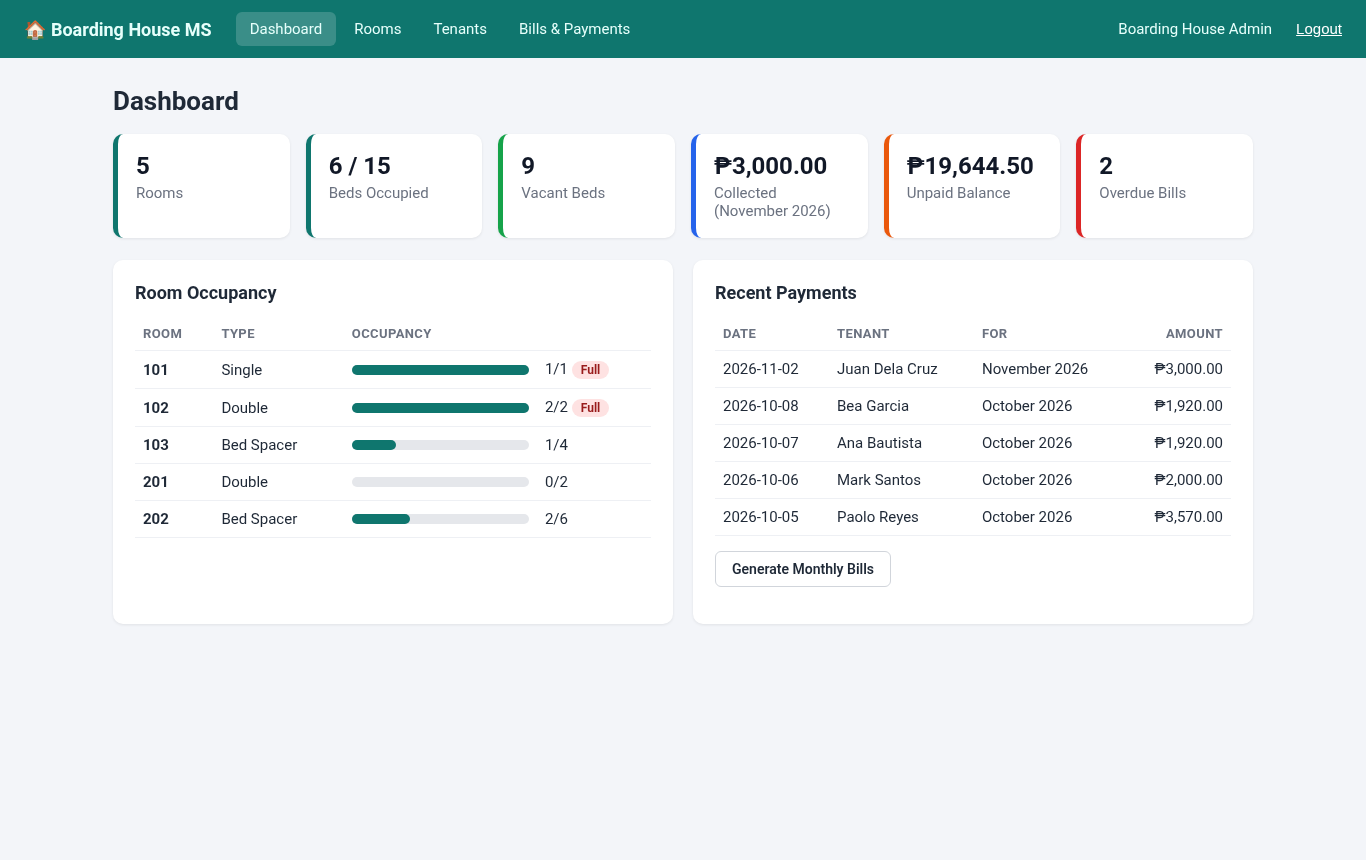
- Cards for total rooms, beds occupied, vacant beds, amount collected this month, total unpaid balance and number of overdue bills.
- Room occupancy bars with a "Full" label, and a list of the most recent payments.
- Room Management
- Add, edit and delete rooms with room number, type (Single, Double, Bed Spacer, Family), number of beds and monthly rate per bed.
- Shows the number of occupants and vacant beds per room.
- Capacity cannot be set lower than the current number of tenants, and rooms with tenant records cannot be deleted.
- Tenant Management
- Add and edit tenants with phone, email, emergency contact, room and move-in date.
- Only rooms with a free bed appear in the room list, and the server double-checks so a full room can never be overbooked.
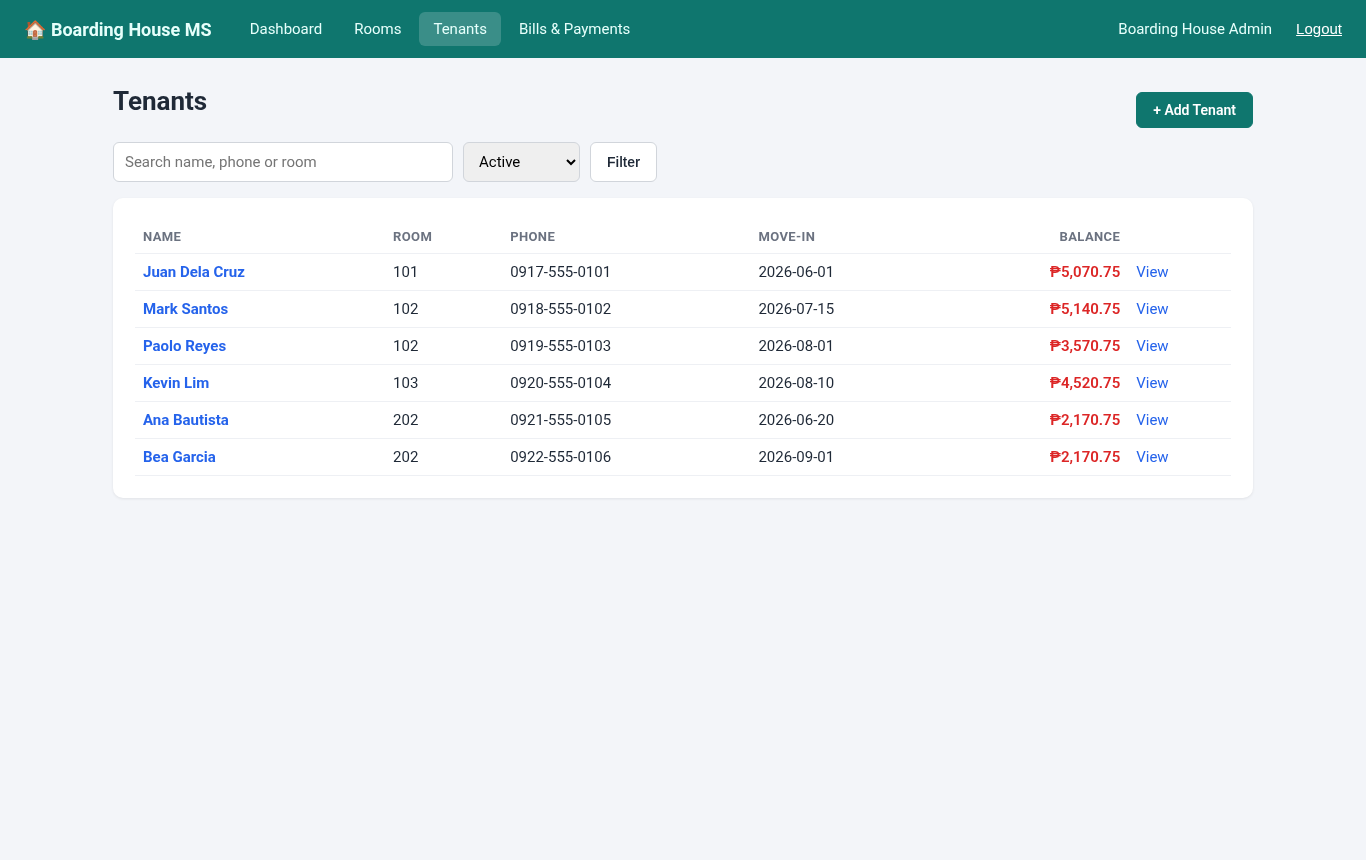
- Search by name, phone or room, and switch between active and moved-out tenants.
- "Move Out" frees the bed while keeping the tenant's billing history.
- Monthly Billing
- Generate bills for all active tenants in one click. Rent comes from each room's rate, plus optional water, electricity and other charges.
- Safe to run again: tenants who already have a bill for that month are skipped.
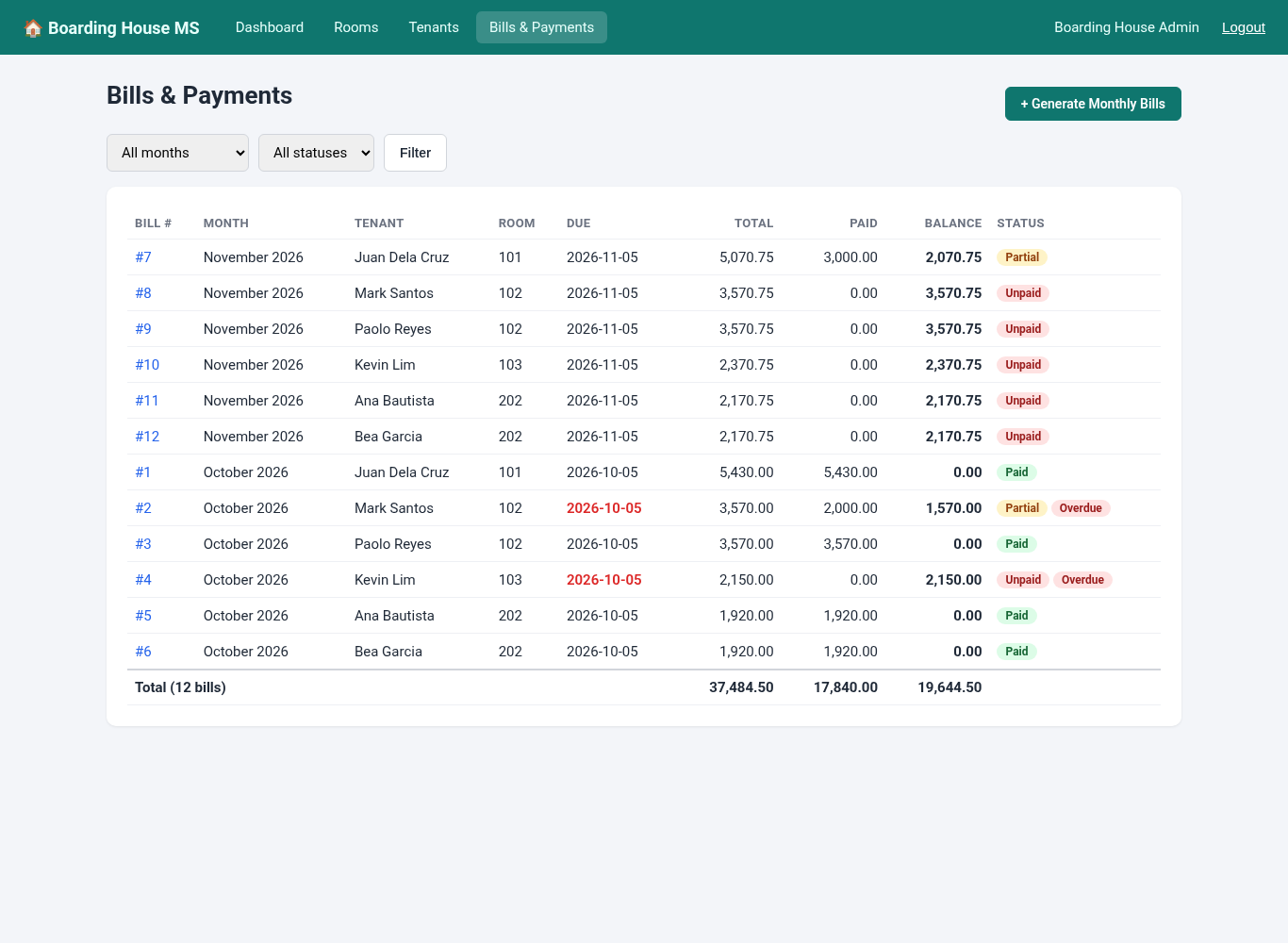
- Filter bills by month and by status: Unpaid, Partial, Paid or Overdue, with totals at the bottom.
- Payments and Receipts
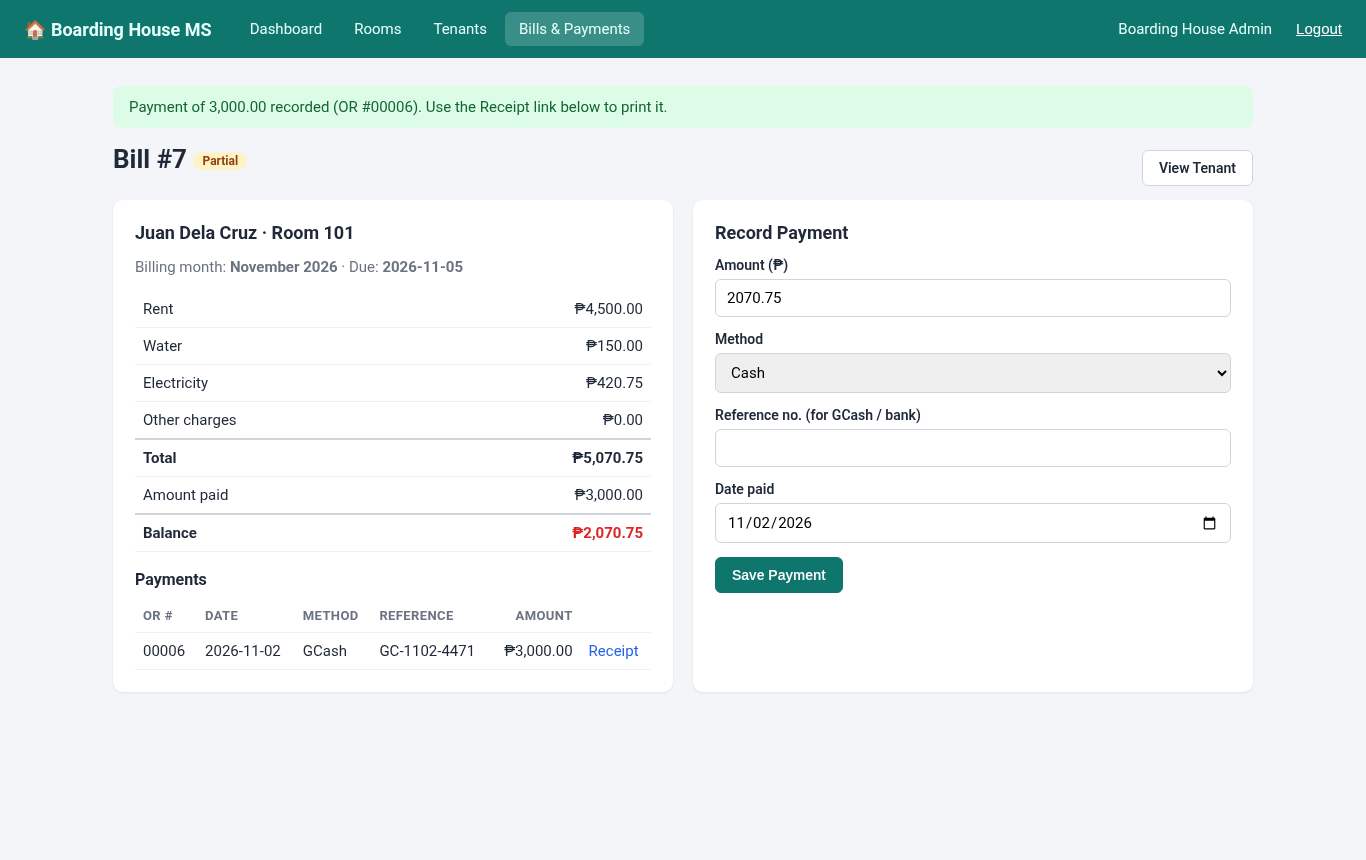
- Record full or partial payments by Cash, GCash or Bank Transfer. A reference number is required for GCash and bank payments.
- Payments cannot exceed the remaining balance or be dated in the future.
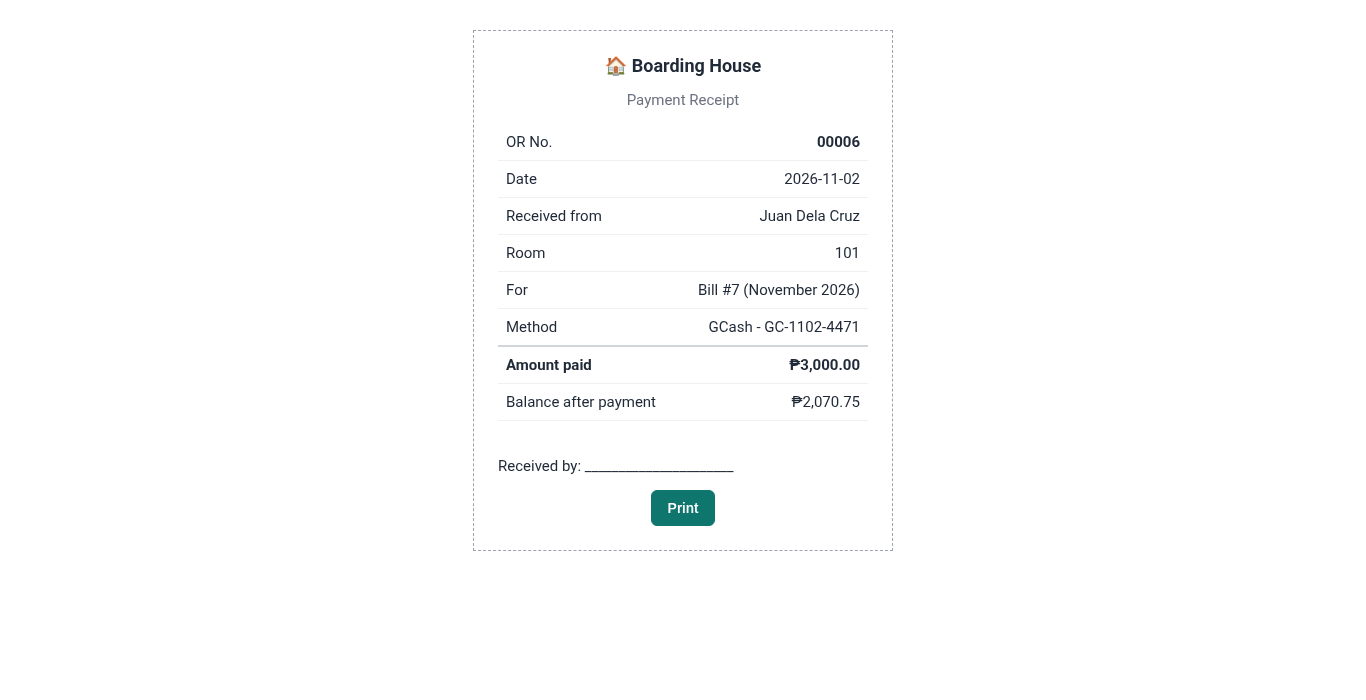
- Printable receipt with an OR number and the balance right after that payment.
- Security Basics
- All SQL queries use prepared statements with
?placeholders. - EJS escapes all output to prevent XSS.
- Every form has a CSRF token, and the session ID is regenerated on login.
- All SQL queries use prepared statements with
Screenshots
Dashboard:

Bills with status, overdue labels and totals:
Bill details with the payment form:
Tenant list with balances:
Printable payment receipt:
Code Highlights
The database connection uses DatabaseSync from Node's built-in node:sqlite module. Because nothing has to be compiled, npm install works the same on Windows, macOS and Linux. On the first run, the tables are created and sample data is inserted automatically:
- // Opens the SQLite database using Node's built-in node:sqlite module.
- // No native packages to compile: it works on Windows, macOS and Linux.
- const fs = require('node:fs');
- const path = require('node:path');
- const { DatabaseSync } = require('node:sqlite');
- const seed = require('./seed');
- const DATA_DIR = path.join(__dirname, '..', 'data');
- const DB_FILE = process.env.DB_FILE || path.join(DATA_DIR, 'boarding_house.db');
- fs.mkdirSync(path.dirname(DB_FILE), { recursive: true });
- const isNew = !fs.existsSync(DB_FILE);
- const db = new DatabaseSync(DB_FILE);
- db.exec('PRAGMA foreign_keys = ON;');
- db.exec(fs.readFileSync(path.join(__dirname, 'schema.sql'), 'utf8'));
- if (isNew) {
- seed(db);
- console.log('New database created with sample data:', DB_FILE);
- }
- // Run several statements as one unit: all succeed or none are saved
- db.transaction = (fn) => {
- db.exec('BEGIN');
- try {
- const result = fn();
- db.exec('COMMIT');
- return result;
- } catch (err) {
- db.exec('ROLLBACK');
- throw err;
- }
- };
- module.exports = db;
Instead of storing a "status" column that can get out of sync, the bill's total, amount paid, balance and status are computed by an SQL view, so they are always correct:
- -- One row per bill with the computed total, amount paid, balance and status
- CREATE VIEW IF NOT EXISTS bill_summary AS
- SELECT b.*,
- (b.rent + b.water + b.electricity + b.other) AS total,
- COALESCE((SELECT SUM(p.amount) FROM payments p WHERE p.bill_id = b.id), 0) AS paid,
- (b.rent + b.water + b.electricity + b.other)
- - COALESCE((SELECT SUM(p.amount) FROM payments p WHERE p.bill_id = b.id), 0) AS balance,
- CASE
- WHEN COALESCE((SELECT SUM(p.amount) FROM payments p WHERE p.bill_id = b.id), 0) = 0 THEN 'Unpaid'
- WHEN COALESCE((SELECT SUM(p.amount) FROM payments p WHERE p.bill_id = b.id), 0)
- >= (b.rent + b.water + b.electricity + b.other) THEN 'Paid'
- ELSE 'Partial'
- END AS STATUS
- FROM bills b;
Generating the monthly bills runs inside a transaction. The NOT EXISTS condition is what makes it safe to click the button more than once:
- // Creates one bill per active tenant for the chosen month (skips tenants already billed)
- router.post('/generate', (req, res) => {
- const form = { ...req.body };
- const errors = [];
- if (!/^\d{4}-(0[1-9]|1[0-2])$/.test(form.bill_month || '')) errors.push('Please choose a billing month.');
- if (!isDate(form.due_date)) errors.push('Please choose a due date.');
- const water = toCentavos(form.water), electricity = toCentavos(form.electricity), other = toCentavos(form.other);
- if (water === null || electricity === null || other === null) errors.push('Charges must be valid amounts, for example 150 or 150.50.');
- if (errors.length) return res.status(422).render('bills/generate', { title: 'Generate Monthly Bills', form, errors });
- const tenants = db.prepare(`
- SELECT t.id, r.monthly_rate FROM tenants t JOIN rooms r ON r.id = t.room_id
- WHERE t.status = 'Active' AND substr(t.move_in, 1, 7) <= ?
- AND NOT EXISTS (SELECT 1 FROM bills b WHERE b.tenant_id = t.id AND b.bill_month = ?)`).all(form.bill_month, form.bill_month);
- const insert = db.prepare(`INSERT INTO bills (tenant_id, bill_month, rent, water, electricity, other, due_date) VALUES (?, ?, ?, ?, ?, ?, ?)`);
- db.transaction(() => {
- for (const t of tenants) insert.run(t.id, form.bill_month, t.monthly_rate, water, electricity, other, form.due_date);
- });
- req.session.flash = tenants.length
- ? `${tenants.length} bill(s) generated for ${monthLabel(form.bill_month)}.`
- : `No new bills: every active tenant already has a bill for ${monthLabel(form.bill_month)}.`;
- res.redirect('/bills?month=' + form.bill_month);
- });
Every POST request is checked against the session's CSRF token using a constant-time comparison:
- // CSRF protection: every POST form must send the session token
- app.use((req, res, next) => {
- if (req.method === 'POST') {
- const sent = String(req.body?._csrf || '');
- const ok = sent.length === req.session.csrf.length &&
- crypto.timingSafeEqual(Buffer.from(sent), Buffer.from(req.session.csrf));
- if (!ok) return res.status(403).send('Invalid form token. Please go back, refresh the page and try again.');
- }
- next();
- });
Project Structure
boarding-house-management-system/
├── app.js              # Express setup, sessions, CSRF and login check
├── helpers.js          # peso formatting, centavo conversion, dates
├── package.json
├── tests.js            # automated end-to-end tests (npm test)
├── db/
│   ├── database.js     # opens SQLite and creates tables on first run
│   ├── schema.sql      # tables and the bill_summary view
│   ├── seed.js         # sample rooms, tenants, bills and payments
│   └── reset.js        # npm run reset-db
├── routes/
│   ├── auth.js         # login, logout, change password
│   ├── dashboard.js
│   ├── rooms.js
│   ├── tenants.js
│   └── bills.js        # billing, payments and receipts
├── views/              # EJS templates
├── public/style.css
├── data/               # boarding_house.db is created here
└── README.txt
Database Tables
- users – admin accounts with bcrypt password hashes.
- rooms – room number, type, number of beds and monthly rate per bed.
- tenants – contact details, room, move-in and move-out dates, and status.
- bills – one bill per tenant per month with rent, water, electricity and other charges.
- payments – amount, method, reference number and date of each payment.
- bill_summary (view) – total, paid, balance and status of every bill.
How to Run the Boarding House Management System
Requirements
- Node.js 22.13 or newer (the LTS version is recommended)
- A web browser. No MySQL, XAMPP or other database server is needed.
Installation
- Download the source code below and extract the zip file.
- Open a terminal (Command Prompt, PowerShell or the VS Code terminal) inside the boarding-house-management-system folder.
- Run
npm installto download Express, EJS and the other packages. - Run
npm start. The first run creates data/boarding_house.db with sample data. - Open
http://localhost:3000in your browser.
Default Login
- Username: admin
- Password: admin123
Try this flow: go to Bills & Payments, click Generate Monthly Bills, record a partial GCash payment on one bill, then open the receipt. To start over with fresh sample data, stop the server and run npm run reset-db. On Node.js 22 you may see an "ExperimentalWarning" about SQLite when the app starts; it is only a notice.
Testing
The project includes an automated test script that starts the app on a temporary database and goes through every feature, including the validation and security checks. Run it with npm test. It was run on Node.js 24.22 and Node.js 22.23 with these results:
PASS dashboard redirects to login when logged out
PASS rejects wrong password
PASS rejects form without CSRF token
PASS admin logs in
PASS dashboard shows rooms and beds (6/15 occupied)
PASS dashboard shows unpaid balance from sample data
PASS adds a room
PASS blocks duplicate room number
PASS validates capacity and rate
PASS cannot reduce capacity below current tenants
PASS cannot delete a room that has tenants
PASS adds a tenant
PASS blocks adding a tenant to a full room
PASS validates tenant form
PASS searches tenants
PASS generates November bills for all 7 active tenants
PASS bill total = room rate + water + electricity (2800.50 + 150 + 420.75)
PASS running generate again does not duplicate bills
PASS rejects invalid charge amount
PASS rejects payment above balance
PASS GCash payment requires reference number
PASS rejects future payment date
PASS partial payment sets status to Partial
PASS second payment completes the bill (Paid, balance 0)
PASS paid bill hides payment form
PASS receipt shows balance right after that payment
PASS bill with payments cannot be deleted
PASS filters bills by month and status
PASS overdue filter lists unpaid October bills
PASS moves a tenant out
PASS freed bed can be assigned to a new tenant
PASS output is HTML-escaped (XSS safe)
PASS password change validates length
PASS changes password
PASS logout works
PASS logs in with the new password
All tests passed.
Ideas to Extend the Project
- Send SMS or email reminders a few days before a bill is due.
- Add a security deposit and advance payment for new tenants.
- Compute electricity per room from sub-meter readings instead of a flat charge.
- Add a tenant portal where boarders can view their own bills.
- Export monthly collection reports to Excel or PDF.
That's it! The Boarding House Management System using Node.js, Express and SQLite with Source Code is a complete and working base for learning Node.js and Express or for building your own capstone project. Feel free to download the source code below and modify it to fit your needs. Enjoy coding!
More JavaScript Projects
Note: Due to the size or complexity of this submission, the author has submitted it as a .zip file to shorten your download time. After downloading it, you will need a program like Winzip to decompress it.
Virus note: All files are scanned once-a-day by SourceCodester.com for viruses, but new viruses come out every day, so no prevention program can catch 100% of them.
FOR YOUR OWN SAFETY, PLEASE:
1. Re-scan downloaded files using your personal virus checker before using it.
2. NEVER, EVER run compiled files (.exe's, .ocx's, .dll's etc.)--only run source code.