
IT Helpdesk Ticketing System using PHP and MySQL with Source Code
The IT Helpdesk Ticketing System is a web application built with PHP and MySQL that lets employees or students report computer problems, and lets the IT team track, assign and resolve each request in one place. Instead of support requests getting lost in chat messages and sticky notes, every issue becomes a numbered ticket with a status, a priority, an assigned technician, and a full conversation history.
It is a practical project for learning PHP because it covers what real systems need: login and registration, three user roles, CRUD, search and filters, a dashboard, and simple workflow rules. The IT Helpdesk Ticketing System using PHP and MySQL with Source Code is free to download. Just read the content below for more information. This application is for educational purposes only.
IT Helpdesk Ticketing System Basic Information
- Language used: PHP 8 (works on PHP 8.0 and newer)
- Database used: MySQL / MariaDB
- Database access: PDO with prepared statements
- Front-end used: HTML and CSS (no framework, no internet connection needed)
- Coding Tool used: VS Code, Sublime Text or any text editor
- Type: Web Application
About the IT Helpdesk Ticketing System
Almost every school, office and company has an IT team that receives the same kinds of requests every day: a printer that keeps jamming, a forgotten password, a laptop that will not connect to Wi-Fi. A helpdesk ticketing system gives those requests structure. The person with the problem submits a ticket, a support agent picks it up and replies, and the ticket moves through the statuses Open → In Progress → Resolved → Closed.
This project keeps the code simple on purpose. There is no framework and no Composer packages, just plain PHP files that each handle one page, plus a shared config.php with the database connection and helper functions. That makes it easy to read, easy to present to a panel, and easy to extend for a capstone or thesis project.
IT Helpdesk Ticketing System Features
- Login, Registration and Roles
- Users can register their own account. Passwords are stored with
password_hash()and checked withpassword_verify(). - Three roles: User (requester), Agent (IT support staff) and Admin.
- New registrations are always regular users; only the admin can create agents or change roles.
- Users can register their own account. Passwords are stored with
- Dashboard
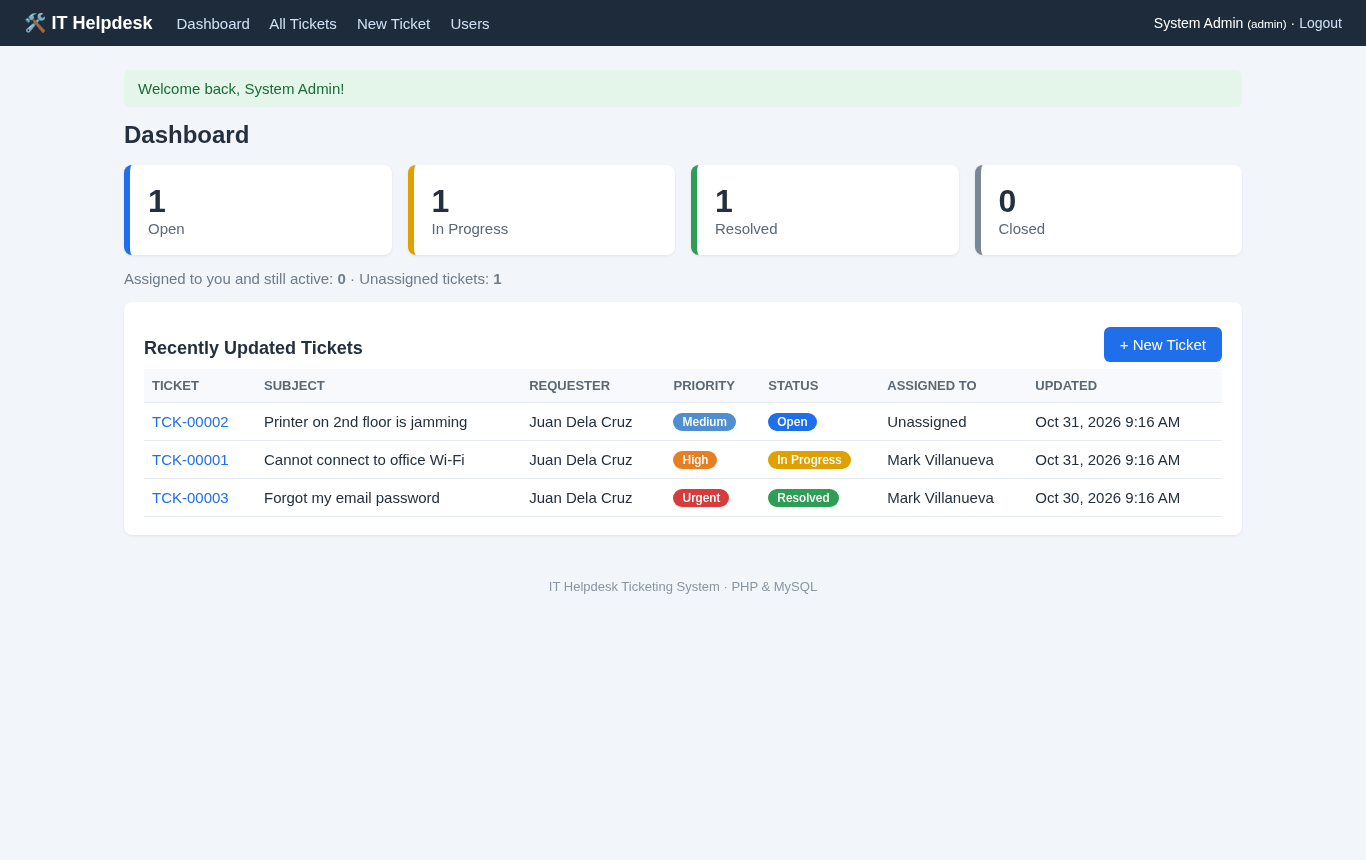
- Clickable cards showing the number of Open, In Progress, Resolved and Closed tickets.
- Staff also see how many active tickets are assigned to them and how many are still unassigned.
- List of the five most recently updated tickets.
- Ticket Management
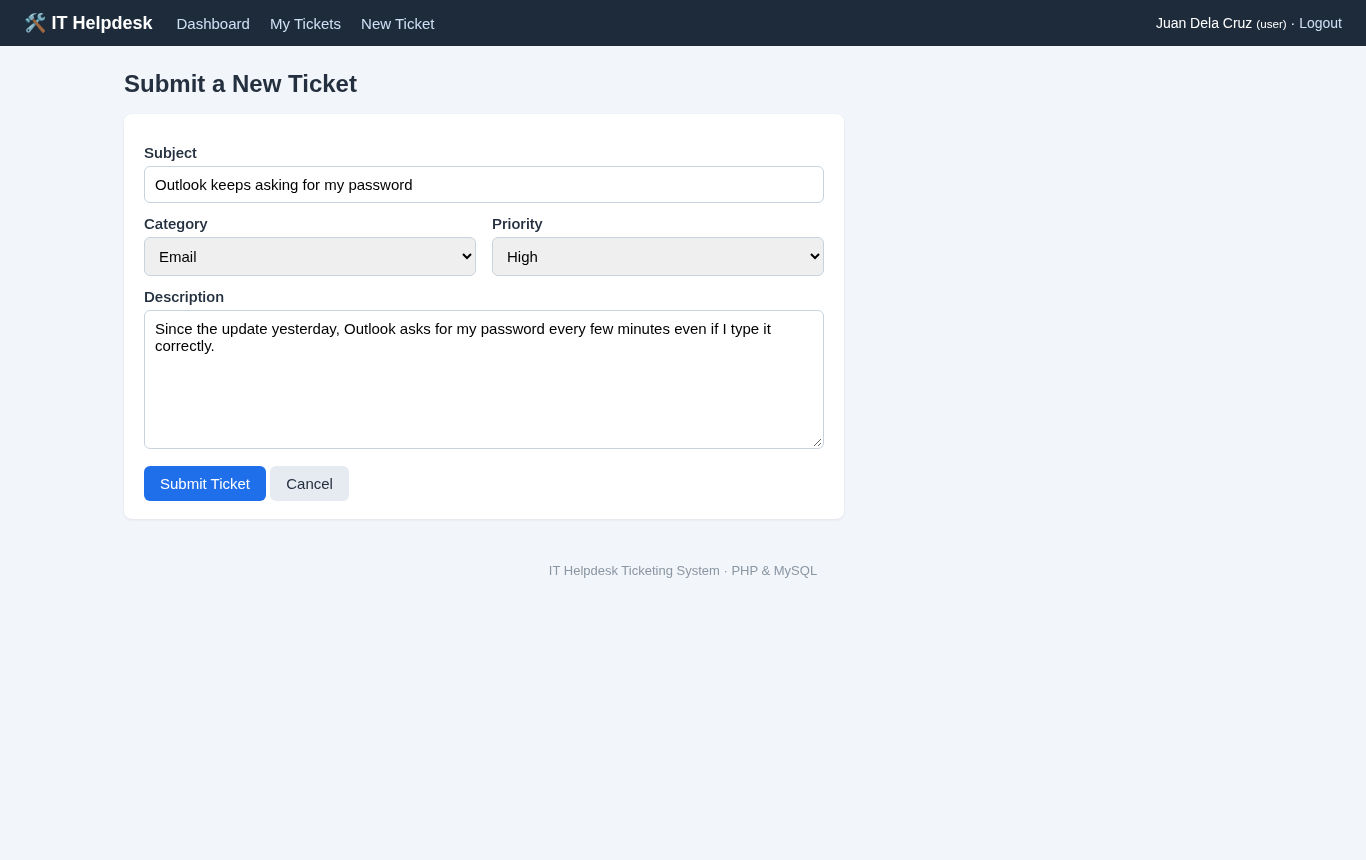
- Submit tickets with a subject, category (Hardware, Software, Network, Account / Password, Email, Printer, Other), priority and description.
- Every ticket gets a readable number such as TCK-00004.
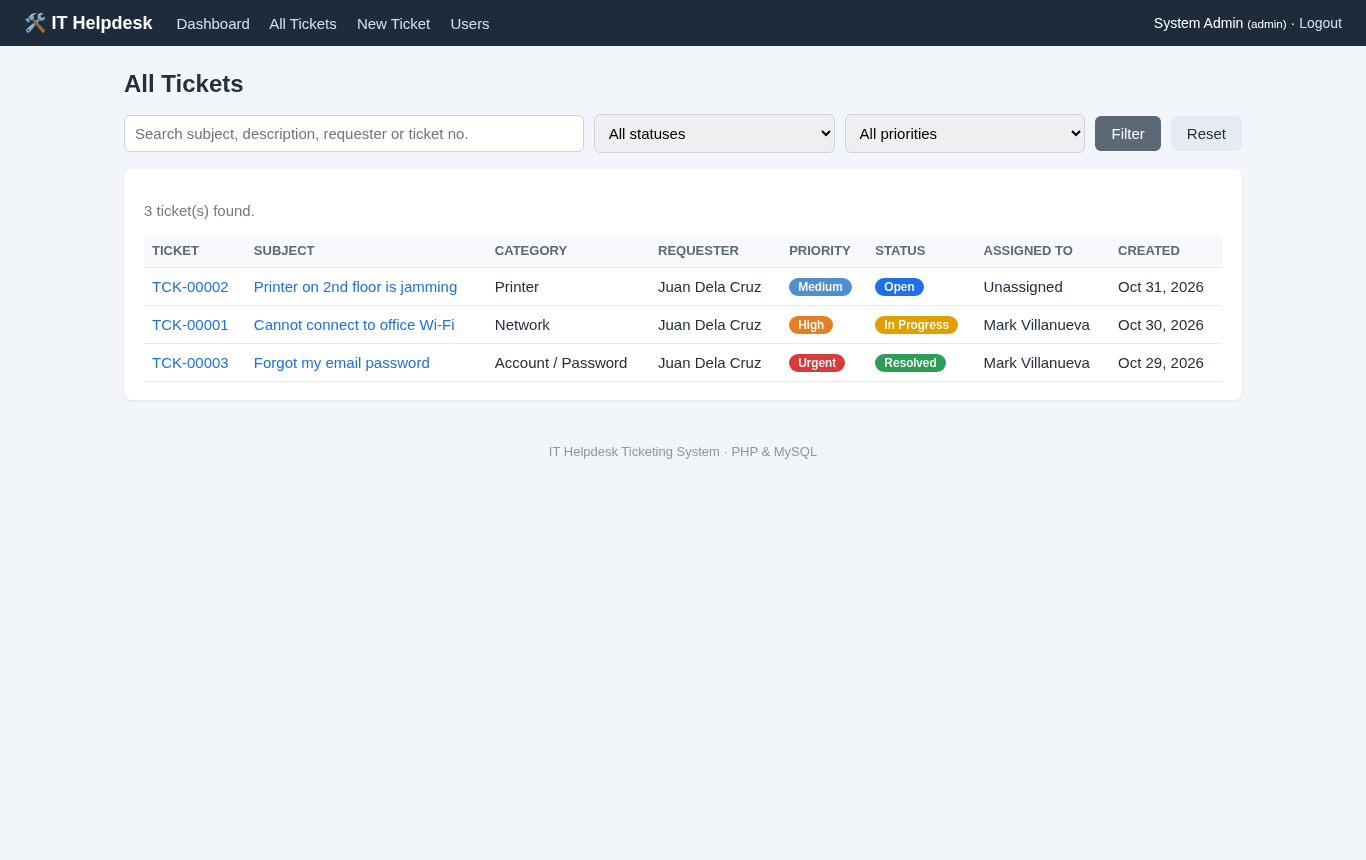
- Search by keyword, requester name or ticket number, and filter by status and priority.
- Tickets are sorted so that open and urgent issues appear first.
- Regular users can only see and open their own tickets.
- Conversation and Workflow
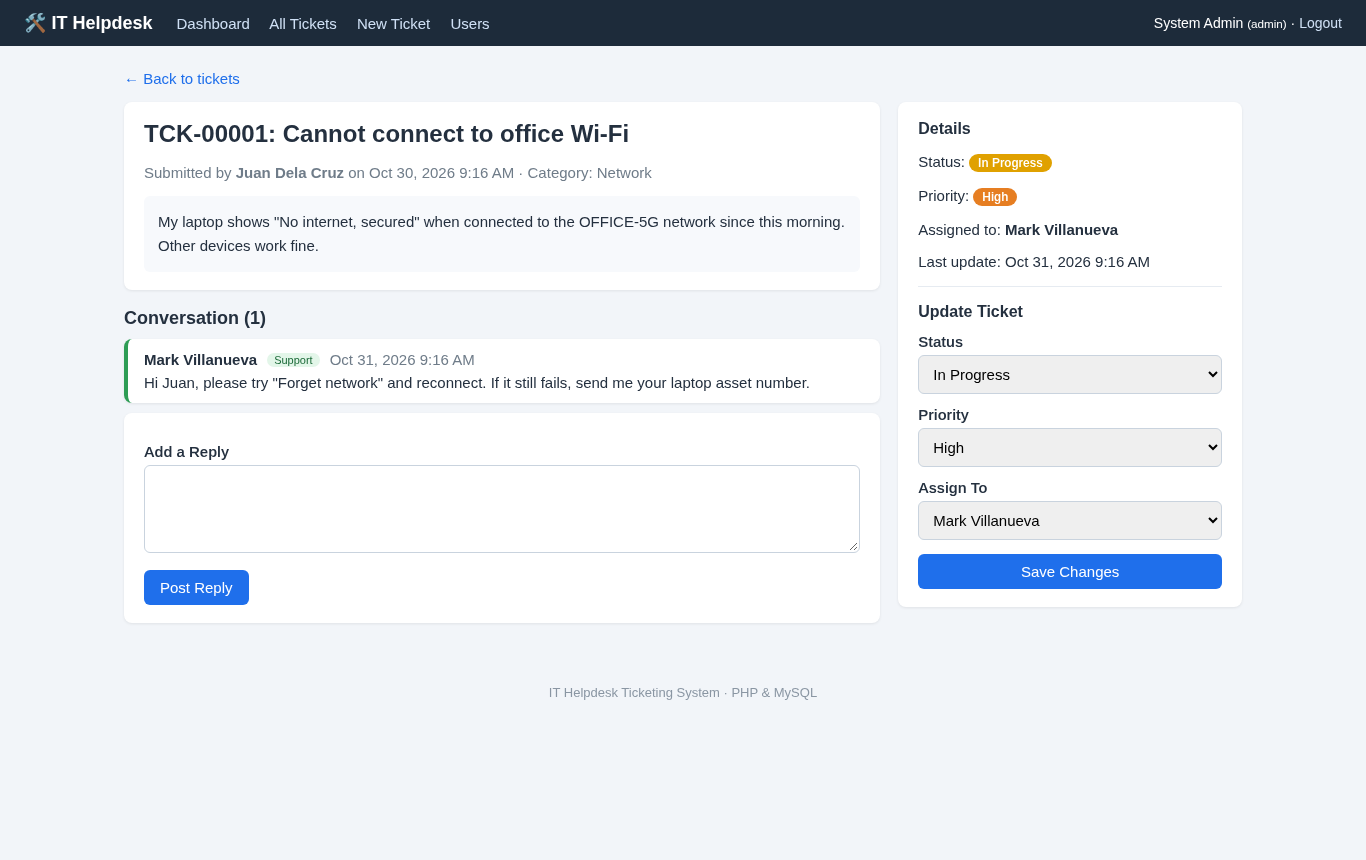
- Requesters and support staff can reply on each ticket, and staff replies are labeled "Support."
- When staff reply to an Open ticket, it automatically moves to In Progress.
- When the requester replies to a Resolved ticket, it automatically reopens.
- Requesters can close their own ticket once the problem is solved, and closed tickets no longer accept replies.
- Assignment
- Agents can change status and priority and assign tickets to themselves.
- The admin can assign any ticket to any agent or admin.
- User Management (Admin)
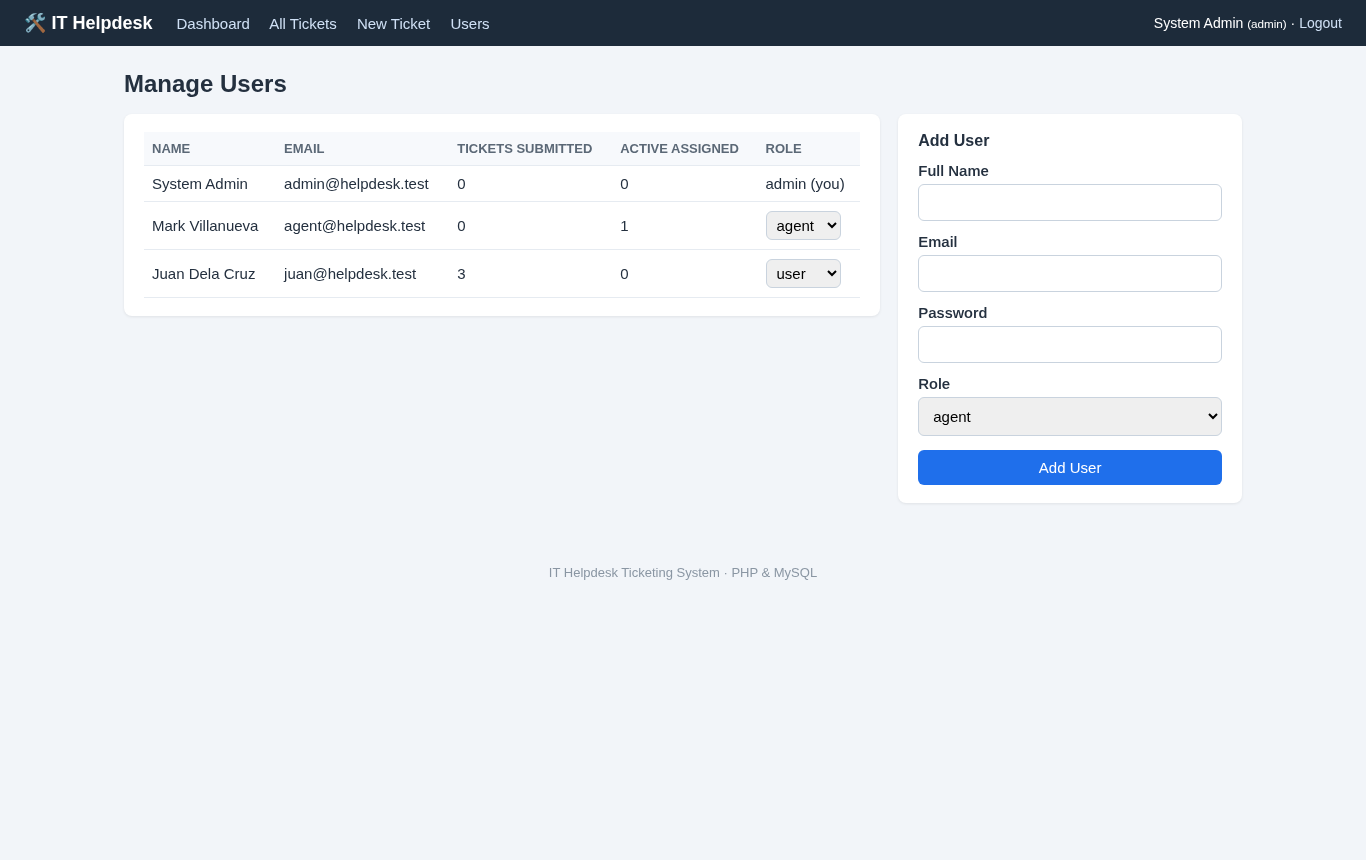
- List all users with the number of tickets they submitted and their active assigned tickets.
- Add new users with any role and change roles from a dropdown.
- When a staff member is changed to a regular user, their ticket assignments are released automatically.
- Security Basics
- All queries use PDO prepared statements to prevent SQL injection.
- All output is escaped with
htmlspecialchars()to prevent XSS. - Every form is protected by a CSRF token, and the session ID is regenerated on login.
Screenshots
Admin dashboard:

Ticket details with conversation and the staff update panel:
All tickets with search and filters:
Submitting a new ticket (user view):
User management (admin only):
Code Highlights
Every form includes a hidden CSRF token, and every POST request checks it before doing anything. This stops other websites from submitting forms on behalf of a logged-in user:
- // CSRF protection for every POST form
- function csrf_token(): string
- {
- }
- return $_SESSION['csrf'];
- }
- function csrf_field(): string
- {
- return '<input type="hidden" name="csrf" value="' . csrf_token() . '">';
- }
- function check_csrf(): void
- {
- if (!hash_equals($_SESSION['csrf'] ?? '', $_POST['csrf'] ?? '')) {
- http_response_code(400);
- }
- }
Access control for tickets lives in one function. Staff can open any ticket, but a regular user gets a "Ticket not found" response for tickets that belong to someone else, so ticket IDs cannot be guessed to read other people's issues:
- // Load a ticket the current user is allowed to see, or stop with 404
- {
- $stmt = $pdo->prepare(
- 'SELECT t.*, u.full_name AS requester, u.email AS requester_email, a.full_name AS agent
- FROM tickets t
- JOIN users u ON u.id = t.user_id
- LEFT JOIN users a ON a.id = t.assigned_to
- WHERE t.id = ?'
- );
- $stmt->execute([$id]);
- $ticket = $stmt->fetch();
- if (!$ticket || (!is_staff($user) && (int) $ticket['user_id'] !== (int) $user['id'])) {
- http_response_code(404);
- }
- return $ticket;
- }
Posting a reply also applies the workflow rules. The reply and the status update run inside a transaction so they are always saved together:
- if ($action === 'reply') {
- if ($ticket['status'] === 'Closed') {
- $errors[] = 'This ticket is closed and can no longer receive replies.';
- } elseif ($message === '') {
- $errors[] = 'Reply cannot be empty.';
- } else {
- $pdo->beginTransaction();
- $stmt = $pdo->prepare('INSERT INTO replies (ticket_id, user_id, message) VALUES (?, ?, ?)');
- $stmt->execute([$id, $user['id'], $message]);
- // Simple workflow rules:
- // - staff replying to an Open ticket moves it to In Progress
- // - the requester replying to a Resolved ticket reopens it
- $newStatus = $ticket['status'];
- if ($staff && $ticket['status'] === 'Open') {
- $newStatus = 'In Progress';
- } elseif (!$staff && $ticket['status'] === 'Resolved') {
- $newStatus = 'Open';
- }
- $stmt = $pdo->prepare('UPDATE tickets SET status = ?, updated_at = NOW() WHERE id = ?');
- $stmt->execute([$newStatus, $id]);
- $pdo->commit();
- flash($newStatus !== $ticket['status'] ? "Reply posted. Status changed to $newStatus." : 'Reply posted.');
- redirect('ticket_view.php?id=' . $id);
- }
- }
Project Structure
helpdesk-ticketing-system/
├── config.php          # database settings, session and helper functions
├── database.sql        # tables and sample data
├── login.php           # sign in
├── register.php        # create a user account
├── logout.php
├── index.php           # dashboard
├── tickets.php         # ticket list with search and filters
├── ticket_create.php   # submit a ticket
├── ticket_view.php     # details, replies, status and assignment
├── users.php           # user management (admin)
├── includes/
│   ├── header.php      # layout and navigation
│   └── footer.php
├── assets/
│   └── style.css
└── README.txt
Database Tables
- users – full name, email, hashed password and role (admin, agent or user).
- tickets – requester, assigned staff, subject, category, priority, status, description and timestamps.
- replies – the conversation messages for each ticket.
How to Run the IT Helpdesk Ticketing System
Requirements
- XAMPP, WAMP or Laragon with PHP 8.0 or newer
- MySQL or MariaDB (included in XAMPP)
Installation
- Download the source code below and extract the zip file.
- Copy the helpdesk-ticketing-system folder into
C:\xampp\htdocs\. - Open the XAMPP Control Panel and start Apache and MySQL.
- Go to
http://localhost/phpmyadmin, open the Import tab and import database.sql. It creates the helpdesk_db database with sample tickets. - If your MySQL account is not
rootwith an empty password, updateDB_USERandDB_PASSin config.php. - Open
http://localhost/helpdesk-ticketing-system/in your browser.
Default Login Accounts
- Admin: [email protected] / admin123
- Agent: [email protected] / agent123
- User: [email protected] / user1234
Log in as Juan to submit a ticket, then log out and log in as the agent to reply to it. Watching the status change automatically is the quickest way to understand the workflow.
Testing
The project was tested with PHP 8.4 and MariaDB 11.8 using an automated script that logs in as each role and goes through the whole ticket life cycle, including the security checks. These are the results:
PASS dashboard redirects to login when logged out
PASS rejects form without valid CSRF token
PASS rejects wrong password
PASS register validates password length
PASS register blocks duplicate email
PASS registers new user
PASS self-registered account gets the user role
PASS new user logs in
PASS ticket form validation
PASS creates ticket and shows ticket number
PASS user sees only own tickets
PASS user cannot open another user's ticket
PASS user cannot use staff update action
PASS agent sees all tickets
PASS filter by status and priority
PASS search by keyword
PASS search by ticket number
PASS agent cannot assign ticket to someone else
PASS agent assigns ticket to self and changes priority
PASS assignment saved in database
PASS staff reply moves Open ticket to In Progress
PASS agent marks ticket as Resolved
PASS user sees staff reply
PASS user reply reopens a Resolved ticket
PASS user closes own ticket
PASS closed ticket rejects replies
PASS user cannot open admin Users page
PASS admin dashboard loads
PASS admin sees user list
PASS admin adds an agent
PASS admin assigns ticket to another agent
PASS admin changes role
PASS demoted user loses ticket assignments
PASS output is HTML-escaped (XSS safe)
PASS logout works
All tests passed.
Ideas to Extend the Project
- Send email notifications with PHPMailer when a ticket is created or updated.
- Allow file attachments, such as screenshots of error messages.
- Add SLA targets per priority, for example "Urgent tickets must be answered within 1 hour."
- Add a satisfaction rating when the requester closes a ticket.
- Generate monthly reports per category or per agent.
That's it! The IT Helpdesk Ticketing System using PHP and MySQL with Source Code is a complete and working base for learning PHP and MySQL or for building your own capstone project. Feel free to download the source code below and modify it to fit your needs. Enjoy coding!
More PHP Projects
Note: Due to the size or complexity of this submission, the author has submitted it as a .zip file to shorten your download time. After downloading it, you will need a program like Winzip to decompress it.
Virus note: All files are scanned once-a-day by SourceCodester.com for viruses, but new viruses come out every day, so no prevention program can catch 100% of them.
FOR YOUR OWN SAFETY, PLEASE:
1. Re-scan downloaded files using your personal virus checker before using it.
2. NEVER, EVER run compiled files (.exe's, .ocx's, .dll's etc.)--only run source code.