HTML

3D Flip Content Using CSS

Submitted by GeePee on
This project will teach you how to animate a 3D effect flip content using css/html only. No javascript code or jQuery plugin needed. Once the user hover over the image, the image flip to back and the information of the image appear. This is very cool animation and simple to do. Hope you learn from this.

Disable Right Click, Copy And Paste Using Javascript

Submitted by GeePee on
This project will teach you on how to disable right click, copy and paste. We can use this codes in preventing the users doing unwanted things on our page. It can protect your page content from being copied. I used my previous project Auto Scroll as an example. The right click are being disabled and there's no way the users can copy and paste the page content. Hope you learn from this.

Creating Shapes in CSS

Submitted by GeePee on
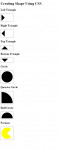
This project will teach you on how to create a different shapes using CSS. We can create shapes in our web page without including images. This is simple but very useful. This is for the newbie in programming. I have here an example of triangles(left, right, up, bottom), circle, quarter circle and half circle. Hope you learn from this.

Repeating Tile Background Animation in CSS

Submitted by GeePee on
This project will teach you on how to animate a repeating tile background using CSS keyframes. Using the css keyframes, tiled images will animate like a falling snow as seen on my example. It is depend on your style if you want to animate it from the right. Feel free to modify this project according to your preference. Hope you learn from this.

Image Mapping in HTML

Submitted by GeePee on
This project will teach you on how to image map using html. This is easy and simple project. Image mapping has the ability to hyperlink areas of the image to multiple destination. Just like my example, I have one image with with 6 boxes which contains different browser in each box. I set the coords of each box and link to it's preferred destination. The first 2 figures of the coords is the x, y

Email Subscription List in PHP/HTML

Submitted by Yorkiebar on
Introduction: This tutorial is on how to create a simple email subscription service - part 1 - allowing the user to enter their email address. HTML: Before we can process any information the user enters and then add it to our database of email subscription addresses, we need to take the information from the user - for this we need a simple HTML form.

How To Insert Data in to a MySQLi Database through PHP

Submitted by Yorkiebar on
Introduction: This tutorial will be on allowing users to input data in to an HTML form, and then upload that data to a MySQL database through PHP. HTML: First we need our HTML form. This example will just be for a user to enter their username and email address, we will not do any validation or username checking (to assure no duplicate usernames within our website) as this is not the purpose of this tutorial.