
How to Implement a Circular Singly Linked List in Python

In this tutorial, we will learn how to program “How to Implement a Circular Singly Linked List in Python.” The objective is to implement a circular singly linked list. This tutorial will guide you step by step through the process of creating and displaying the circular linked list. By the end of this tutorial, you will have a solid understanding of how to implement a circular singly linked list effectively in Python, helping you strengthen your problem-solving abilities and improve your coding skills.
This topic is straightforward and easy to understand. Simply follow the instructions provided, and you will complete it with ease. The program will guide you step by step through the implementation of a circular singly linked list. So, let's dive into the coding process!
Getting Started:
First you will have to download & install the Python IDLE's, here's the link for the Integrated Development And Learning Environment for Python https://www.python.org/downloads/.
Creating Main Function
This is the main function of the application. The following code will display a simple GUI in terminal console that will display program. To do this, simply copy and paste these blocks of code into the IDLE text editor.- class Node:
- def __init__(self, data):
- self.data = data
- self.next = None
- class CircularLinkedList:
- def __init__(self):
- self.head = None
- def get_node(self, index):
- if self.head is None:
- return None
- current = self.head
- for _ in range(index):
- current = current.next
- if current == self.head:
- return None
- return current
- def get_prev_node(self, ref_node):
- current = self.head
- while current.next != ref_node:
- current = current.next
- return current
- def insert_after(self, ref_node, new_node):
- new_node.next = ref_node.next
- ref_node.next = new_node
- def insert_before(self, ref_node, new_node):
- prev = self.get_prev_node(ref_node)
- self.insert_after(prev, new_node)
- def insert_at_end(self, new_node):
- if self.head is None:
- self.head = new_node
- new_node.next = new_node
- else:
- self.insert_before(self.head, new_node)
- def insert_at_beg(self, new_node):
- self.insert_at_end(new_node)
- self.head = new_node
- def remove(self, node):
- if self.head.next == self.head:
- self.head = None
- else:
- prev = self.get_prev_node(node)
- prev.next = node.next
- if self.head == node:
- self.head = node.next
- def display(self):
- if self.head is None:
- print("Empty list")
- return
- current = self.head
- while True:
- print(current.data, end=" ")
- current = current.next
- if current == self.head:
- break
- print()
- # ================= MAIN PROGRAM =================
- while True:
- print("\n================= Circular Linked List Operations =================\n")
- clist = CircularLinkedList()
- print("Menu:")
- print("insert <data> after <index>")
- print("insert <data> before <index>")
- print("insert <data> at beg")
- print("insert <data> at end")
- print("remove <index>")
- print("quit")
- while True:
- print("\nThe list:", end=" ")
- clist.display()
- cmd = input("What would you like to do? ").strip().lower().split()
- if not cmd:
- continue
- operation = cmd[0]
- if operation == "insert":
- data = int(cmd[1])
- new_node = Node(data)
- if cmd[2] == "at":
- if cmd[3] == "beg":
- clist.insert_at_beg(new_node)
- elif cmd[3] == "end":
- clist.insert_at_end(new_node)
- else:
- index = int(cmd[3])
- ref_node = clist.get_node(index)
- if ref_node is None:
- print("No such index.")
- continue
- if cmd[2] == "after":
- clist.insert_after(ref_node, new_node)
- elif cmd[2] == "before":
- clist.insert_before(ref_node, new_node)
- elif operation == "remove":
- index = int(cmd[1])
- node = clist.get_node(index)
- if node is None:
- print("No such index.")
- else:
- clist.remove(node)
- elif operation == "quit":
- break
- else:
- print("Invalid command.")
- opt = input("\nDo you want to try again? (yes/no): ").strip().lower()
- if opt == "no":
- print("Exiting program...")
- break
- elif opt != "yes":
- print("Invalid choice. Exiting program...")
- break
This program demonstrates a menu-driven implementation of a Circular Linked List in Python, allowing users to perform dynamic insertion and deletion operations. It defines a `Node` class to store data and a `CircularLinkedList` class that manages node connections in a circular manner, where the last node points back to the head. The program supports inserting new nodes at the beginning, at the end, before a given index, or after a given index, as well as removing a node at a specified index. Users interact with the list through clear text-based commands, and the current state of the list is displayed after each operation. The outer loop allows the entire program to be restarted or exited, making it interactive and suitable for understanding circular linked list behavior and pointer manipulation.
Output:
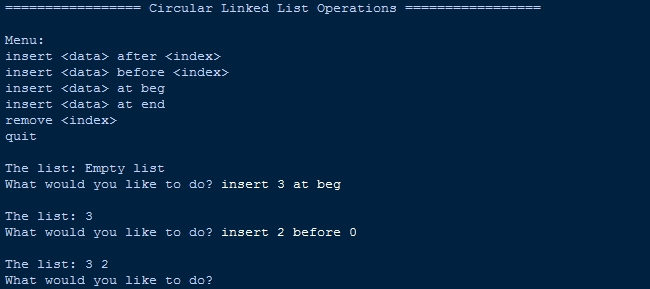
There you have it we successfully created How to Implement a Circular Singly Linked List in Python. I hope that this simple tutorial help you to what you are looking for. For more updates and tutorials just kindly visit this site. Enjoy Coding!
More Tutorials for Python Language