
How to Implement a Stack Using a Queue in Python
In this tutorial, we will learn "How to Implement a Stack using a Queue in Python". The objective is to apply the stack data structure principles. This guide will walk you step-by-step through the methods for building a stack using a queue. By the end, you will have a solid understanding of how to implement this effectively in Python, which will help strengthen your problem-solving abilities and improve your coding skills.
This topic is straightforward and easy to understand. Simply follow the instructions provided, and you will complete the implementation with ease. This program will guide you step-by-step through the process of implementing the stack data structure using a queue. So, let's dive into the coding process!
Getting Started:
First you will have to download & install the Python IDLE's, here's the link for the Integrated Development And Learning Environment for Python https://www.python.org/downloads/.
Creating Main Function
This is the main function of the application. The following code will display a simple GUI in terminal console that will display program. To do this, simply copy and paste these blocks of code into the IDLE text editor.- class Queue:
- """A basic Queue implementation using a list."""
- def __init__(self):
- self.items = []
- # Note: self.size tracking is redundant since self.items list has len()
- # but it's kept here to match the original structure.
- def is_empty(self):
- """Checks if the queue is empty."""
- return self.items == []
- def enqueue(self, data):
- """Adds an item to the end of the queue."""
- self.items.append(data)
- # self.size += 1 # Not needed if we use len()
- def dequeue(self):
- """Removes and returns the item from the front of the queue."""
- if self.is_empty():
- raise IndexError("dequeue from empty queue")
- # Removes and returns the element at the beginning of the list (index 0)
- return self.items.pop(0)
- # self.size -= 1 # Not needed if we use len()
- def get_size(self):
- """Returns the current number of items in the queue."""
- return len(self.items) # Use len() instead of self.size
- class Stack:
- """
- Implements a Stack (LIFO) using a single Queue.
- Push is O(1). Pop is O(n) because it moves n-1 elements back to the queue.
- """
- def __init__(self):
- self.q = Queue()
- #
- def is_empty(self):
- """Checks if the stack is empty."""
- return self.q.is_empty()
- def push(self, data):
- """Adds an item to the top of the stack (enqueue in the queue)."""
- self.q.enqueue(data)
- def pop(self):
- """
- Removes and returns the item from the top of the stack.
- To implement LIFO, it moves all but the last item to the back,
- then dequeues the last one.
- """
- if self.is_empty():
- raise IndexError("pop from empty stack")
- # Move n-1 elements from the front to the back of the queue
- for _ in range(self.q.get_size() - 1):
- dequeued = self.q.dequeue()
- self.q.enqueue(dequeued)
- # The last element dequeued is the one that was 'pushed' most recently (LIFO)
- return self.q.dequeue()
- # --- Interactive Testing Section ---
- s = Stack()
- while True:
- print("\n============ Implement a Stack Using a Queue ============")
- print('#### Menu ###')
- print('-> push <value>')
- print('-> pop')
- print('-> quit\n')
- # Input is inside the loop, so the program will continuously ask for commands
- do = input('What would you like to do? (e.g., push 10, pop, quit) ').split()
- if not do:
- continue # Skip if user just presses Enter
- operation = do[0].strip().lower()
- if operation == 'push':
- try:
- if len(do) > 1:
- s.push(int(do[1]))
- print(f'Pushed value: {do[1]}. Current stack size: {s.q.get_size()}')
- else:
- print('Error: Please provide a value to push (e.g., push 10).')
- except ValueError:
- print('Error: Invalid value. Please enter an integer.')
- elif operation == 'pop':
- if s.is_empty():
- print('Stack is empty. Cannot pop.')
- else:
- try:
- popped_value = s.pop()
- print(f'✅ Popped value: {popped_value}. Current stack size: {s.q.get_size()}')
- except IndexError as e:
- # Should be caught by s.is_empty(), but good practice to handle
- print(f"Error: {e}")
- elif operation == 'quit':
- print("👋 Exiting program...")
- break
- else:
- print("❌ Invalid command. Please use 'push <value>', 'pop', or 'quit'.")
- # The original "Do you want to try again" prompt is removed because the main
- # 'while True' loop handles continuous operation until 'quit' is entered.
The code first defines a basic Queue class, which is a FIFO (First-In, First-Out) structure, like a line of people: items are added to the back (enqueue) and removed from the front (dequeue). It then defines the Stack class, which uses an instance of the Queue internally to achieve LIFO (Last-In, First-Out) behavior, like a stack of plates. The push operation is simple (enqueue to the queue), but the pop operation is clever: to get the last item added (the LIFO requirement), it repeatedly takes all the other items from the front of the queue and immediately adds them back to the end, leaving the most recently added item at the front for the final dequeue. Finally, the code includes an interactive testing section that runs a continuous menu, allowing a user to push (add) or pop (remove) values from the stack to see how the implementation works in real-time.
Output:
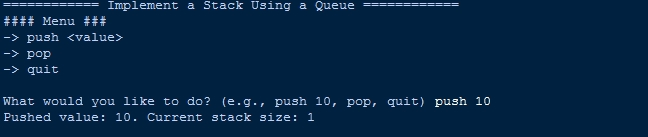
There you have it we successfully created How to Implement a Stack Using a Queue in Python. I hope that this simple tutorial help you to what you are looking for. For more updates and tutorials just kindly visit this site. Enjoy Coding!
More Tutorials for Python Language