DateTime

How to Convert Timestamp String to Datetime in Python

Submitted by razormist on

In this tutorial, we will learn how to program "How to Convert Timestamp String to Datetime in Python". The objective is to convert a timestamp string into a readable datetime format. This tutorial will guide you step by step through the process of converting it into a datetime object. By the end of this tutorial, you will have a solid understanding of how to implement datetime handling effectively in Python, helping you strengthen your problem-solving abilities and improve your coding skills.

Alarm Clock and Timer Web Application using JavaScript/jQuery Free Source Code

Submitted by oretnom23 on
This is a Simple JavaScript project entitled Alarm Clock and Timer Web Application. This is a simple web-based application that allows users to set a timer and an alarm. The application was developed using JavaScript and jQuery Library. It uses web local storage to store data. I have developed this simple application to give new web developers or programmers an idea to build this kind of project

Use DateTime Stamp Appropriately in PHP/MySQLi

Submitted by Yorkiebar on
Introduction: This tutorial is on how to use timestamps properly in PHP and MySQLi to sort information from databases in to the correct order. What's a Timestamp? A timestamp is a data type in PHP and MySQL(i) which is used to hold the correct format of a specified date, time, or date and time together. Database: To enable a database table to hold a timestamp we can first create a database, named 'fln', then create a table named 'test', and give it the following column structure... id, int, 5 length, primary key, auto increment date, dateti

How to Compute Date Difference in C#

Submitted by donbermoy on
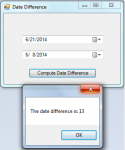
Today in C#, i will teach you how to create a program that finds and calculates the difference between two dates using C#. So, now let's start this Date Difference tutorial in C#! 1. Let's start with creating a Windows Form Application in C# for this tutorial by following the following steps in Microsoft Visual Studio: Go to File, click New Project, and choose Windows Application and name your project as Date Difference. 2.

Simple Clock in Visual Basic

Submitted by Yorkiebar on
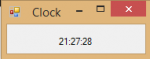
Introduction: This tutorial is on how to create a simple clock in Visual Basic. Design: For this, we simply need a new Windows Form, with one label - call it; 'clockLbl'. You may center the label to the middle of the form in both x and y axis' and give it a large font size. We also need a timer, name this timer1. Set it's interval to 1000ms/1second and it's enabled state to 'True'. Form Load: On form load, we want to initiate the label with the current computer time.