JavaScript

Memory Game in JavaScript

Submitted by GeePee on
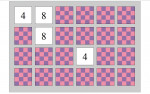
You may be familiar with "Memory Game". Here, you will learn how to create a fun game that challenges your visual ability to remember numbers. The puzzle is composed of 24 checkered tiles with hidden numbers (12 pairs). When you click two consecutive tiles with the same corresponding number, it steadily appears; if not, the tiles flip to back. And when the puzzle is solved, the game automatically

Auto Scroll Animation

Submitted by GeePee on
Auto Scroll Animation using JavaScript. In this project, I also used PHP to lessen the codes and MySQL so that I can grab all the contents of the topics that I placed in the page. One feature of the project is that, once you click a topic, it automatically slides down to its content. And by clicking Go Back To Top, it will automatically slide to top. Hope you learn from this.

Image Slider

Submitted by GeePee on
This is a simple image slider using JavaScript and jQuery. This slider automatically slides and takes you to the next image. And while the slideshow plays, you can also click the previous and next button. To pause the slideshow, hover the mouse pointer over the image. Hope this helps.

Interact With Webpage Using Chrome and jQuery - Mass Follow on Twitter!

Submitted by Yorkiebar on
Introduction: This tutorial is on how to use basic jQuery knowledge and Google Chrome to manipulate a webpage. Notes: The webpage we will be using for this is Twitter of which we will be following a page full of users with a simple, one line jQuery command. First: You need to find a list of users of which have the 'Follow' button displayed next to them.

List Manipulator in Javascript

Submitted by Yorkiebar on
Introduction: This tutorial is on how to create a simple array re-orderer in Javascript. HTML: We are going to have a few HTML elements, here are the details... Textarea, named area, to contain the original list. Button, to reverse the list. Button, to sort the list a-z. Button, to sort the list z-a. Button, to randomise the list.

String Structure Checker in Javascript

Submitted by Yorkiebar on
Introduction: This tutorial is on how to create a structure checker for basic plain text in Javascript. Why? This tool would be used for ensuring data that is getting parsed through functions, databases and/or files is in the correct format and would not cause an error. This example tool is for removing multiple spaces at once, for example; ->Hi there! would be replaced with: ->Hi there! HTML: The HTML is basic HTML and just includes two textareas.