
How to Construct and Operate on Trees in Python
In this tutorial, we will learn how to program “How to Construct and Operate on Trees in Python.” The main objective is to understand how tree data structures are built and how different operations can be performed on them. This tutorial will guide you step by step through the process of constructing a tree and implementing common tree operations such as insertion, traversal, and searching. By the end of this tutorial, you will have a solid understanding of how trees work in Python, helping you strengthen your problem-solving abilities and improve your overall coding skills in data structure implementation.
This topic is straightforward and easy to understand. By simply following the instructions provided, you will be able to complete it with ease. The program will guide you step by step through the process of constructing a tree and performing various operations on it, such as insertion, traversal, and manipulation of nodes. So, let’s dive into the coding process and start implementing the solution to gain a deeper understanding of tree data structures in Python!
Getting Started:
First you will have to download & install the Python IDLE's, here's the link for the Integrated Development And Learning Environment for Python https://www.python.org/downloads/.
Creating Main Function
This is the main function of the application. The following code will display a simple GUI in terminal console that will display program. To do this, simply copy and paste these blocks of code into the IDLE text editor.- class Tree:
- def __init__(self, data=None, parent=None):
- self.key = data
- self.children = []
- self.parent = parent
- def add(self, node):
- self.children.append(node)
- def search(self, key):
- if self.key == key:
- return self
- for child in self.children:
- found = child.search(key)
- if found:
- return found
- return None
- def remove(self):
- parent = self.parent
- index = parent.children.index(self)
- parent.children.remove(self)
- for child in reversed(self.children):
- parent.children.insert(index, child)
- child.parent = parent
- def bfs_display(self):
- queue = [self]
- while queue:
- current = queue.pop(0)
- print(current.key, end=" ")
- for child in current.children:
- queue.append(child)
- # MAIN PROGRAM
- while True:
- print("\n================= Construct and Operate on Trees =================\n")
- tree = None
- print("Menu (this assumes no duplicate keys)")
- print("add <data> at root")
- print("add <data> below <data>")
- print("remove <data>")
- print("display")
- print("quit")
- while True:
- do = input("\nWhat would you like to do? ").split()
- if not do:
- continue
- operation = do[0].lower()
- if operation == "add":
- data = int(do[1])
- new_node = Tree(data)
- if do[2] == "at" and do[3] == "root":
- if tree is None:
- tree = new_node
- else:
- print("Root already exists.")
- elif do[2] == "below":
- key = int(do[3])
- ref_node = tree.search(key) if tree else None
- if ref_node is None:
- print("No such key.")
- else:
- new_node.parent = ref_node
- ref_node.add(new_node)
- elif operation == "remove":
- if tree is None:
- print("Tree is empty.")
- continue
- key = int(do[1])
- node = tree.search(key)
- if node is None:
- print("No such key.")
- elif node == tree:
- if not tree.children:
- tree = None
- else:
- new_root = tree.children[0]
- new_root.parent = None
- tree.children.remove(new_root)
- new_root.children.extend(tree.children)
- for c in new_root.children:
- c.parent = new_root
- tree = new_root
- else:
- node.remove()
- elif operation == "display":
- if tree:
- print("BFS traversal display:", end=" ")
- tree.bfs_display()
- print()
- else:
- print("Tree is empty.")
- elif operation == "quit":
- break
- else:
- print("Invalid command.")
- # Try again option
- opt = input("\nDo you want to try again? (yes/no): ").strip().lower()
- if opt == "no":
- print("Exiting program...")
- break
- elif opt != "yes":
- print("Invalid choice. Exiting program...")
- break
This program demonstrates how to construct and operate on a tree data structure in Python using a simple, object-oriented approach. Each node in the tree is represented by the `Tree` class, which stores a key, a reference to its parent, and a list of its children. The program allows users to add nodes either as the root or below an existing node, search for nodes recursively, remove nodes while preserving their children by reattaching them to the parent, and display the tree using a breadth-first search (BFS) traversal. Through a menu-driven interface, users can interactively build, modify, and visualize the tree, making this program a clear and practical example of basic tree construction and operations.
Output:
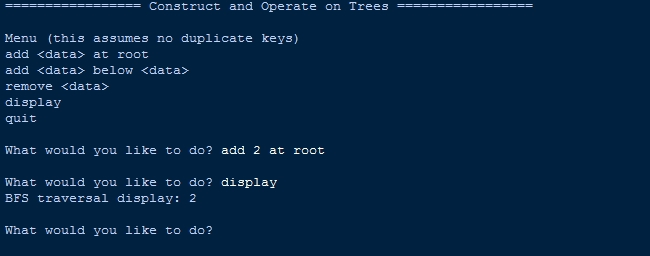
There you have it we successfully created How to Construct and Operate on Trees in Python. I hope that this simple tutorial help you to what you are looking for. For more updates and tutorials just kindly visit this site. Enjoy Coding!
More Tutorials for Python Language