
Search
Equipment Borrowing System using Python Django and SQLite with Source Code
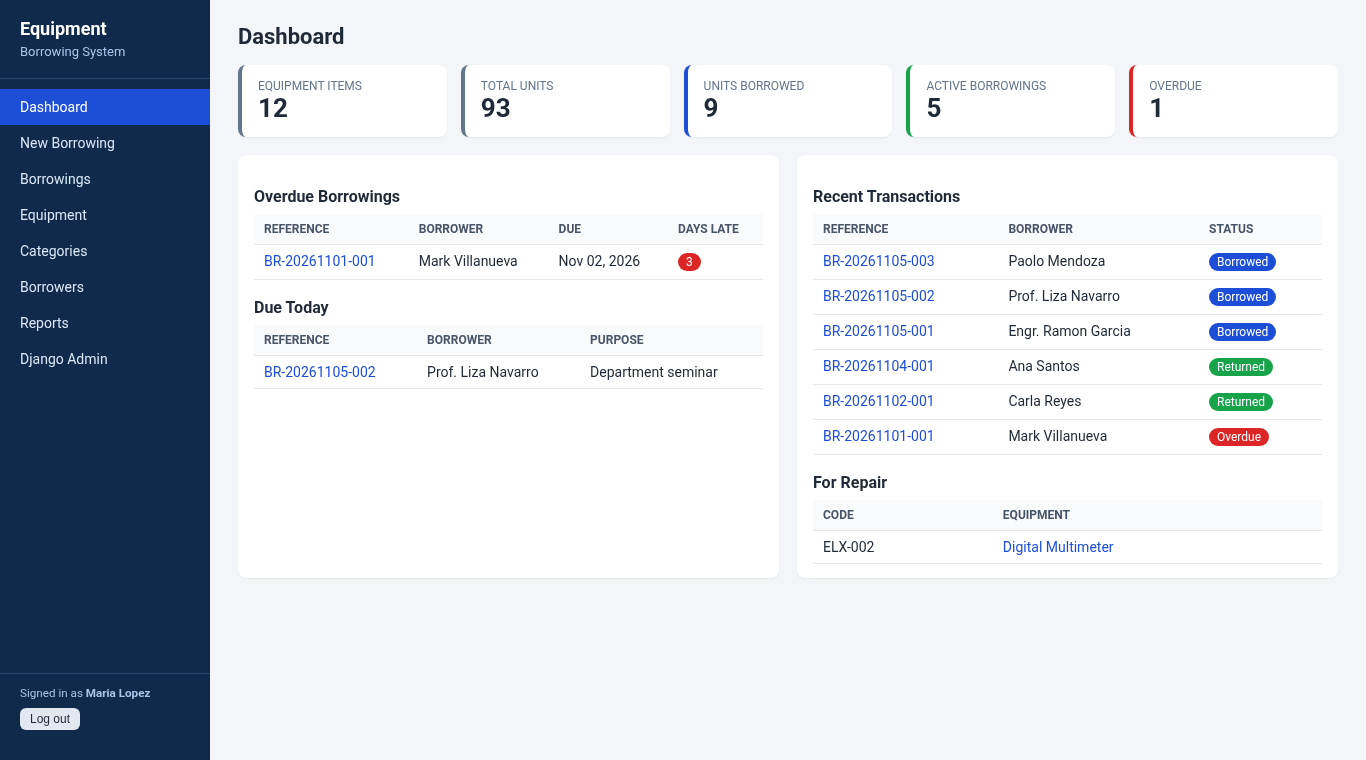
The Equipment Borrowing System is a web application built with Python Django and SQLite for school computer laboratories, electronics labs, AV rooms and property custodian offices. It replaces the logbook where students write down the laptop, projector or multimeter they borrowed, and it answers the questions a lab in-charge asks every day: What is still out? Who is late? How many units are left? Which items came back damaged?
It is a good capstone or final project for IT and CS students because it goes beyond simple CRUD. It has stock that is computed from transactions, database transactions with row locking, a borrowing with several items in one form, overdue detection, a printable borrower's slip, reports with CSV export, and 15 automated tests. Since it uses SQLite, there is no XAMPP or MySQL server to set up. The source code is free to download below.
Equipment Borrowing System Basic Information
- Language used: Python 3.12+ (tested with Python 3.13.5)
- Framework: Django 6.1.3
- Database used: SQLite (built into Python, created automatically)
- Front end: Django templates and plain CSS (no internet connection needed)
- Coding Tool used: VS Code, PyCharm or any text editor
- Type: Web Application
About the Equipment Borrowing System
In many schools, borrowing equipment means writing in a logbook and leaving an ID at the counter. The problems are always the same: nobody knows exactly how many units are left, a projector is lent out twice, overdue items are noticed only during inventory, and when something comes back broken there is no record of who used it last.
In this system, the lab staff logs in, picks a borrower, adds one or more items with quantities and a due date, and saves. The system checks the stock, refuses to lend more units than are available, blocks borrowers who still have an overdue item, and gives each transaction a reference number like BR-20261105-004. When the items come back, the staff marks each one as Good, Damaged or Lost. Damaged items are automatically flagged For Repair so nobody can borrow them until they are checked, and lost units are deducted from the inventory.
The code is organized so it is easy to explain during a defense: models.py (tables), services.py (the borrowing and return rules, with no HTML), views.py (pages), and templates (screens). Because the rules live in services.py, they are tested directly in tests.py.
Equipment Borrowing System Features
- Login
- Uses Django's built-in authentication with hashed passwords. Every page requires login.
- The superuser also gets the Django Admin at
/admin/for managing staff accounts.
- Dashboard
- Number of equipment items, total units, units borrowed, active borrowings and overdue count.
- Lists of overdue borrowings (with days late), items due today, recent transactions and equipment for repair.
- Equipment Inventory
- Add, edit and delete equipment with property code, category, brand, quantity, storage location and condition (Good, Fair, For Repair).
- Search by code, name or brand and filter by category.
- Available quantity is computed live from unreturned borrowings, so it never goes out of sync.
- Equipment with borrowing history cannot be deleted, and the quantity cannot be set lower than the units currently borrowed.
- Per-item borrowing history.
- Categories and Borrowers
- Categories such as Computers & Laptops, Networking and Electronics Lab.
- Borrower records for students, faculty and staff with ID number, course or department and contact details, plus each borrower's history.
- Borrowing
- One transaction can include several items with different quantities.
- Validates stock, due date and overdue status, and saves everything in one database transaction.
- Automatic reference numbers per day.
- Printable borrower's slip with signature lines.
- Returns
- Record the condition of each item (Good, Damaged, Lost) and remarks.
- Records who released and who received the items, with date and time.
- Reports
- Borrowing history for any date range, most borrowed equipment, and damaged or lost items.
- Export the borrowing history to CSV for Excel.
Screenshots
These screenshots were taken from the running application with the included sample data. The dashboard is shown above as the main screenshot; the rest are below in the additional screenshots: the login page, equipment inventory, new borrowing form, borrowing details, borrower's slip, borrowings list, return form, reports and borrowers.
Code Highlights
The available quantity is never stored in the database. It is computed from the borrowings that are still out, so there is no counter that can drift when someone edits a record. This is in models.py:
- @property
- def borrowed_quantity(self):
- """Units currently out (in borrowings that are not yet returned)."""
- total = self.borrow_items.filter(borrowing__status=Borrowing.BORROWED).aggregate(t=Sum('quantity'))['t']
- return total or 0
- @property
- def available_quantity(self):
- if self.condition == self.REPAIR:
- return 0
- return max(self.quantity - self.borrowed_quantity, 0)
The borrowing rule lives in services.py. @transaction.atomic makes the whole function succeed or fail together, and select_for_update() locks the equipment rows so two staff members saving at the same time cannot lend the same last unit twice (on databases that support row locks, such as PostgreSQL and MySQL; SQLite locks the whole database during the write):
- @transaction.atomic
- def create_borrowing(borrower, items, due_date, purpose, user=None):
- """items is a list of (equipment, quantity) pairs."""
- if not items:
- raise BorrowingError('Add at least one item.')
- if due_date < timezone.localdate():
- raise BorrowingError('The due date cannot be in the past.')
- if borrower.borrowings.filter(status=Borrowing.BORROWED, due_date__lt=timezone.localdate()).exists():
- raise BorrowingError(f'{borrower.full_name} has an overdue borrowing. Return it first.')
- # Merge duplicate rows (same equipment picked twice) and lock the rows we change.
- wanted = {}
- for equipment, qty in items:
- if qty < 1:
- raise BorrowingError('Quantity must be at least 1.')
- wanted[equipment.pk] = wanted.get(equipment.pk, 0) + qty
- locked = Equipment.objects.select_for_update().filter(pk__in=wanted)
- for equipment in locked:
- if equipment.condition == Equipment.REPAIR:
- raise BorrowingError(f'{equipment.name} is marked For Repair and cannot be borrowed.')
- if wanted[equipment.pk] > equipment.available_quantity:
- raise BorrowingError(f'Only {equipment.available_quantity} unit(s) of {equipment.name} available.')
- borrowing = Borrowing.objects.create(reference_no=next_reference_no(), borrower=borrower, purpose=purpose,
- due_date=due_date, released_by=user)
- for equipment in locked:
- BorrowItem.objects.create(borrowing=borrowing, equipment=equipment, quantity=wanted[equipment.pk])
- return borrowing
Notice that duplicate rows are merged first. If a user picks the same laptop twice in the form, with 2 and 2 units, the system checks 4 units against the stock instead of checking each row separately.
Project Structure
equipment-borrowing-system/
├── config/               settings.py, urls.py
├── inventory/
│   ├── models.py         Category, Equipment, Borrower, Borrowing, BorrowItem
│   ├── services.py       create_borrowing() and return_borrowing() rules
│   ├── forms.py          model forms and the borrowing item formset
│   ├── views.py          dashboard, CRUD pages, borrowing, return, reports, CSV
│   ├── tests.py          15 automated tests
│   ├── management/commands/seed_demo.py   sample data and admin account
│   ├── templates/inventory/   HTML pages
│   └── static/inventory/style.css
├── manage.py
├── requirements.txt
├── run.sh / run.bat      one-step setup and run
└── README.txt
Database Tables
- inventory_category: equipment categories.
- inventory_equipment: property code, name, category, brand, total quantity, location, condition, notes.
- inventory_borrower: ID number, full name, type (Student, Faculty, Staff), course or department, contact.
- inventory_borrowing: reference number, borrower, purpose, date borrowed, due date, status, date returned, remarks, released by, received by.
- inventory_borrowitem: the items and quantities in each borrowing, and the condition on return.
- Plus Django's built-in auth_user and session tables for login.
How to Run the Equipment Borrowing System
Requirements: Python 3.12 or newer from python.org. During installation on Windows, check "Add python.exe to PATH".
- Download the source code below and extract the zip file.
- Open a terminal (Command Prompt or PowerShell on Windows) inside the
equipment-borrowing-systemfolder. - Create and activate a virtual environment:
py -m venv .venv
.venv\Scripts\activate
On macOS or Linux usepython3 -m venv .venvandsource .venv/bin/activate. - Install Django:
pip install -r requirements.txt - Create the database tables:
python manage.py migrate - Load the admin account and sample data:
python manage.py seed_demo - Start the server:
python manage.py runserver - Open
http://127.0.0.1:8000in your browser and log in with username admin and password admin123.
Shortcut: on Windows, double-click run.bat; on macOS or Linux, run ./run.sh. Both scripts do all the steps above.
To start with an empty system instead of sample data, skip seed_demo and create your own account with python manage.py createsuperuser.
Testing
The project includes 15 automated tests covering the stock check, merged duplicate rows, reference numbers, past due dates, blocking borrowers with overdue items, returns, damaged and lost items, login protection, every page loading, the borrowing and return forms, delete protection, quantity validation and CSV export. Run them with:
python manage.py test inventory
On a fresh copy extracted from the zip file, the output ends with:
Ran 15 tests in 2.459s

OK
Ideas to Extend the Project
- Print QR code stickers for each item and scan them when borrowing and returning.
- Send email or SMS reminders a day before the due date.
- Add a reservation feature so faculty can book projectors for a specific date.
- Add penalties for late returns and a clearance check at the end of the semester.
- Add roles: student assistants can record borrowings, but only the custodian can edit inventory.
Conclusion
The Equipment Borrowing System shows how a real school process becomes a clean Django application: models for the data, a service layer for the rules, transactions for safety, and tests to prove it works. Use it as your capstone base, study how the stock is computed, or adapt it for a library, sports office or tool room. Before putting it online, set a secret key, turn off debug mode and change the default password, as explained in the README.
Note: the default login is for testing only. Change the password after your first login.
Download the complete source code below. Happy coding!
Note: Due to the size or complexity of this submission, the author has submitted it as a .zip file to shorten your download time. After downloading it, you will need a program like Winzip to decompress it.
Virus note: All files are scanned once-a-day by SourceCodester.com for viruses, but new viruses come out every day, so no prevention program can catch 100% of them.
FOR YOUR OWN SAFETY, PLEASE:
1. Re-scan downloaded files using your personal virus checker before using it.
2. NEVER, EVER run compiled files (.exe's, .ocx's, .dll's etc.)--only run source code.