How to Create a Splash Screen in VB.NET
In Visual Basic 6.0, you need to insert a code in your startup object in order to run your splash screen or make your splash screen form as the startup object. In VB.NET, there is an option in the My Project Properties to specify the startup object and the splash screen. You can also insert a code to delay the splash screen.
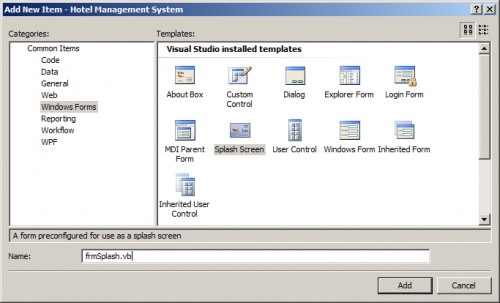
First you need to add a splash screen to your project.
[inline:add_splash_screen.jpg=Splash Screen]
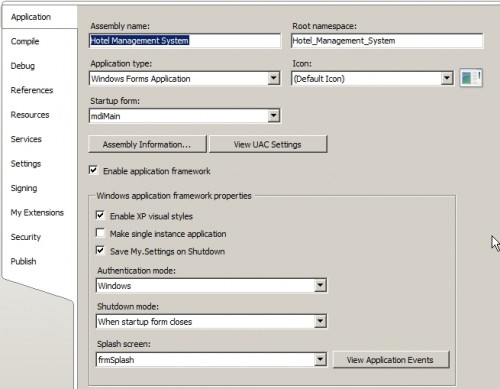
After that, open the project properties.
Select a project in Solution Explorer, and then on the Project menu, click Properties.
Select the Application page.
[inline:project_properties.jpg=Project Properties]
As you can see you can specify the form in the startup object and a splash screen under the Windows application framework properties. This way you do not need to add a line of code in your startup object to show the splash screen.
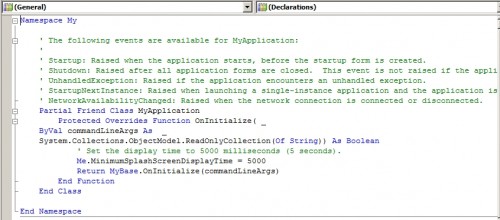
To add a delay in the splash screen click the View Application Events button and type the code as shown below:
Protected Overrides Function OnInitialize( _
ByVal commandLineArgs As _
System.Collections.ObjectModel.ReadOnlyCollection(Of String)) As Boolean
' Set the display time to 5000 milliseconds (5 seconds).
Me.MinimumSplashScreenDisplayTime = 5000
Return MyBase.OnInitialize(commandLineArgs)
End Function
[inline:delay_code.jpg=Delay]
The Me.MinimumSplashScreenDisplayTime = 5000 will delay the display of your splash screen by 5 seconds. If you want to increase the delay, then increase it by 1000. 1000 is equals to 1 secs.
Now, when you run your project the first object that will show is the Splash Screen.

Comments
Easy Way Set Splash Screen Display Time (By: Harmandeep Singh)
Here Is the easy Way To Set Time (Alter Splash Screen Time) Follow Steps
Step 1.
Step 2.
Step 3.
Step 4.
Step 5.
Step 6.
Step 7.
it works, but exiting the application
I'm using VB.NET 2008, I don't know if that's the problem, and either way doesn't changed the time the splash screen is displayed at the start up. What it does is show the splash screen when the application is closing, and then it does vary the time showing it if I change the value .... any idea...
re: it works, but exiting the application
May be you miss something. Please double check your code.
CUT COPY PASTE FUNCTIONALITY
How to cut copy paste the row from listview?
If I want to Use A loginForm before Splash Screen,How I do?
My means that when you finished the password and account 's input,program close the Login Form and run Splash screen.I don't know how to make that
re: Splash Screen
Download the Hotel Reservation System (VB.NET) and copy the source.
tanx
nice, job,.. pretty cool......
Splashcreen Displays Forever
Ok, i've added a splashcreen to my project and set it to run on startup, but the problem is, IT DOES NOT DISPLAY FOR THE STATED 2 SECONDS....IT DISPLAYS FOREVER..What may be the cause?? (VB.NET 2008)
Hi
unload ur splash screen, u must unload it...
THANKS ALOTTT
This splash screen timer tutorial was really great!
THe way of explaining CAN NOT BE BETTER THAN THIS!!
THANKS ALOT for all the screen shots.
Regards
Seema
jewellery shop management system
hi
am a tybsc student
my project is on jewellery shop management system in vb.net as front end and sql as backend
plz help me to do d project...
hi
i want this project source code .can u send me
hiiiiiii how v wl change d
hiiiiiii
how v wl change d image for our splash screen....
thanx
hiiii
thnx Harmandeep Singh)
thank's men
wish your code will succesfull function
Splash screen
I have a problem in coding the codes of splash sceen,please help.
reply
very nice tutorial.......
Thanks a lot its very good
Thanks a lot
its very good method...
Hatss of to u Sir...
Since from 2 days i m trying alot to execute the code,but no result i got, but thanx to u.....My Sir....
splash screen
i have vs2008 professional edition...when i click on the new item control i dont get the option of splash screen..what to do?
Add new comment