
The following guidelines will teach you how to post properly in this website.
Code Coloring
This website has a code coloring for every language you selected. Whether you submit an article, tutorial, comments, source code the syntax highlighting will trigger if you use the following code.
| Language | Language code |
| ASP | asp |
| C | c |
| C++ | cpp |
| C# | csharp |
| CSS | css |
| Java | java |
| Java(TM) 2 Platform Standard Edition 5.0 | java5 |
| Javascript | javascript |
| MySQL | mysql |
| PHP | php |
| SQL | sql |
| Visual Basic | vb |
| vb.net | vbnet |
For example:
<vb>
  Private  Sub CmdClose_Click()
       End
  End  Sub
</vb>
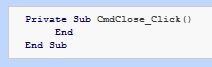
This will trigger the Visual Basic 6.0 code highlighting which will result in automatic formatting as shown below:
Inserting Image(s)
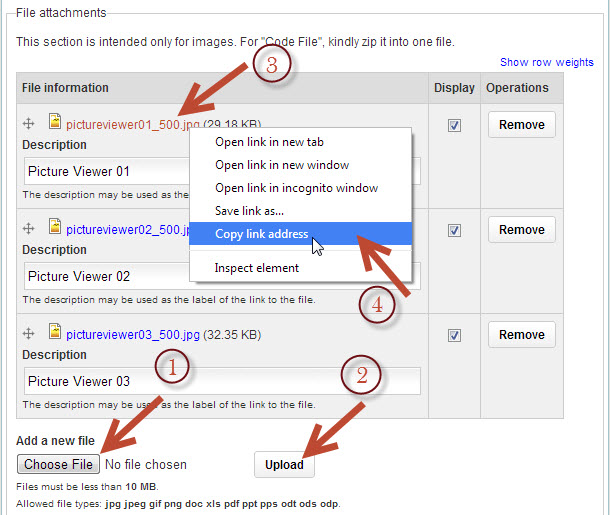
To insert an image, upload your image using File Attachment and copy the URL of the file as shown below:
Then insert the image in your article using the Insert/edit image icon as shown below:
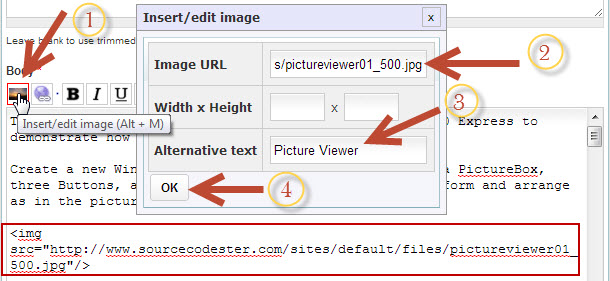 Note that you can insert multiple image.
Inserting Youtube Video
To insert a YouTube video use the following syntax:
[ video:URL ]
Example

Note: You do not need to use the syntax in inserting of images when you upload a source code. This applies only to blog, books, articles and tutorials. The system will do this for you automatically.